


Updated Date: 07/07/2026
Overview: F5 Access for Android
F5 Access for mobile devices provides full network access through BIG-IP® Access Policy Manager®. With network access, users can run applications such as RDP, SSH, Citrix, VMware View, and other enterprise applications on their mobile devices.
For information about how to use F5 Access on your device, refer to the F5 Access for Android User Guide.
F5 Access features include:
- Support for F5 Access on Chrome OS
- N-factor authentication (at least two input fields, password and passcode) support
- User name and password, client certificate, and RSA SecurID support
- Support for RSA SecurID software tokens
- Multiple input field support
- Credential caching support
- Support for biometric authentication, PIN, pattern, or device password to make a connection, when using cached credentials
- Support for checking information from client devices
- Support for roaming between cellular and WiFi networks
- Landing URI support
- Logging support to report issues
- Support for certificate-only authentication
- Support client certificate for DTLS tunnels and SSL tunnels
- Per-app VPN support for Android 5.0 and later
- Always-On mode for Android 7.0 and later for devices managed by an MDM
- Support for VPN tunnel on IPv6 single stack
- Support for APM VPN Proxy
F5 Access for mobile devices provides the following SAML support:
- Service provider-initiated access only, for example, APM acting as the service provider (SP)
- Web Logon mode only
When you use F5 Access as a client performing the SP-initiated access, F5 Access first connects to BIG-IP® Access Policy Manager® (APM®). Because there is no assertion, APM redirects the client to the IdP. The IdP then authenticates the user and redirects F5 Access back to the SP with an assertion. APM then accepts the assertion and establishes a VPN connection. You can then access back-end resources through F5 Access.
You can configure a BIG-IP system by configuring APM as an SP. The access policy associated with the configuration assigns a SAML AAA resource followed by a Network Access Resource. For more information about SAML configurations, refer to the BIG-IP® Access Policy Manager®: SAML Configuration guide.
F5 Access for Android provides these authentication types:
|
Authentication type |
Description |
|---|---|
|
Regular Logon |
Provides the following two options: - Username and password
|
|
Certificate-only |
Provides a certificate-only authentication without a username and password by adding a certificate in the configuration while leaving the username field empty. |
|
Web Logon |
Provides the following three options: - Username and password
Tip: Client certificate is supported for the Web Logon authentication type in Android 5.0 and higher. |
You can use F5 Access to establish a VPN tunnel connection.
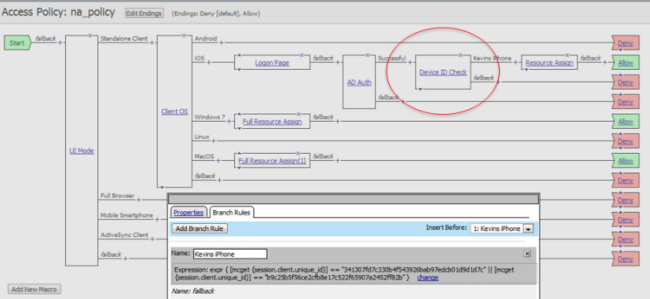
Access Policy Manager® can check unique identifying information from an Android device. The supported session variables, which become populated with the Android device information, are gathered automatically, and can easily be combined with an LDAP or AD query to implement white-listing in a custom action to improve access context. This information allows the Access Policy Manager to perform pre-logon sequence checks and operations based on information about the connecting device. Using such information, the Access Policy Manager can perform the following tasks:
- Deny access if the Android version is less than the required level.
- Log UDID information.
This example displays an access policy with a custom action of Device ID Check to check the device’s UDID.
Access Policy Manager® provides web application-level security to prevent malware attacks. As an administrator, you can enforce all web access through a secured gateway, as well as bypass secure gateways for internal resources. This is especially helpful, for example, when you have clients using corporate tablets, smartphones, or other mobile devices to browse the web.
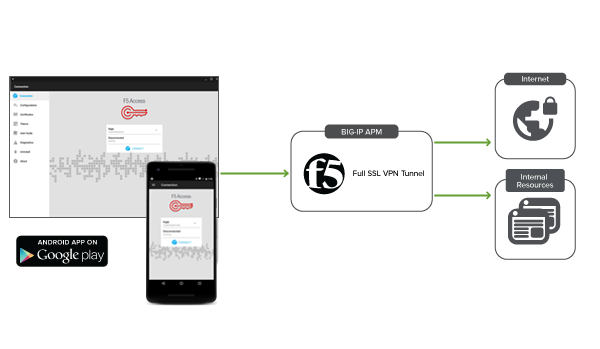
F5 Access supports VPN tunnel on IPv6 single stack devices.
F5 Access running on devices with IPv6 single stack can establish VPN connection with BIG-IP APM that communicates over IPv4. However, it requires a NAT64 translator to perform the required IPv6 to IPv4 protocol conversion. Refer to the APM supported configuration section for more information.
F5 Access client supports the specified deployment scenario as long as the NAT64 conversion device is used between the client and BIG-IP APM.
Following is the simple block diagram that illustrates the supported deployment scenario:

APM supported configuration:
Basic IPv4 APM network access configuration with IPv4 lease pool.
For the BIG-IP system, Network Address Translation (NAT64) functions as a translator that maps F5 Access client IPv6 private addresses to BIG-IP IPv4 internet public addresses. NAT64 translates the client IPv6 addresses to the BIG-IP IPv4 addresses and allows Internet traffic from an IPv6 client to reach a public IPv4 server.
When IPv6 client initiates a request to the IPv4 server, the NAT64 translates the IPv6 into an IPv4 and sends the translated packet to the IPv4 server. After receiving the IPv4 server packet, the NAT64 translates the IPv4 into an IPv6 and sends the response to the client.
Note: In the real-world deployments, the ISP may possess the NAT64 capabilities required for IPv6 to IPv4 protocol conversion and vice-versa.