


Updated Date: 07/07/2026
Session Variables
An access policy stores the values that actions return in session variables. A session variable contains a number or string that represents a specific piece of information. This information is organized in a hierarchical arrangement and is stored as the user’s session data.
The Current Sessions report in the Access Policy Manager Reports area displays all session variables for a session. Session variables can be useful in access policies to achieve various results, including:
- Customizing access rules or defining your own access policy rules.
- Providing different outcomes for policies based on the values in the session variables.
- Determining which resources to assign to users (with the Resource Assign action).
The name of a session variable consists of multiple hierarchical nodes separated by periods (.).
Note: Do not use the word .subsession in a session variable. It may be interpreted as a subsession variable.
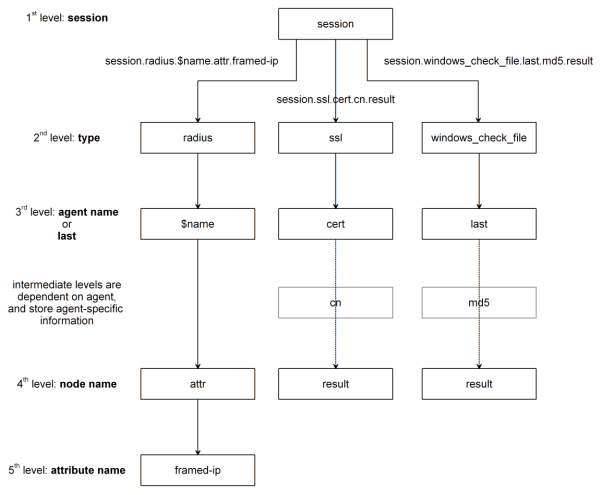
Access Policy Manager names session variables in the following manner:
- session.ad.<username>.queryresult = query result (0 = failed, 1=passed)
- session.ad.<username>.authresult = authentication result (0 = failed, 1=passed)
- session.ad.<username>.attr.<attr_name> = the name of an attribute retrieved during the Active Directory query. Each retrieved attribute is converted to a separate session variable.
Attributes assigned to a user on the AAA server are specific to that server, and not to Access Policy Manager.
This table lists session variables and related reference information. Note that the $name syntax is the agent name, and the BIG-IP system generates the name automatically.
|
Action Item |
Session Variable |
Type |
Description |
|---|---|---|---|
|
Denied Ending |
session.policy.result |
string |
Access policy result: the access policy ended at Deny. The value is access_denied. |
|
Redirect Ending |
session.policy.result |
string |
Access policy result: the access policy ended at Redirect. The value is redirect. |
|
session.policy.result.redirect.url |
string |
URL specified in the redirect, for example, http://www.siterequest.com. | |
|
Allowed Ending |
session.policy.result |
string |
Access policy result: the access policy ended at Allow. The value is allowed. |
|
session.policy.result.webtop .network_access.autolaunch |
string |
Name of the resource that is automatically started for a network access webtop. | |
|
session.policy.result.webtop.type |
string |
Type of webtop resource: network_access or web_application. | |
|
Session management |
session.ui.mode |
enum |
UI mode, as determined by HTTP headers. UI mode reflects the protocol that the client used to communicate with the server during APM session establishment and access policy execution. UI mode does not directly map to client type (session.client.type). For example, when BIG-IP Edge Client uses a web browser component to establish a session, the session.ui.mode is set to 0 (Full Browser). Values: - 0 - Full Browser
|
|
session.ui.lang |
string |
Language in use in the session, for example “en” (English). | |
|
session.ui.charset |
string |
Character set used in the session. | |
|
session.client.type |
enum |
Client type as determined by HTTP headers: portalclient or “Standalone” (Edge Client). | |
|
session.client.version |
string | ||
|
session.client.jailbreak |
bool |
Mobile device is jailbroken/rooted:- 0 - No
| |
|
session.client.js |
bool |
Client is capable of executing JavaScript:- 0 - No
| |
|
session.client.activex |
bool |
Client is capable of running ActiveX Controls: - 0 - No
| |
|
session.client.plugin |
bool | ||
|
session.client.platform |
string |
Client platform as determined by HTTP headers: - “Android”
| |
|
session.user.access_mode |
string |
Enables direct access to a Citrix resource from the webtop. Example: local. | |
|
Active Directory action |
session.ad.$name.queryresult |
bool |
0 or 1. - 0 - Active Directory query failed
|
|
session.ad.$name.authresult |
bool |
0 or 1. - 0 - Active Directory authentication failed
| |
|
session.ad.$name.attr.$attr_name |
string |
Users attributes retrieved during Active Directory query. Each attribute is converted to a separate session variable. | |
|
session.ad.$name.attr.group.$attr_name |
string |
User’s group attributes retrieved during Active Directory query. Each group attribute is converted to a separate session variable. | |
|
Advanced Resource Assign |
session.assigned.bwc.dynamic |
string |
Name of the assigned dynamic bandwidth control policy. |
|
session.assigned.bwc.static |
string |
Name of the assigned static bandwidth control policy. | |
|
Client certificate authentication |
session.ssl.cert.x509extension |
string |
X509 extensions. |
|
session.ssl.cert.valid |
string |
Certificate result: OK or error string. | |
|
session.ssl.cert.exist |
integer |
0 or 1. - 0 - Certificate does not exist
| |
|
session.ssl.cert.version |
string |
Certificate version | |
|
session.ssl.cert.subject |
string |
Certificate subject field | |
|
session.ssl.cert.serial |
string |
Certificate serial number | |
|
session.ssl.cert.end |
string |
Validity end date | |
|
session.ssl.cert.start |
string |
Validity start date | |
|
session.ssl.cert.issuer |
string |
Certificate issuer | |
|
session.ssl.cert.whole |
string |
The whole certificate | |
|
Decision box |
session.decision_box.last.result |
integer |
0 or 1. - 0 - User chooses option 2 on the decision page, which corresponds to the fallback rule branch in the action.
|
|
Encryption of client hard disk |
session.check_software.last.hd.item_1.state Note: Currently, there is no session variable available to represent the status of the System Drive Encrypted state. |
bool |
0 or 1. - 0 - Not all drive encrypted.
|
|
session.check_software.last.hd.state |
bool |
Unused session variable; always shows the value 0. | |
|
File check |
session.windows_check_file.$name.item_0.exist |
string |
True - if all files exist on the client. |
|
session.windows_check_file.$name.item_0.result |
integer |
Set when files on the client meet the configured attributes. | |
|
session.windows_check_file.$name.item_0.md5 |
string |
MD5 value of a checked file. | |
|
session.windows_check_file.$name.item_0.version |
string |
Version of a checked file. | |
|
session.windows_check_file.$name.item_0.size |
integer |
File size, in bytes. | |
|
session.windows_check_file.$name.item_0.modified |
Date the file was modified in UTC form. | ||
|
session.windows_check_file.$name.item_0.signer |
File signer information. | ||
|
LDAP action |
session.ldap.$name.authresult |
bool |
0 or 1. - 0 - LDAP authentication failed
|
|
session.ldap.$name.attr.$attr_name |
string |
Users attributes retrieved during LDAP query. Each attribute is converted to a separate session variable. | |
|
session.ldap.$name.queryresult |
bool |
0 or 1. - 0 - LDAP query failed
| |
|
Logon Page (CAPTCHA challenge) |
session.logon.captcha.tracking |
unsigned integer |
A bitmask used when CAPTCHA is enabled. - Bit in 0 position - Track successful and unsuccessful logon attempts by IP address
Note: Should not be used by external modules because it is intended for very specific purposes. |
|
Machine Cert Auth |
session.check_machinecert.last.result |
integer |
0, 1, 2, or -2. - 0 - Neither certificate nor private key found.
Note: The Machine Cert Auth action is not supported on Linux. |
|
OTP Generate |
session.otp.assigned.val |
string |
Generated one-time password value to send to the end user. Example message: |
|
session.otp.assigned.expire |
string |
Internally used timestamp; OTP expiration in seconds since this date and time: (00:00:00 UTC, January 1, 1970) | |
|
session.otp.assigned.ttl |
string |
OTP time-to-live; configurable as OTP timeout in seconds. Example message: | |
|
OTP Verify |
session.otp.verify.last.authresult |
bool |
0 or 1.- 0 - OTP authentication failed
|
|
RADIUS action |
session.radius.$name.authresult |
bool |
0 or 1. - 0 - RADIUS authentication failed
|
|
session.radius.$name.attr.$attr_name |
string |
User attributes retrieved during RADIUS authentication. Each attribute is converted to a separate session variable. | |
|
Resource allocation |
session.assigned.resources.at |
string |
Space-delimited list of names of assigned App tunnel resources. |
|
session.assigned.resources.na |
string |
Space-delimited list of names of assigned Network Access resources. | |
|
session.assigned.resources.pa |
string |
Space-delimited list of names of assigned Portal Access resources. | |
|
session.assigned.resources.rd |
string |
Space-delimited list of names of assigned remote desktop resources. | |
|
session.assigned.resources.saml |
string |
Space-delimited list of names of assigned SAML resources. | |
|
session.assigned.webtop |
string |
Name of the assigned webtop. | |
|
Windows Info |
session.windows_info_os.$name.ie_version |
string |
Stores the Internet Explorer version |
|
session.windows_info_os.$name.ie_updates |
string |
List of installed SP and KB fixes for Internet Explorer. For example: “¦SP2¦KB12345¦KB54321¦” | |
|
session.windows_info_os.$name.platform |
string |
Platform. - “Win7” - Windows 7
| |
|
session.windows_info_os.$name.updates |
string |
List of installed SP and KB fixes for Windows. For example, "¦SP2¦KB12345¦KB54321¦" | |
|
session.windows_info_os.$name.user |
string |
List of current Windows user names | |
|
session.windows_info_os.$name.computer |
string |
List of computer names | |
|
Windows Process |
session.windows_check_process.$name.result |
integer |
0, 1, or -1. - 0 - Failure
|
|
Windows Registry |
session.windows_check_registrys.$name.result |
integer |
0, 1, or -1. - 0 - Failure
|
This table includes network access resource configuration variables and attributes.
|
Network access resource property |
Type |
Attribute value format |
|---|---|---|
|
leasepool_name |
string |
The attribute value is the name of a leasepool that exists on Access Policy Manager. |
|
proxy_arp |
Bool |
The attribute value is 0 or 1. - 0 = disable the Proxy ARP option
|
|
compression |
int |
The attribute value is 0 or 1. - 0 = disable compression
|
|
client_proxy_settings |
|
The attribute is XML, formatted as follows: < client_proxy_settings > <client_proxy>1</client_proxy> <client_proxy_script>proxy_script </client_proxy_script> <client_proxy_address>proxyaddress</ client_proxy_address> <client_proxy_port>proxyport</client_proxy_port> <client_proxy_local_bypass>1</client_proxy_local_bypass> <client_proxy_exclusion_list> <item>exclusion_list_item1</item> <item>exclusion_list_item2</item> </client_proxy_exclusion_list> </client_proxy_settings> Note: For Windows, <client_proxy> should have the value |
|
drive_mapping |
Vector (Struct) |
The attribute is XML, formatted as follows: <drive_mapping> <item> <description> description</description> <path>drive_path</path> <drive>drive_letter</drive> </item> </drive_mapping> Note that the drive letter range is from D to Z. |
|
session_update_threshold |
int |
The attribute value is the session update threshold, in seconds. |
|
session_update_window |
int |
The attribute value is the session update window, in seconds. |
|
address_space_include_dns_name |
Vector (string) |
The attribute is XML, formatted as follows: <address_space_include_dns_name> <item><dnsname> dnsname1 </dnsname> </item> <item><dnsname> dnsname2 </dnsname> </item> </address_space_include_dns_name> |
|
address_space_include_subnet |
Vector (network) |
The attribute value is a space-separated list of subnets. For example: 192.168.30.0/255.255.255.0 172.30.11.0/255.255.255.0 |
|
address_space_exclude_subnet |
Vector(network) |
The attribute value is a space-separated list of subnets. For example: 192.168.30.0/255.255.255.0 172.30.11.0/255.255.255.0 |
|
address_space_protect |
Bool |
The attribute value is 0 or 1. 0 = disable address space protection 1 = enable address space protection |
|
address_space_local_subnets_excluded |
Bool |
The attribute value is 0 or 1. 0 = disable address space local subnet exclusion 1 = enable address space local subnet exclusion |
|
address_space_dhcp_requests_excluded |
Bool |
The attribute value is 0 or 1. 0 = disable address space DHCP requestexclusion 1 = enable address space DHCP requestexclusion |
|
split_tunneling |
Bool |
The attribute value is 0 or 1. 0 = disable split tunneling 1 = enable split tunneling Note: If split_tunneling is set to 0 then you must set the following variables: address_space_exclude_subnet = "" address_space_include_subnet = “128.0.0.0/128.0.0.0 0.0.0.0/128.0.0.0” address_space_include_dns_name = “*” |
|
dns |
String |
The attribute is XML, formatted as follows: <dns> <dns_primary>IPAddress</ dns_primary><dns_secondary>IPAddress</ dns_secondary></dns> |
|
dns_suffix |
String |
The DNS Default Domain Suffix. For example, siterequest.com. |
|
wins |
String |
The attribute is XML, formatted as follows: <wins> <wins_primary >IPAddress</ wins_primary ><wins_secondary>IPAddress</ wins_secondary></wins> |
|
static_host |
Vector(staticHost) |
The attribute is XML, formatted as follows: <static_host> <item> <hostname>hostname</hostname> <address>IPAddress</address> </item> </static_host> |
|
client_interface_speed |
int |
The number for the client interface speed value in the network access resource, in bytes. |
|
client_ip_filter_engine |
Bool |
The attribute value is 0 or 1. 0 = disable integrated IP filtering engine 1 = enable integrated IP filtering engine |
|
client_power_management |
Bool |
The attribute value is 0 or 1. 0 = disable client power management 1 = enable client power management |
|
microsoft_network_client |
Bool |
The attribute value is 0 or 1. 0 = disable the Client for Microsoft Networks option 1 = enable the Client for Microsoft Networks |
|
warn_before_application_launch |
Bool |
The attribute value is 0 or 1. 0 = disable the Display warning before launching applications option 1 = enable the Display warning before launching applications option |
|
application_launch |
Vector(AppLaunch) |
The attribute is XML, formatted as follows: <application_launch> <item><path>path</path> <parameter>string</parameter> <os_type>os_type</os_type> </item> </application_launch> For the <os_type> value, type WINDOWS, MAC, or IOS. This field is case sensitive. |
|
provide_client_cert |
Bool |
The attribute value is 0 or 1. 0 = disable the Provide client certificate on Network Access connection when requested option 1 = enable the Provide client certificate on Network Access connection when requested option |
|
tunnel_port_dtls |
int |
The attribute is the DTLS port, for example 4433. Note: setting this to any number other than 0 enables DTLS in the network access resource, and sets the number you specify as the DTLS port. |
Assigning proxy information using session variables is different for Windows and Mac.
For Windows:
   <client_proxy_settings><client_proxy>1</client_proxy>
   <client_proxy_address>192.168.100.101</client_proxy_address>
   <client_proxy_port>8080</client_proxy_port></client_proxy_settings>
For MacOS:
   <client_proxy_settings><client_proxy>yes</client_proxy></client_proxy_settings>
   <client_proxy_script></client_proxy_script><client_proxy_address>10.10.10.4
   </client_proxy_address><client_proxy_port>3128</client_proxy_port>
   <client_proxy_local_bypass>1</client_proxy_local_bypass>
<client_proxy_exclusion_list></client_proxy_exclusion_list></client_proxy_settings> The sessiondump command syntax includes one operation and one or more arguments and flags.
sessiondump <operation> <arguments> <flags>
| Name | Description |
|---|---|
| help | Show this help message |
| list | Show list of all sessions |
| allkeys | Show all session variables for all sessions |
| locks | Show list of session locks |
| ip | Show list of IP to session maps |
| ntlm | Show list of NTLM credentials to session maps |
| Name | Description |
|---|---|
| sid | Show all session variables for a session |
| delete | Delete a specific session |
| lockdelete | Delete all or a specific session lock |
| Name | Description |
|---|---|
| savetofile | Save all results to a file |
| hidden | |
| debug |