


Updated Date: 07/07/2026
Configuring the BIG-IP System for DHCP Renewal
You can configure the BIG-IP system to manage DHCP renewal requests and responses.
Before configuring the BIG-IP system to manage DHCP renewal requests and responses, it is helpful to understand some BIG-IP system terminology:
| BIG-IP object type | Definition |
|---|---|
| BIG-IP pool member | A DHCP relay target (such as a DHCP server or BOOTP server). This is the dynamic address server to which the BIG-IP system forwards unicast requests. |
| BIG-IP virtual server | A BIG-IP system address on the listening VLAN |
| BIG-IP VLAN assigned to a virtual server | A listening VLAN, controlled on a per-virtual server basis |
You can configure the BIG-IP system to act as a DHCP renewal system. A common reason to configure the BIG-IP system as a renewal system is when the DHCP servers reside on a different subnet than that of the client systems, and the BIG-IP system is also configured as a DHCP relay agent. As a DHCP renewal system, the BIG-IP system manages the renewal of client IP addresses by DHCP servers before the addresses expire.
During the renewal process, a DHCP client sends a renewal request, which is passed through a BIG-IP Forwarding IP type of virtual server directly to the specific DHCP server that issued the initial client IP address. The DHCP server then sends a response to renew the lease for the client’s IP address.
In the example shown in the illustration, a DHCP client sends a renewal message to the same BIG-IP system that initially acted as the DHCP relay agent. This renewal request is forwarded through a BIG-IP renewal virtual server directly to DHCP server 1. DHCP server 1 then provides a response to renew the lease for the client’s IP address.
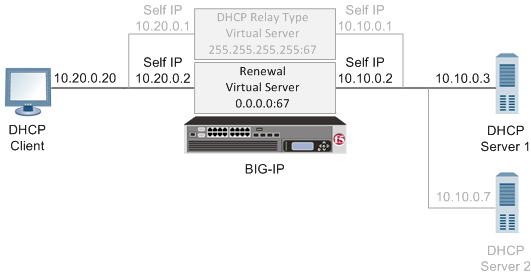
A Dynamic Host Configuration Protocol (DHCP) renewal virtual server forwards a DHCP request message from a DHCP client directly to a DHCP server, to automatically renew an IP address before it expires.
-
On the Main tab, click Local Traffic > Virtual Servers.
The Virtual Server List screen opens.
-
Click Create.
The New Virtual Server screen opens.
-
In the Name field, type a unique name for the virtual server.
-
Type a description for the virtual server.
-
From the Type list, select Forwarding (IP).
-
For a host, in the Destination Address/Mask field, type an IPv4 or IPv6 address in CIDR format to allow all traffic to be translated.
The supported format is address/prefix, where the prefix length is in bits. For example, an IPv4 address/prefix is
0.0.0.0/0, and an IPv6 address/prefix is::/0. -
In the Service Port field, type
67(IPv4) or547(IPv6). -
From the Protocol list, select UDP.
-
From the VLAN and Tunnel Traffic list, select the VLANs on the same network as the DHCP clients.
-
Click Finished.
The BIG-IP system is now configured with a virtual server that can forward DHCP renewal requests directly to the appropriate DHCP server.
The BIG-IP system is configured to forward DHCP client renewal requests to appropriate DHCP servers that reside on a different subnet than the client systems. The BIG-IP also forwards the DHCP server responses back to the client systems, therefore ensuring that client IP addresses do not expire.