


Updated Date: 07/07/2026
About Variable Assign
The Variable Assign action can includes one or more entries. An entry specifies a variable and assigns a value to it.
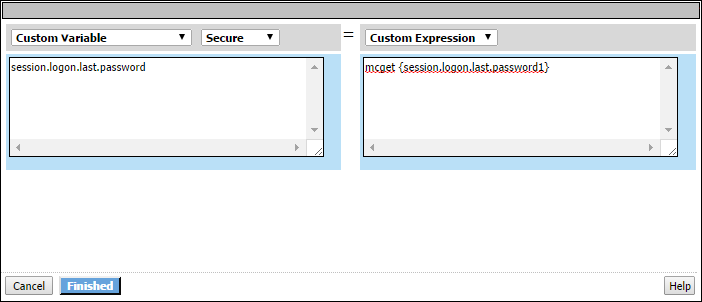
In the entry screen, the variable is specified in the left pane and the value is specified in the right pane.
A Variable Assign action provides these configuration elements and options for the variable:
- Custom Variable
- Specifies a variable name. It can be any name including the name of a session variable or the name of a perflow variable.
Note: For a per-session policy, when the policy runs it recognizes only existing perflow variables.
- Predefined Variables
- Specifies a predefined session variable or perflow variable name, which must be selected from the Variable list. The type of variable (session or perflow) that is available for selection depends on the selected Group: Per-Session Variables or Per-Request Variables.
For Per-Request Variables, the Scratchpad, Custom, and Primary Category perflow variables are available for use in the per-request policy and in per-request policy subroutines. You can, for example, pass the value of a session variable into the per-request policy in one of these variables.
- Unsecure or Secure
- Specifies whether the variable is secure. A secure variable is stored in encrypted form in the session database. The value of a secure variable is not displayed in the session report, or logged by the logging agent.
A Variable Assign action provides these configuration elements and options for the value:
- Custom Expression
- Specifies a Tcl expression. The result of the expression is used as the value.
- AAA attribute
- Specifies the name of the attribute that contains the value:
- Agent Type - specifies the type of AAA server: AD, LDAP, or RADIUS.
- Attribute Type - specifies the attribute type to use depending on the agent type:
- Use user’s attribute - for AD agent.
- Use user’s primary group attribute - for AD agent.
- Use LDAP attribute - for LDAP agent.
- Use RADIUS attribute - for RADIUS agent.
- Agent type attribute name - specifies the name of the attribute that contains the value.
- Text
- Specifies a text string to use as the value. The text entered in this field is used as is.
- Session Variable
- Specifies the name of a session variable from which to get the value.