


Updated Date: 07/07/2026
Logout/Ending Deny - Modern
You can customize the following settings for Logout and Ending Deny messages that appear in web browsers and on mobile devices with the Customization tool, if you created an access profile or per-request policy with the Customization Type set to Modern. The settings for Ending Deny (under Access Policy) are the same as those for Logout.
| Name | Value | Description |
|---|---|---|
| Access denied message | Text | Specifies the message that is displayed when the per-session or per-request policy denied access. |
| Access not found page reject message | Text | Specifies the message displayed when the per-session or per-request policy cannot be completed correctly. |
| Access not found page title | Text | Specifies the title for the page displayed when the access policy cannot be completed correctly. |
| All sessions navigation | Text | Specifies where to go to look up the session reference number specified in the message. |
| Error title | Text | Specifies text that indicates that the session could not start. |
| Logout link message | Text | Specifies text the user sees to logout. |
| Session expired message | Text | Specifies the message that appears when the user session expires due to inactivity. |
| Session ID title | Text | Specifies the text that precedes the session number when an error occurs. |
| Success message | Text | Specifies the text displayed when the user logs out successfully. |
| Success title | Text | Specifies the text displayed when a session is finished. |
| Thank you message | Text | Specifies a thank you message displayed for network access users after logout. |
| Name | Value | Description |
|---|---|---|
| ACL denied page reject message | Text | Specifies the message displayed when the user attempts to access a page to which access is specifically denied by an access control list. |
| ACL denied page reject message | Text | Specifies the message displayed to retry to access a page to which access was not available. |
| ACL denied page return link message | Text | Specifies the link text on the ACL Denied page that the user can click to return to the previous page. |
| ACL denied page title | Text | Specifies the title text on the ACL Denied page. |
| Name | Value | Description |
|---|---|---|
| Application Filter denied page application family message | Text | Specifies the application family reference. |
| Application Filter denied page application name message | Text | Specifies the application name reference. |
| URL Filter denied page category message | Text | Specifies the category reference. |
| URL Filter denied page reject message | Text | Specifies the message when a page is blocked. |
| URL Filter denied page retry link message | Text | Specifies the link to retry when a page is denied. |
| URL Filter denied page return link message | Text | Specifies the message to return to the previous page. |
| URL Filter denied page title | Text | Displays the BIG-IP Per-Request Policy Resource blocked page. |
The Endpoint Inspection Remediation settings are the same for policies created with the Customization Type set to Modern or Standard.
| Name | Value | Description |
|---|---|---|
| Remediation page: message | Text | Specifies the message displayed when the user request is blocked by the Endpoint Inspection software. |
| Remediation page: return link message | Text | Specifies the link text that the user can click to return to the previous page. |
| Remediation page: session ID title | Text | Specifies the text for displaying the session reference number. |
| Remediation page: software download message | Text | Specifies the link text to download the endpoint inspection remediation software. |
| Remediation page: software download URL | Text | Specifies the link text that the user can click to download the remediation software. |
| Remediation page: Title | Text | Specifies the title text on the endpoint inspection remediation page. |
Note: The correct place for customizing the OAuth Complete Page is in the Logout folder and not using the OAuth Complete Page that is listed in the Access Policy/Ending Pages/Deny folder.
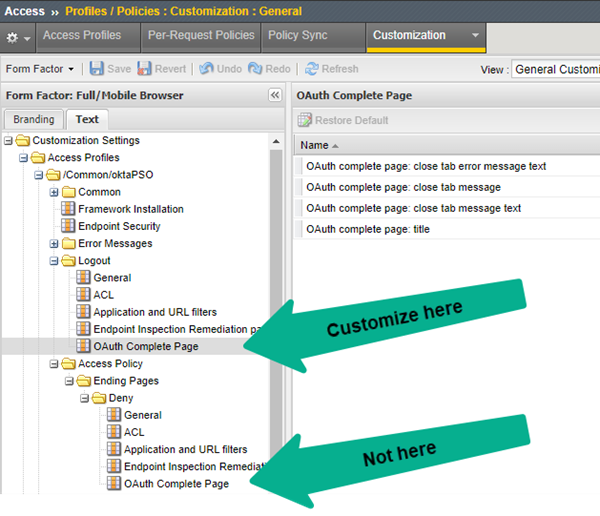
When a user finishes a session, the messages are taken from the Logout settings. You can customize the OAuth Complete page that is in the Logout folder. The OAuth Complete Page settings are the same for policies created with the Customization Type set to Modern or Standard.
| Name | Value | Description |
|---|---|---|
| OAuth complete page: close tab error message text | Text | Specifies the error message displayed when there is an authentication error. |
| OAuth complete page: close tab message | Text | Specifies the message displayed when authentication is successful, and the OAuth tab can be closed. |
| OAuth complete page: close tab message text | Text | Specifies an additional text that can be included when authentication is successful, and the OAuth tab can be closed. |
| OAuth complete page: title | Text | Specifies the title of the OAuth complete page. |