


Updated Date: 07/07/2026
Tips for Standalone View Client and Dynamic Webtop Integration
You can configure one access policy that can provide access to a standalone View Client and can launch View from a webtop depending on the client type.
Place actions for the standalone View Client on the VMware View branch, and place actions for launching View from a dynamic webtop on the Full or Mobile Browser branch.
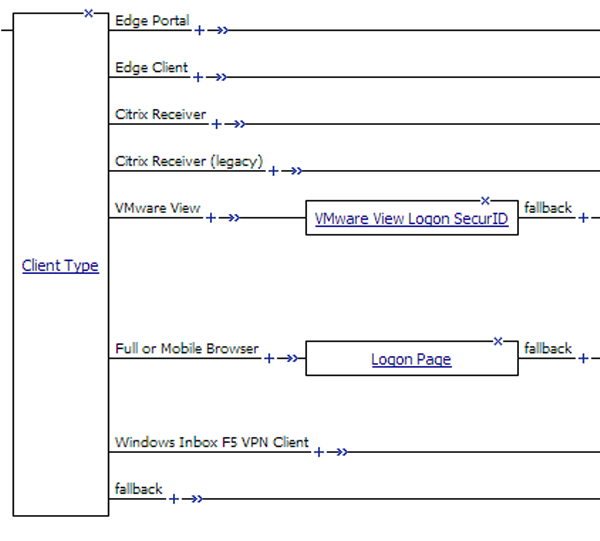
To support a standalone View Client, you must provide a VMware View Logon page and Active Directory authentication. This example shows RSA SecurID authentication followed by Active Directory (AD) authentication. (SecurID authentication is optional for a standalone View Client; it can follow or precede the AD Auth action.)
To support launching View from a webtop, you can provide a Logon Page and any authentication type. This example includes AD Auth.
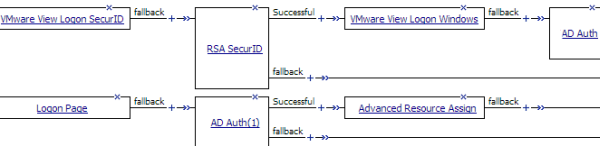
After successful authentication, assign resources to the session.
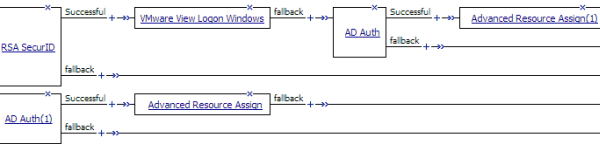
Note: You might choose to configure your access policy differently. For example, you might not use SecurID authentication for a standalone View Client at all, and you might choose a different type of authentication, or multiple types of authentication, before launching View from a webtop.
When you configure Access Policy Manager (APM) to support standalone View Client authentication and to support launching View from a dynamic webtop, the instructions specify the same type of configuration objects for either case. You can use the same objects for both cases if you begin the access policy with the Client Type action. Then configure actions for View Client authentication on the VMware View branch and configure actions for the webtop on the Full or Mobile Browser branch.