


Updated Date: 07/07/2026
Working with Passive Monitoring
You can configure a physical interface on a BIG-IP ®system to operate in passive mode. In this mode, the interface accepts mirrored traffic from another device for analysis of Layer 7 traffic.
Note:
Important:
-
*******The following hardware platform series do not support passive monitoring: 2000,4000,i2000 and i4000
-
Virtualized setup using vCMP (Virtual Clustered Multiprocessing) are not supported for passive monitoring
-
High Availability (HA) setup is not supported for passive monitoring
Using a configured ASM passive monitoring policy and/or ASM DoS profile, the system analyzes the mirrored traffic, displays the resulting reports and sends the resulting analytics data and log messages to a remote analytics and logging server. The mirrored traffic never leaves the system, and the BIG-IP system never acts on the headers and payload. The logs report the actions the system would have taken if it were not in passive mode.
It allows Layer 7 monitoring of attacks and discovers system vulnerabilities while being quick and easy to deploy. The existing network topology does not need to be changed and VLANS and IP addresses are not configured.
There are two passive monitoring options, and their sample configurations are different.
- ASM Layer 7 policy: DoSL7 and ASM need to be mirrored after the SSL terminator since they need to work with unencrypted data.
- ASM DoS profile: Network DoS needs to work on traffic mirrored before the SSL terminator. Otherwise, we are not protecting the SSL terminator.
This illustration shows a configuration for ASM policy passive monitoring.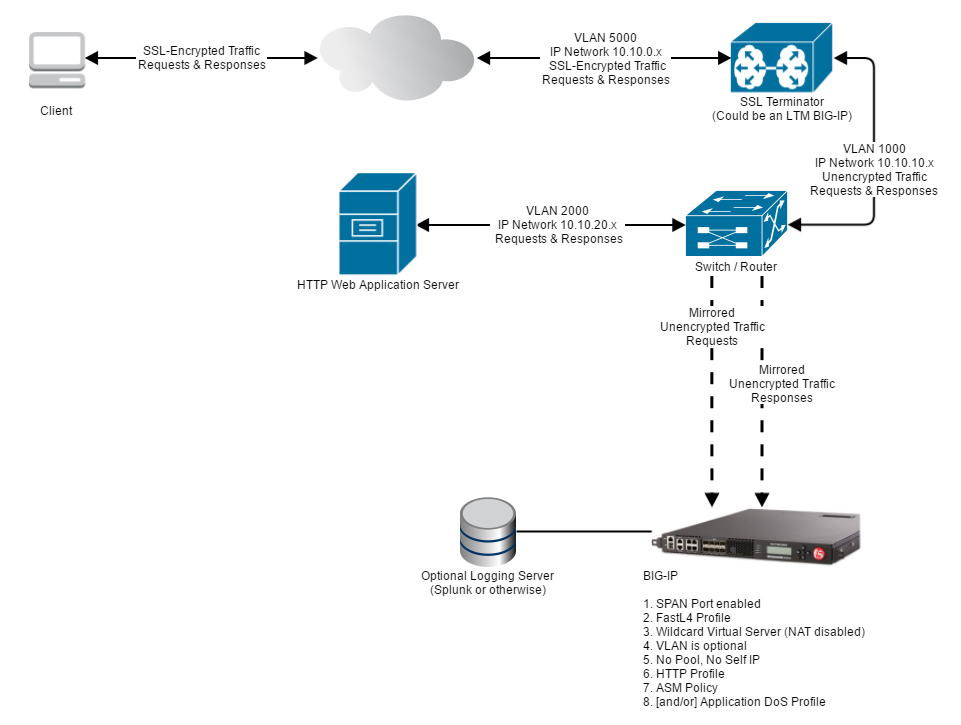
This illustration shows a configuration for DoS profile passive monitoring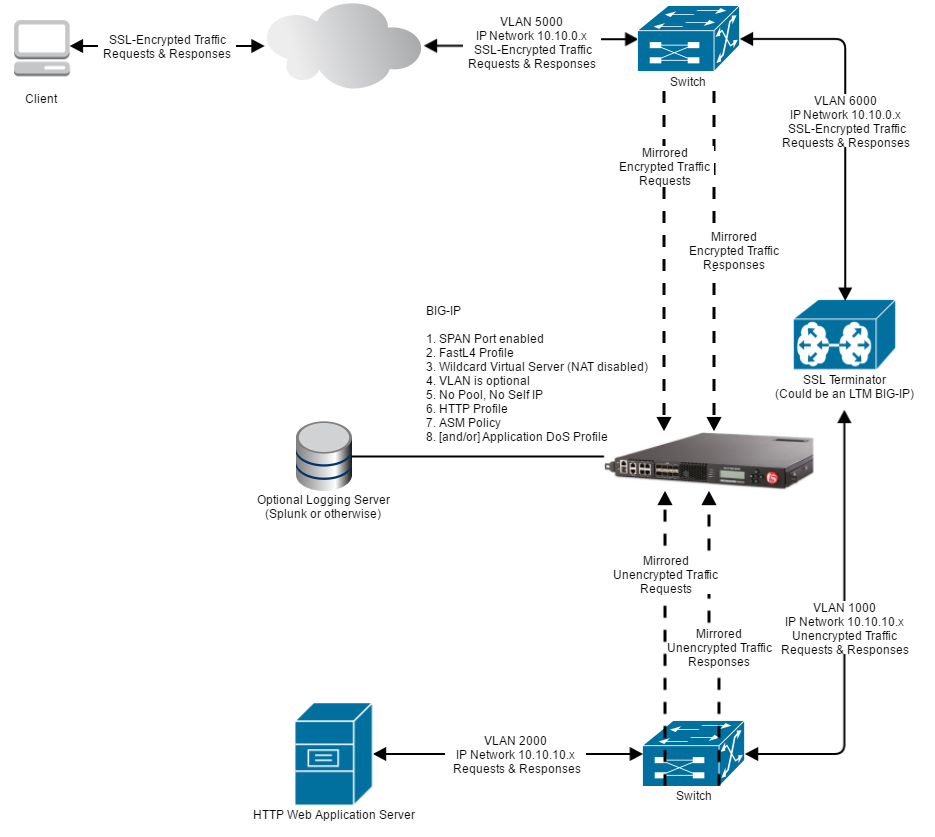
Passive monitoring of DoS Layer 7 is for evaluation purposes only.
Before you begin to configure your ASM passive mode policy or your DoS profile, ensure that you have set up your network and configured your BIG-IP system according to the BIG-IP Passive Monitoring Configuration Guide. You need an SSL terminator to open mirrored traffic for analysis.
- DoS Layer 7 and ASM traffic works on unencrypted data so their traffic needs to be mirrored after the SSL terminator.
- Network DoS works on encrypted data so its traffic needs to be mirrored before the SSL terminator.
Only certain features are supported for passive monitoring. Unsupported features must be disabled in the security policy.
-
On the Main tab, click Security > Application Security > Security Policies > Policies List.
The Policies List screen opens.
-
Click Create New Policy.
You only see this button when no policy is selected.
-
In the Policy Name field, enter a meaningful name to reflect that this is a passive monitoring policy.
-
Leave Policy Type set to Security.
-
Set the Policy Template to Passive Monitoring
-
Set the Enforcement Mode to Transparent.
-
Click Create Policy to create the security policy.
ASM creates the passive monitoring security policy.
Now you must configure the policy’s Learning and Blocking Settings.
The following details the ASM security policy features and what is supported in passive mode.
| Feature | Parts Supported | Parts Not Supported |
|---|---|---|
| Enforcement Mode | Transparent | Blocking |
| Learning based on Device ID is not supported. | ||
| Attack Signatures | Fully Supported (Request and Response) | - |
| Content Profiles | Fully Supported | Content-Based Routing |
| File Types | Fully Supported | - |
| IP Intelligence | Fully Supported | - |
| Geolocation Enforcement | Fully Supported | - |
| Headers | Fully Supported | - |
| Dynamic Session ID in URL | None | -Not Supported |
| Vulnerability Assessments | Resolutions are supported according to the features they enable as specified in this table.(Requires a Separate Forwarding Port) | |
| - | ||
| Antivirus protection (ICAP) | None | Not Supported |
| Database Security | None | Not Supported |
| Bypassing of Search Engines | None | Not Supported |
| Login Enforcement | None | Not Supported |
| Session Tracking | None | Not Supported |
| CSRF Protection | None | Not Supported |
| Web Scraping | None | Not Supported |
| Single Page Application | None | Not Supported |
| Content-Based Routing (CBR) | None | Not Supported |
| Brute Force | - Alarm - Automatic detection of Login Page - Statistics are collected |
Any action except for “Alarm” - Device ID - Alarm and Blocking Page - Alarm and CAPTCHA - Alarm and Client Side Integrity - Alarm and Client Side Integrity Followed by CAPTCHA - Alarm and Drop - Alarm and Honeypot Page |
| CORS (Cross-Origin Request Sharing) | None | Not Supported |
| WebSocket Enforcement | All Except —-> | - CORS (see above) - WebSocket Extensions |
| URL Enforcement | All Except —-> | - CORS (see above) - URL Flows |
| Parameters | All Except —-> | - Dynamic Extractions - Parameter Level Flow |
| Data Guard | - Detection and triggering violations - Mask Data: only affecting response logging (local and remote) |
Mask Data: Masking the responses on the network will not be done. |
| Cookies | Allowed Cookies | Enforced Cookies |
| iRules | None | Not Supported |
| Logging and Reporting | - Local Event Log - Remote Event Log (requires a separate forwarding port) - Response Logging - Event Correlation - ASM Charts - Chart Schedule - Brute Force Attacks Statistics |
- Web Scraping Reports - Session Tracking Reports |
The key configurations for a passive monitoring DoS profile are:
- TSP-Based Detection must be set to Transparent mode.
- Stress-Based Detection must be set to Transparent mode.
- Geolocation blacklist must be empty.
-
On the Main tab, click Security > DoS Protection > Protection Profiles.
The Protection Profiles list screen opens.
-
Click Create.
The Create New DoS Profile screen opens.
-
In the Name field, type the name for the profile, then click Finished.
-
In the list of DoS profiles, click the name of the profile you just created, and click the Application Security tab.
-
In the General Settings tab, for Application Security, click Edit and select the Enabled check box.
General settings are displayed. The following features are supported. All other features are not supported in passive mode.
Feature Parts Supported Parts Not Supported Heavy URL Protection Fully Supported - Geolocations Whitelist -Blacklist Trigger iRule IN_DOSL7_ATTACK event Blocking or modifying traffic from iRules -
In the TPS-based Detection tab, select Transparent for the Operation Mode.
The Operation Mode settings are displayed. The following features are supported. All other features are not supported in passive mode.
Feature Parts Supported Parts Not Supported Thresholds Mode Fully Suported:
- Manual
- Automatic- How to detect attackers and which mitigation to use - Client Side Integrity Defense
- CAPTCHA Challenge
- Request Blocking- Prevention Duration No prevention Resolutions are supported according to the features they enable as specified in this table. -
In the Behavioral & Stress-based Detection tab, select Transparent for the Operation Mode.
The Operation Mode settings are displayed. The following features are supported. All other features are not supported in passive mode.
Feature Parts Supported Parts Not Supported Thresholds Mode Fully Suppored:
- Manual
- Automatic- Stress-based Detection and Mitigation
- Client Side Integrity Defense
- CAPTCHA Challenge
- Request BlockingDetection of Server Stress is done as “best effort”. In case the switch that is doing the mirroring becomes congested, a Layer 7 DoS attack may be detected, although the problem is actually at the Layer 3 switch. Behavioral Detection and Mitigation: Bad actors behavior detection Detection Behavioral Detection and Mitigation: Request signatures detection Detection Mitigation Behavioral Detection and Mitigation: Mitigation No Mitigation - Conservative Protection
- Standard Protection
- Aggressive Protection
The following details the ASM volumetric DoS Layer 7 features and what is supported in passive mode.
| Features | Parts Supported | Parts Not Supported |
|---|---|---|
| TPS-Based Detection | (Enforcement mode) | |
| Stress-based Detection | (Enforcement mode) | - Transparent Mode - Blocking Mode* (See NOTE below). |
| Detection of Server Stress is done as “best effort”. In case the switch that is doing the mirroring becomes congested, a Layer 7 DoS attack may be detected, although the problem is actually at the Layer 3 switch. | Mitigation | - Transparent - Client Side Integrity Defense* (See NOTE below) - CAPTCHA Challenge* (See NOTE below) - Request Blocking* (See NOTE below) |
| Thresholds Mode | Fully Supported: - Manual - Automatic |
|
| Heavy URL Protection | Fully Supported | |
| Record Traffic | Supported on single host VS | Not supported on catch-all Virtual Servers (those with any/any destination) |
| Geolocations | Fully Supported: - Blacklist* (See NOTE below) - Whitelist |
|
| Single Page Application | None | Not Supported |
| Trigger iRule | IN_DOSL7_ATTACK event | Blocking or modifying traffic from iRules |
| Logging and Reporting | Fully Supported: - DoS Visibility - Local Event Log - Remote Event Log (Requires a Separate Forwarding Port) |
|
| Note: Server Health and average server latency is on “best effort”: | In case the switch that is doing the mirroring becomes congested, these values may be wrong. | The server health may be shown as low, although the problem is actually at the L3 layer switch. |
Note: All the “block” or “mitigation” parts mentioned above are for reporting purposes only. The traffic is always sent to the server without mitigation. When selecting blocking mode and a specific mitigation, all the reports will show as if the mitigation was applied, or the traffic was blocked. This is a “what if” report, and is supported. However, using this mode will show error messages in /var/log/ltm such as the following: Feb 25 18:33:46 bigip29 err tmm2[26547]: 011f0016:3: http_process_state_prepend - Invalid action:0x109010 Server sends too much data. serverside (1.1.1.1:80 -> 1.1.1.2:9785) clientside (1.1.1.2:45710 -> 1.1.1.3:80) (Server side: vip=/Common/vs_39_80 profile=http pool=/Common/pool_80 server_ip=1.1.1.1)
The following details the ASM behavrioral analysis DoS Layer 7 features and what is supported in passive mode.
| Features | Parts Supported | Parts Not Supported |
|---|---|---|
| Mitigation | - | - Conservative Protection - Standard Protection - Aggressive Protection |
| Bad actors behavior detection | Detection | Mitigation |
| Request signatures detection | Detection | Mitigation |
| Logging and Reporting | Fully Supported: - DoS Visibility - Local Event Log - Remote Event Log |
|
| Note: - Server Health and average server latency is on “best effort”: - In case the switch that is doing the mirroring becomes congested, these values may be wrong. - The server health may be shown as low, although the problem is actually at the L3 layer switch. - A Layer 7 DoS attack may be detected, although the problem is actually at the Layer 3 switch. |
When testing the passive monitoring feature, keep the following observations in mind.
| Feature | Notes | Observations when feature is enabled |
|---|---|---|
| Login Enforcement | - | Even after a successful login, every request for the Authenticated URL would cause a violation. |
| Session Tracking | Includes Session Hijacking and Session Awareness. | Request is not logged after the first 10 requests and there is no violation. |
| Web Scraping | - | Request is not logged after the first 10 requests and there is no violation. |
| Single Page Application | - | This feature is completely based on injected JavaScript. Since JavaScript is not injected in passive mode, the feature does not work. |
| CSRF Protection | Verify CSRF Token is not supported. | The enforcement based on origin works the same as for inline BIG-IP systems. CSRF token enforcement does not work because it is based on JavaScript and cookies injection. Every Request to URL where token verification is required raises a CSRF violation. |
| Brute Force | The following are not supported:- Blocking Mode - Session-based - Device ID - Client Side Integrity Defense - Rate Limiting |
Under one of the following conditions, a request is not logged after the first 10 requests and there is no violation: 1. Blocking mode/violation + username based + Alarm and CAPTCHA. 2. Blocking mode/violation + username based + Alarm and CS-challenge. 3. Blocking mode/violation + IP based + Alarm and CAPTCHA. 4. Blocking mode/violation + IP based + Alarm and CS-challenge. 5. Device ID based. 6. Detect Distributed Attack + any of the conditions 1 through 5. 7. Credential Stuffing + any of the conditions 1 through 5. 8. As in all other use cases, Blocking mode does not block any request. |
| CORS | The following are not supported: - Remove all CORS headers - Replace CORS headers |
CORS headers are not modified. |
| WebSocket Enforcement | The following are not supported: - Remove all CORS headers - WebSocket Extensions: Remove Headers is not supported. Block is supported only for logging. |
CORS headers are not removed and not replaced. |
| Enforced Cookies | - | Every request with one enforced cookie included causes a violation. |
| URL Flow | - | Every request for the configured URL causes a violation. |
| Dynamic Extractions | - | Every request related to dynamic extraction causes a violation. |
| Session Tracking Reports | - | Reports only show the first 10 requests. |
| Web Scraping Reports | - | Statistics are not reported. |
| Policy Builder | Learning based on Device ID is NOT supported. | No effect on traffic after enabling Device ID. Policy builder still learns suggestions from IP |
| Anti-Virus protection (ICAP) | - | Violation is not detected and there is no side effect. |
| Database Security | - | Not tested |
| Bypassing of Search Engines | - | No matter what User Agent / XFF value is used, only the first 10 requests are logged. There is no violation |
| iRules | - | 1. If ASM_REQUEST_DONE event triggers for request, then IO_PLUGIN|ERR appear in bd.log and request is not logged (Bug 655562). 2. If ASM_REQUEST_BLOCKING event triggers for request, then request logged as illegal only (Bug 655818). 3. If ASM_RESPONSE_VIOLATION event triggers for request, then request is not logged (Bug 655823). |