


Updated Date: 07/07/2026
Placing BIG-IP DNS in front of a Pool of DNS Servers
BIG-IP DNS can function as a traffic screener in front of a pool of DNS servers. In this situation, BIG-IP DNS checks incoming DNS queries and if the query is for a wide IP, resolves the query. Otherwise, BIG-IP DNS forwards the DNS query to one of the servers in a pool of DNS servers, and that server handles the query.
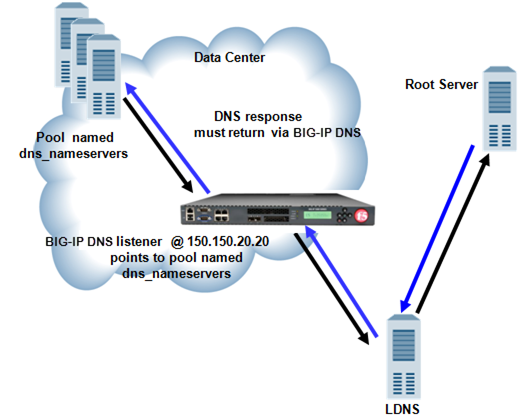
A listener is a specialized virtual server that passively checks for DNS packets on port 53 and the IP address you assign to the listener. When a DNS request is sent to the IP address of the listener, the BIG-IP system either handles the request or forwards the request to the appropriate resource.
Ensure that at least one custom DNS monitor exists on the BIG-IP system. Gather the IP addresses of the DNS servers that you want to include in a pool to which the BIG-IP system load balances DNS traffic.
Create a pool of local DNS servers when you want to load balance DNS queries to other DNS servers.
-
On the Main tab, click the applicable path.
- DNS > Delivery > Load Balancing > Pools
- Local Traffic > Pools The Pool List screen opens.
-
Click Create.
The New Pool screen opens.
-
In the Name field, type a unique name for the pool.
-
For the Health Monitors setting, from the Available list, select the custom DNS monitor you created and move the monitor to the Active list.
-
Using the New Members setting, add each resource that you want to include in the pool:
-
(Optional) In the Node Name field, type a name for the node portion of the pool member.
-
In the Address field, type an IP address.
-
In the Service Port field, type a port number, or select a service name from the list.
-
(Optional) In the Priority field, type a priority number.
-
Click Add.
-
-
Click Finished.
Ensure that a pool of DNS servers exists on DNS.
Configure a listener that alerts BIG-IP DNS to DNS queries destined for a pool of DNS servers. The best practice is to create four listeners: one with an IPv4 address that handles UDP traffic, and one with the same IPv4 address that handles TCP traffic; one with an IPv6 address that handles UDP traffic, and one with the same IPv6 address that handles TCP traffic.
Tip: If you have multiple BIG-IP DNS systems in a device group, perform this procedure on only one system.
-
On the Main tab, click DNS > Delivery > Listeners.
The Listeners List screen opens.
-
Click Create.
The Listeners properties screen opens.
-
In the Name field, type a unique name for the listener.
-
For the Destination setting, in the Address field, type an IPv4 address on which BIG-IP DNS listens for network traffic.
-
From the Listener list, select Advanced.
-
For the Address Translation setting, select the Enabled check box.
-
In the Service area, from the Protocol list, select UDP.
-
From the Default Pool list, select the pool to which this listener forwards DNS queries.
-
Click Finished.
Create another listener with the same IPv4 address and configuration, but select TCP from the Protocol list. Then, create two more listeners, configuring both with the same IPv6 address, but one with the UDP protocol and one with the TCP protocol.