


Updated Date: 05/19/2026
Adding subroutines for SAML Auth with and without MFA
You should have a per-request policy, and SAML authentication servers for authentication with and without MFA.
Create the subroutines to allow continuous checks and reauthenticate with SAML and MFA when the user goes to a specific URL.
-
From the Main tab, click Access > Profiles / Policies > Per-Request Policies.
-
Find the policy you want to edit, and in the Per-Request Policy column, click Edit.
-
In the per-request policy, click Add New Subroutine.
-
Name the subroutine for use with SAML Auth and MFA. For example,
APP Azure SAML Auth + MFA. -
Click Save.
-
Expand the subroutine, and click the plus to add a new item.
-
Click the Authentication tab, select SAML Auth, and click Add Item.
-
Select the AAA Server for SAML Authentication with MFA. For example,
/Common/app.example.com-azure-mfa. -
Click Save.
-
In the subroutine, click Edit Terminals.
-
Click Add Terminal.
-
Select the red color for the new terminal, and name the unsuccessful terminal, for example,
fail.Restriction: You cannot name the failure terminal
fallback. -
Create another subroutine for SAML Auth without MFA, name it accordingly, and for the AAA Server, select the non-MFA AAA server.
Configure the terminals in the same way.
-
On the MFA branch of the per-request policy, click the plus symbol.
-
Click the Subroutines tab, select the SAML Auth with MFA subroutine you created, and click Add Item.
-
On the non-MFA branch of the per-request policy, click the plus symbol.
-
Click the Subroutines tab, select the SAML Auth without MFA subroutine you created, and click Add Item.
-
Add any other items your per-request policy requires.
This example shows a completed per-request policy with MFA and non-MFA subroutines, assigned by URL branching. A Pool Assign macro has also been added, which assigns a static pool after authentication succeeds. The Start of the policy has been removed for image clarity.
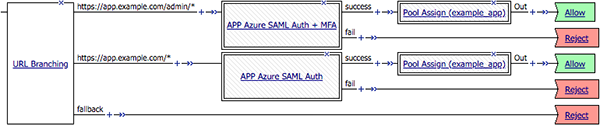
The per-request policy is now configured.
Configure a virtual server for the application, and attach the allow-all access policy and the authentication per-request policy.