


Updated Date: 05/19/2026
Assigning push and OTP variables for MFA in a subroutine
You should have created the subroutine for MFA with a variable assign agent and logon page item as previously described. This task begins in the subroutine.
Assign the variables for the push and one time passcode to provide successful MFA in the per-request policy.
-
On the Push branch following the logon page items, click plus.
-
Click the Assignment tab, select Variable Assign, and click Add Item.
-
Click Add new entry.
-
On the left, select Custom Variable and type
subsession.logon.last.password. -
On the right, select Text and type
push. -
Click Finished.
-
On the OTP branch, following the logon page items, click plus.
-
Click the Assignment tab, select Variable Assign, and click Add Item.
-
Click Add new entry.
-
On the left, select Custom Variable and type
subsession.logon.last.password. -
On the right, select Session Variable and type
subsession.logon.last.mfaToken. -
Click Finished.
-
Click Save.
-
On both branches, add a RADIUS Auth item, and specify the RADIUS server.
-
Add terminals for the branches.
This example shows a completed subroutine for MFA with a one time passcode and push options.
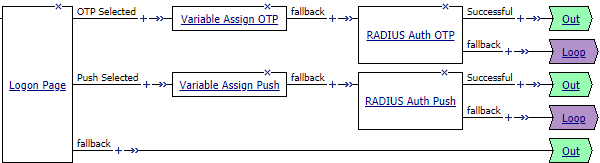
The subroutine for MFA is created.
Add the subroutine to the per-request policy.