Updated Date: 05/19/2026
Adding an HTTP Connector to a subroutine to check an external blocklist
You should have created a per-request policy before you complete this task.
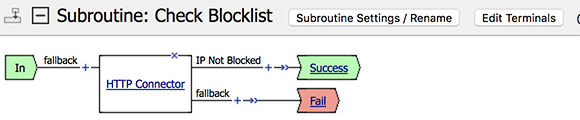
Add the HTTP Connector item to the Check Blocklist subroutine you created to check data against an external HTTP server. In this example, you verify that an IP address is not included on an external IP blocklist.
-
Expand the subroutine by clicking the [+] icon.
The subroutine displays.
-
Click the (+) icon anywhere in the subroutine to add a new item.
-
Click the General Purpose tab.
-
Select the HTTP Connector item, and click Add Item.
-
From HTTP Connector Request, select the HTTP connector request you configured previously.
-
Click the Branch Rules tab.
The Branch Rules screen opens.
-
Change the name of the default Successful rule.
In this case, the expression will detect that the IP addrress is not on a blocklist, so you could name this rule
IP Not Blocked, for example. -
Click the change link in the Expression area.
A popup screen opens.
-
Click the Advanced tab.
Use this tab to enter Tcl expressions.
A text input field displays.
-
In the field, type
expr {[mcget {subsession.http_connector.body.is-listed == false}, and click Finished. -
Click Edit Terminals.
A popup screen opens.
-
Click Add Terminal.
A new terminal line appears.
-
Type the name for the new terminal, for example,
Fail, and select the red color, then click Save. -
On the IP Not Blocked branch you created earlier in the subroutine, click the Out terminal.
-
Select the success terminal, for example, Success, and click Save.
-
Click Save.