


Updated Date: 05/19/2026
Creating a per-session policy for the SAML step-up authentication example
Here you create the per-session policy that is used for the SAML step-up authentication example. The per-session policy presents a logon page and uses Active Directory to authenticate users attempting to access resources behind a virtual server.
-
On the Main tab, click Access > Profiles / Policies.
-
Click Create to create a per-session policy:
-
Call it example_com.
-
Set Profile Type to LTM-APM.
-
Set Profile Scope to Profile.
-
Select the accepted languages.
-
Click Finished.
The policy is listed in the Access Profiles (Per-Session Policies) list.
-
-
In the Per-Session Policy column of the example.com policy, click Edit.
The visual policy editor opens the per-session policy in a separate screen.
-
In the policy, click (+) to add an item.
-
From the Logon tab, select Logon Page then Add Item.
-
Use default values for the Logon Page or customize it, then click Save.
Click Help for details on the fields.
-
On the right of the Logon Page, click (+) and from the Authentication tab, select AD Auth then Add Item.
-
In the popup, for Server, select the previously configured Active Directory server, use the default values for the rest of the fields, and click Save.
-
In the policy, click one of the Deny endings and change it to Allow.
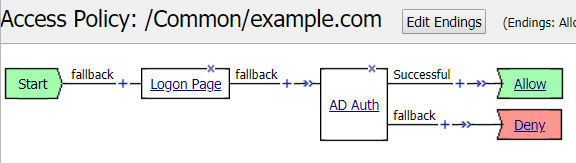
You created a per-session policy that authenticates users at the edge of the network with a login page and active directory authentication. The per-session policy you created looks like this:
Next, create the per-request policy where the system performs additional, SAML step-up authentication on requests for sensitive information.