


Updated Date: 05/19/2026
How step-up authentication works
|
1 |
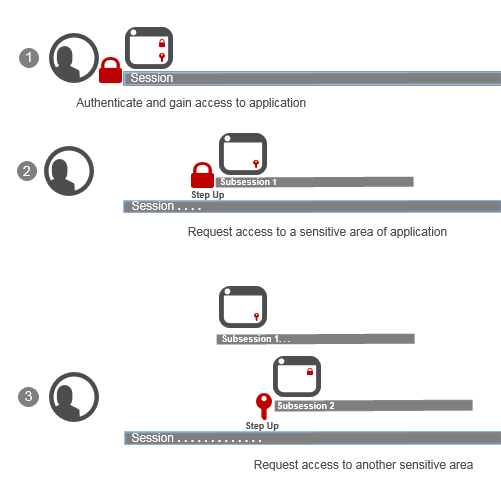
User logs in and authenticates through a per-session policy; Access Policy Manager (APM) creates a session. User starts to use an application that’s available in the enterprise. User can access all but two parts of the application that APM protects with step-up authentication, which requires: - Password-based authentication (
|
|
2 |
User requests access to part of the application protected with step-up authentication (username and password). APM challenges the user and then starts a subsession; for simplicity, we call it Subsession 1. For the duration of Subsession 1: If the user passed step-up authentication, the user does not need to authenticate again to access that part of the application; If the user failed step-up authentication, the user does not have access and step-up authentication does not run again. |
|
3 |
User requests access to part of the application protected with step-up authentication certificate authentication. APM challenges the user and then starts another subsession, Subsession 2. If the user passes certificate authentication, for the duration of Subsession 2: If the user passed step-up authentication, the user does not need to authenticate again to access that part of the application; If the user failed step-up authentication, the user does not have access and step-up authentication does not run again.Tip: A subsession ends when its lifetime expires or when the session ends, whichever is sooner. |

