


Updated Date: 07/07/2026
Planning a BIG-IQ Centralized Management Deployment
There are two license types for a centralized management solution, one for BIG-IQ device management and one for a data collection device (DCD).
F5 BIG-IQ Centralized Management is a platform that you use as a tool to help you manage BIG-IP devices and all of their services (such as LTM, AFM, ASM, and so forth), from one location. BIG-IQ can manage up to 200 (physical, virtual, or vCMP) BIG-IP devices and handle licensing for up to 5,000 unmanaged devices.
Using BIG-IQ helps you more efficiently manage your BIG-IP devices. That means you and your co-workers don’t have to log in to individual BIG-IP systems to get your job done. Instead, you can discover, upgrade, deploy policy changes, manage licenses, and more, from just one place.
From BIG-IQ, you can manage a variety of tasks from software updates to health monitoring, and traffic to security. And because permissions for users are role-based, you can limit access to just a few trusted administrators to minimize downtime and potential security issues. You can also allow users to view or edit only those BIG-IP objects that they need to do their job.
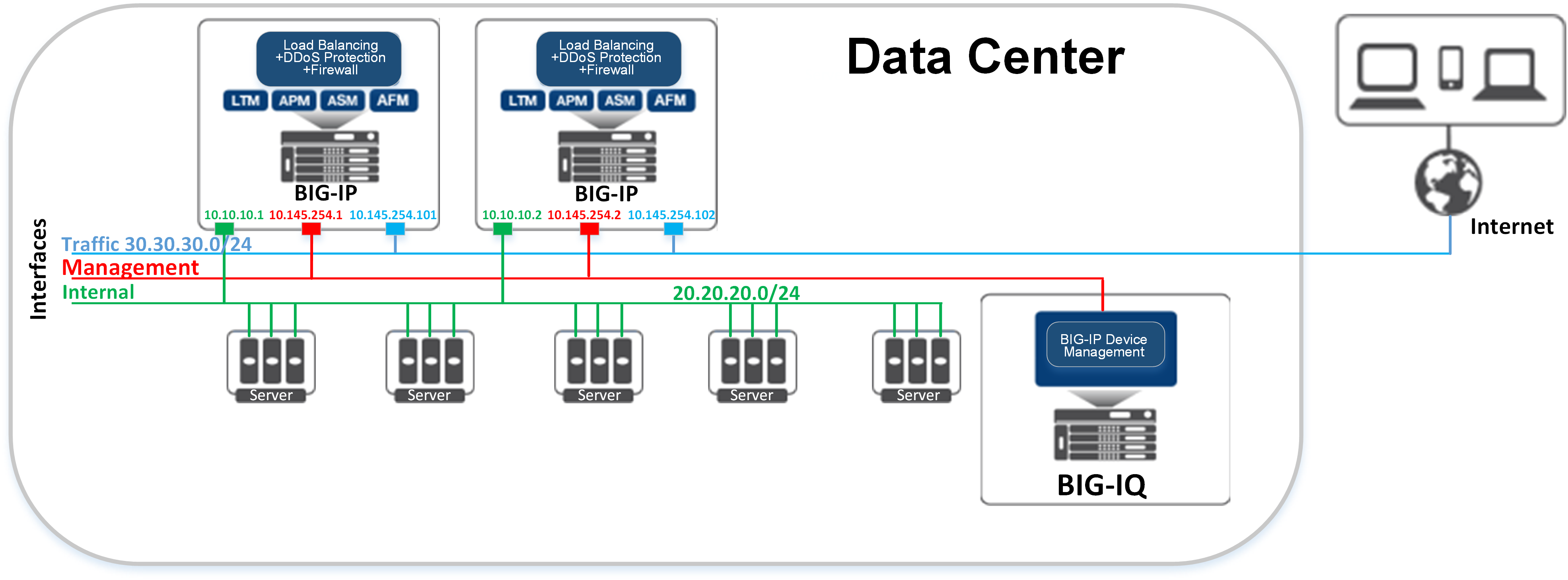
Here’s an example of how BIG-IQ can fit into a data center. This topology does not include any data collection devices, so statistical analytics, and event or alert management are not supported.
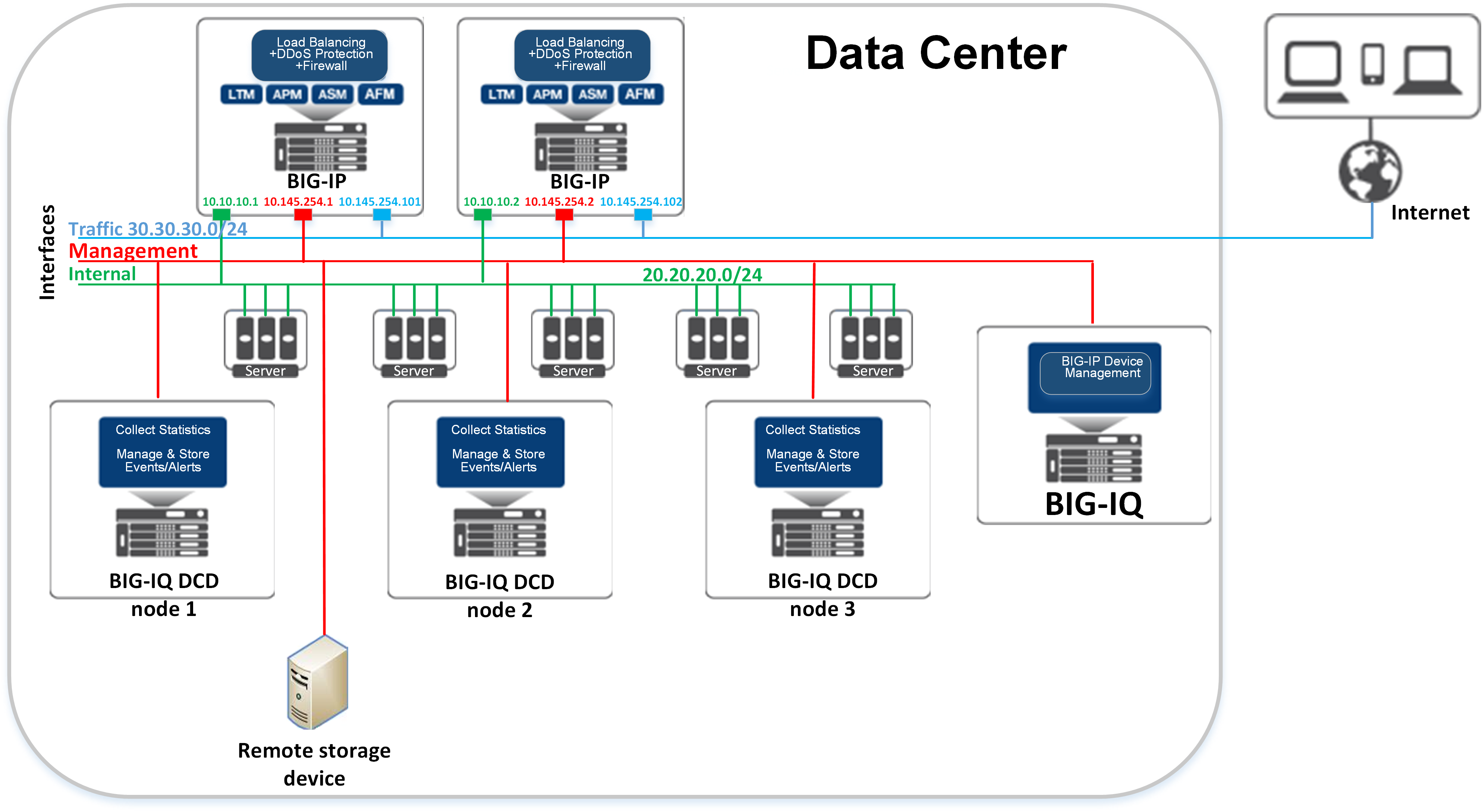
A data collection device (DCD) is a specially provisioned BIG-IQ system that you use to manage and store alerts, events, and statistical data from one or more BIG-IP systems. The next diagram illustrates a simplified example of how DCDs add to your BIG-IQ Centralized Management solution.
BIG-IQ Centralized Management documentation set is located on AskF5 at https://support.f5.com. Click the Product Manuals link under Resources, and select BIG-IQ Centralized Management from the product list, and select the appropriate version.
|
Title |
Use to: |
|---|---|
|
F5 BIG-IQ Centralized Management Virtual Editions Setup guides |
Set up BIG-IQ Virtual Edition (VE) as a guest in a virtual environment using supported hypervisors. |
|
Planning and Implementing an F5 BIG-IQ Centralized Management Deployment |
Plan deployment, license, and set up the BIG-IQ system in your network. |
|
F5 BIG-IQ Centralized Management: Core Concepts |
Find out more about the concepts about the core functionality included with BIG-IQ Centralized Management. |
|
F5 BIG-IQ Centralized Management DCD Sizing Guide |
Determine the resources that are required to handle the data generated by the BIG-IP® devices you manage. Requirements vary according to the type and amount of data you generate. |
|
F5 BIG-IQ Centralized Management: Authentication, Roles, and User Management |
|
|
F5 BIG-IQ Centralized Management: Monitoring and Reports |
|
|
F5 BIG-IQ Centralized Management: Device |
|
|
F5 BIG-IQ Local Traffic & Network Implementations |
Manage: - Local Traffic profiles
As well as configuring an IPsec tunnel and event viewing. |
|
F5 BIG-IQ Centralized Management: Security |
Manage:
|
|
F5 BIG-IQ Centralized Management: Access |
|
|
F5 BIG-IQ Centralized Management: Fraud Protection Service |
Set up, manage, and monitor alerts for fraud protection. |
|
F5 Platform Guide: BIG-IQ 7000 Series |
Set up and manage the BIG-IQ 7000 hardware platform. |
|
F5 BIG-IQ Centralized Management Use Case: Provide Role-Based User Access to an Application |
Give role-based user access to a SharePoint application. |
|
F5 BIG-IQ Centralized Management: Auto-Scale in a VMware Environment |
Start auto-scaling BIG-IP VE devices in a VMware environment to manage applications. |
|
F5 BIG-IQ Centralized Management: Auto-Scale in a AWS Cloud |
Start auto-scaling BIG-IP VE devices in an AWS cloud to manage applications. |
|
F5 BIG-IQ Centralized Management: Auto-Scale in an Azure Cloud |
Start auto-scaling BIG-IP VE devices in an Azure cloud to manage applications. |
|
BIG-IQ Centralized Management: Monitoring and Managing Application Services |
Monitor the health and statistics for your application services. |
|
F5 BIG-IQ Centralized Management upgrade guides |
Upgrade BIG-IQ Centralized Management and BIG-IQ Data Collection Device to the most recent software version. |
|
Release notes |
Find information about the current software release, including a list of associated documentation, a summary of new features, enhancements, fixes, known issues, and available workarounds. |
|
AskF5 Articles and Tech Notes |
Read responses and resolutions to known issues. Tech Notes provide additional configuration instructions and how-to information. |
An F5BIG-IQ® Centralized Management solution can involve a number of different elements. The topology for these elements depends on your needs, and on whether you include data collection devices (DCDs) in your solution. A typical solution can include the following elements:
- BIG-IQ system(s)
- BIG-IP devices
- Data collection devices (optional)
- Remote storage devices (optional)
Using BIG-IQ Centralized Management, you can centrally manage your BIG-IP(R) devices, performing operations such as backups, licensing, monitoring, and configuration management. And because access to each area of BIG-IQ is role-based, you can limit access to users, thus maximizing work flows while minimizing errors and potential security issues.
A BIG-IP device runs a number of licensed components designed around application availability, access control, and security solutions. These components run on top of ®F5 TMOS®. This custom operating system is an event driven operating system designed specifically to inspect network and application traffic and make real-time decisions based on the configurations you provide. The BIG-IP software runs on both hardware and virtualized environments.
A data collection device (DCD) is a specially provisioned BIG-IQ system that you use to manage and store alerts, events, and statistical data from one or more BIG-IP systems.
Configuration tasks on the BIG-IP system determine when and how alerts or events are triggered on the client. The alerts or events are sent to a BIG-IQ data collection device, and the BIG-IQ system retrieves them for your analysis. When you opt to collect statistical data from the BIG-IP devices, the DCD periodically (at an interval that you configure) retrieves those statistics from your devices, and then processes and stores that data.
The group of data collection devices and BIG-IQ systems that work together to store and manage your data are referred to as the data collection cluster. The individual data collection devices are generally referred to as nodes.
The remote storage device is necessary only when your deployment includes a data collection device (DCD) and you plan to store backups of your events, alerts, and statistical data for disaster recovery requirements. Remote storage is also required so that you can retain this data when you upgrade your software.
Before you begin to deploy a BIG-IQ® system, you should complete these preparations.
- Determine the deployment scenario that works best for your needs.
- Create the interfaces, communications, and networks needed to support your deployment scenario
- Configure your network (including switches and firewalls) to permit BIG-IQ network traffic to flow based on the deployment scenario you choose.
- Assemble the passwords, IP addresses, and licensing information needed for the BIG-IQ cluster components.
To successfully deploy a BIG-IQ® Centralized Management solution, you may need to coordinate with several people in your company.
If you use BIG-IQ virtual editions, you might need to coordinate with the people who manage your virtual environment, so they can provision the virtual machines with the required amount of CPUs, memory, and network interfaces. Further, you’ll need to coordinate with the people who manage the storage for the virtual machines to make sure each virtual machine is provisioned with the necessary storage to support the BIG-IQ environment. You also might need to provide the virtual environment team a copy of the BIG-IQ virtual machine image (available from https://downloads.f5.com), depending how they operate.
If you use BIG-IQ 7000 devices in your network, you need to coordinate with the people who manage the data center where the BIG-IQ devices are housed to make arrangements for the devices to be racked, powered on, and connected to your network.
There are also several tasks to coordinate with your networking team:
- IP address allocation for the BIG-IQ nodes, depending on your deployment model.
- Creation of networks, VLANs, and so on dependent on your deployment model.
- Any routing configuration required to ensure traffic passes between the BIG-IQ nodes and the BIG-IP devices.
- Additional networking configuration required to support the BIG-IQ system’s operation.
Finally, you may need to coordinate with your network firewall administrators, depending on the network configuration at your company. The BIG-IQ software needs to communicate between BIG-IQ nodes and BIG-IP systems; and, if there are firewalls in the network path, firewall rules probably need to be configured to permit that traffic. For additional detail about required network ports and protocols, refer to Open ports required for data collection device cluster deployment on support.f5.com.
There are three common deployment scenarios for the F5BIG-IQ® system. The scenario most appropriate for you depends on what you want to do.
|
What functions does your deployment need to perform? |
Which hardware components and networks do you need? |
Which deployment type should you choose? |
|---|---|---|
|
Manage and configure BIG-IP® devices. For example, take backups, license virtual editions, and configure local traffic and security policies. |
Simple management and configuration |
All you need is one or more BIG-IQ system and the BIG-IP devices you want to manage. This configuration uses a single management network. |
|
Manage and configure BIG-IP devices. Collect and view Local Traffic, DNS, and Device statistical data from the BIG-IP devices. Collect, manage, and view events and alerts from BIG-IP devices provisioned with the APM®, FPS®, or ASM® components. |
You need one or more BIG-IQ systems, data collection devices, and an external storage device. This configuration requires a single management network and an internal BIG-IQ cluster network. |
Advanced management and configuration |
|
Manage and configure BIG-IP devices. Collect and view Local Traffic, DNS, and Device statistical data from the BIG-IP devices. Collect, manage, and view events and alerts from BIG-IP devices provisioned with the APM, FPS, or ASM components. Separate network traffic to support large, distributed deployments of the F5 BIG-IQ Centralized Management solution for improved performance, security, and interactions in multiple data center environments. Or, for disaster recovery capability, you could operate multiple data centers, each with its own set of BIG-IQ systems. (For additional detail, refer to Managing Disaster Recovery Scenarios.) |
You need one or more BIG-IQ systems, data collection devices, and an external storage device. This configuration requires an external network, a management network, and an internal BIG-IQ cluster network. |
Large-scale, distributed management and configuration |
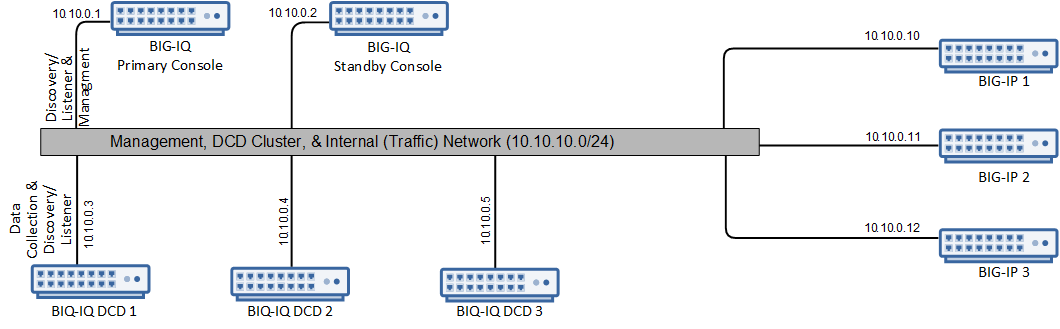
To deploy a simple management and configuration environment, all you need is one or more BIG-IQ systems and the BIG-IP devices that you want to manage. The number of BIG-IQ systems you need depends on how much redundancy your business requires. A second system provides high availability failover capability. You can also add data collection devices (DCDs) to this configuration.
The simple management and configuration uses a single management network. The BIG-IQ system uses traffic on the management network to do these things:
- Enable bidirectional traffic between the BIG-IQ systems and the BIG-IP devices.
- Enable traffic between the BIG-IQ systems. If you use a secondary high availability BIG-IQ system, this traffic keeps the state information synchronized.
- Provide access to the BIG-IQ user interface. You can also use it to access the BIG-IQ system using SSH if you need to use the command line interface.
Note: The number of devices of each type that will best meet your company’s needs depends on a number of factors. Refer to the BIG-IQ Sizing Guidelines on support.f5.com for details.
This figure illustrates the network topology required for a simple management and configuration deployment and includes the optional DCDs needed for analytics or alert and event monitoring.
Use the form to record the IP address for each device in the BIG-IQ deployment.
| Device type | Management IP address(es) |
|---|---|
| Primary BIG-IQ system | |
| Secondary BIG-IQ system | |
| BIG-IP devices |
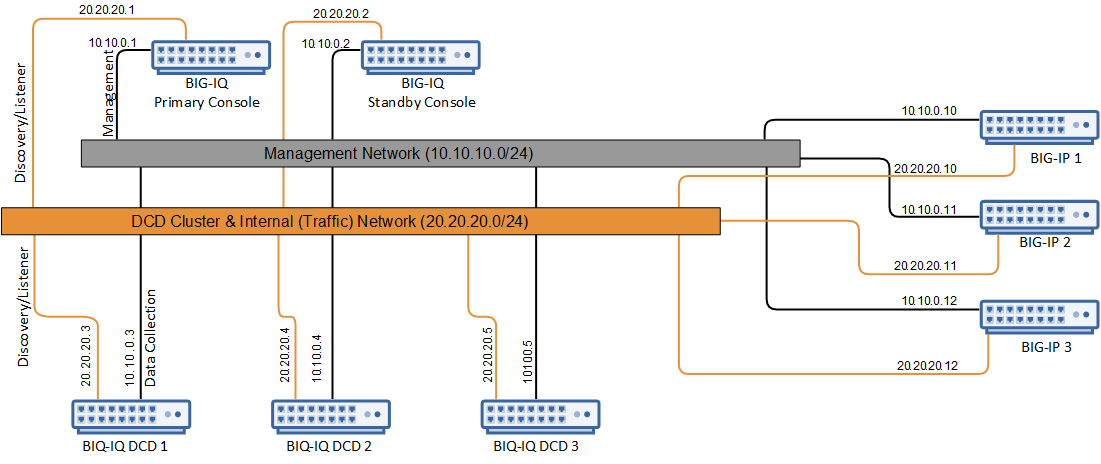
To deploy the advanced management and configuration environment, you need BIG-IQ systems, data collection devices (DCDs), and an optional external storage device for backing up alert, event, and statistical data. The optimal topology for this configuration uses a single management network and a DCD cluster network.
Note: With the addition of the DCD cluster, you can manage alerts and events on your managed devices as well as monitor performance analytics.
Note: The number of devices of each type that will best meet your company’s needs depends on a number of factors. Refer to the BIG-IQ Sizing Guidelines on support.f5.com for details.
The BIG-IQ system uses traffic on the management network to do these things:
- Enable bidirectional traffic between the BIG-IQ systems and the BIG-IP devices.
- Enable traffic between the BIG-IQ systems. If you use a secondary high availability BIG-IQ system, this traffic keeps the state information synchronized.
- Provide access to the BIG-IQ user interface. You can also use it to access the BIG-IQ system using SSH if you need to run manual commands.
The DCD cluster network is used to replicate data to maintain the BIG-IQ Centralized Management cluster.
Note: It is best practice to isolate the traffic between BIG-IQ cluster nodes for performance and improved security.
This figure illustrates the optimal network topology for an advanced management and configuration deployment.
Use the form to record the IP addresses for the devices in the BIG-IQ deployment.
| Device type | Management IP addresses | DCD cluster IP addresses |
|---|---|---|
| Primary BIG-IQ system | ||
| Secondary BIG-IQ system | ||
| Data collection device management IP addresses | ||
| BIG-IP devices | ||
| Remote storage device |
To deploy a large-scale, distributed management and configuration environment, you need BIG-IQ systems, data collection devices, and an optional external storage device for backing up alert, event, and statistical data. This configuration needs a management network, a DCD cluster network, and an internal (or traffic) network.
The BIG-IQ system uses traffic on the management network to do these things:
- Enable traffic between the BIG-IQ systems. If you use a secondary high availability BIG-IQ system, this traffic keeps the state information synchronized.
- Provide access to the BIG-IQ user interface. You can also use it to access the BIG-IQ system using SSH if you need to run manual commands.
The DCD cluster network is used to provide communication between the BIG-IQ system and the DCD nodes, and to replicate data that maintains the BIG-IQ Centralized Management cluster.
Note: It is best practice to isolate the traffic between BIG-IQ cluster nodes for performance and improved security.
The internal (traffic) network is used to route bidirectional traffic between the BIG-IQ Centralized Management cluster and the BIG-IP devices.
Note: With the addition of the DCD cluster, you can manage alerts and events on your managed devices as well as monitor performance analytics.
Note: The number of devices of each type that will best meet your company’s needs depends on a number of factors. Refer to the BIG-IQ Sizing Guidelines on support.f5.com for details.
This figure illustrates the network topology required for this deployment.
Use the form to record the IP addresses for the devices in the BIG-IQ deployment.
| Device type | Management IP addresses | DCD cluster network IP addresses | Internal network IP addresses |
|---|---|---|---|
| Primary BIG-IQ system | |||
| Secondary BIG-IQ system | |||
| Data collection device management IP addresses | |||
| BIG-IP devices | |||
| Remote storage device |
The CPU, RAM, and disk space requirements for the devices in your BIG-IQ deployment are determined by a number of factors, including:
- How many BIG-IP devices your BIG-IQ deployment manages, and which services are provisioned on the managed BIG-IP devices?
- Does your BIG-IQ deployment collect statistics data from your managed BIG-IP devices??
- Does your BIG-IQ deployment collect alerts and events data, from the managed BIG-IP devices?
Note: When you deploy the BIG-IQ software, you can choose 95 GB or 500 GB of disk space. If you choose 500 GB, only 95 GB of the 500 GB is allocated initially. You must allocate extra disk space beyond 95 GB before you can use it. Usually, the extra storage space is for DCDs. However, there are also situations in which BIG-IQ devices can use the extra space. For example, you might want to store a large number of UCS backups. Or, your business needs might require you to store multiple versions of the BIG-IQ software so you can upgrade back and forth between BIG-IQ versions.
|
Deployment type |
Device Type |
CPU |
RAM |
Disk Space |
|---|---|---|---|---|
|
BIG-IQ deployment with statistics collection enabled, as well as alerts and events. |
BIG-IQ |
8 See When do the BIG-IQ devices need additional resources? |
32 GB See When do the BIG-IQ devices need additional resources? |
Generally, 95 GB; or 500GB if extra space is needed. |
|
DCD |
8 |
32 GB |
Initially, 500 GB. VE disk space can be extended further as needed. | |
|
BIG-IQ deployment with alerts and events enabled. |
BIG-IQ |
4See When do the BIG-IQ devices need additional resources? |
16 GB See When do the BIG-IQ devices need additional resources? |
Generally, 95 GB; or 500GB if extra space is needed. |
|
DCD |
4See When do the DCDs need additional resources? |
16 GB See When do the DCDs need additional resources? |
Initially, 500 GB. VE disk space can be extended further as needed. | |
|
BIG-IQ deployment without statistics collection, alerts, or events. |
BIG-IQ |
4 or 8See When do the BIG-IQ devices need additional resources? |
16, 32, or 64 GBSee When do the BIG-IQ devices need additional resources? |
Generally, 95 GB; or 500GB if extra space is needed. |
Important: CPU and RAM pairings other than those listed above have not been tested.
When the number of managed BIG-IP devices in your BIG-IQ deployment exceeds the specified thresholds, F5 recommends that you allocate 8 CPUs and either 32 or 64 GB of RAM to your BIG-IQ devices.
The following table lists the threshold for each BIG-IP service. For example, if your BIG-IQ deployment manages more than 32 BIG-IP devices provisioned with Access, allocate additional resources to your BIG-IQ devices.
| A BIG-IQ managing devices… | Needs 32 GB to manage more than: |
|---|---|
| provisioned with Access | 32 devices |
| provisioned with ADC | 80 devices |
| provisioned with ASM | 40 devices |
| provisioned with DNS | 100 devices |
| provisioned with FPS | 50 devices |
| deployed in a VMware service scaling group | 100 devices |
| deployed in an AWS or Azure service scaling group | 50 devices |
Note: This is a rough approximation. Depending on the number of objects on each BIG-IP device. When your managed BIG-IP devices are provisioned with multiple modules, the RAM requirement increases.
For a broader consideration of the factors that can impact the CPU, RAM, and disk space requirements for DCD devices, refer to the BIG-IQ Centralized Management DCD Sizing Guide.
For work flows that describe how to manage your disk space, refer to the BIG-IQ Centralized Management: Data Collection Device Disk Space Management Guide on support.f5.com.
The BIG-IQ systems and data collection devices require bidirectional communication with the BIG-IP devices in your network to successfully manage them. The ports required must be open to allow for this required two-way communication. You might have to contact a firewall or network administrator to verify that these ports are open, or to have them opened if they are not.
The ports required for your BIG-IQ solution depend on a number of factors such as the services running on the devices you manage, the BIG-IP version running on those devices, and the number of subnets configured on your network.
For further information on how to configure ports for BIG-IP interfaces, refer to: https://support.f5.com/csp/article/K15612
Before you upgrade BIG-IQ Centralized Management, it’s important to take inventory of the status of the running daemons. Then after you upgrade, you can verify they’re in the same state and make any necessary modifications. To view the daemons, type the following command: admin@(ip-10-1-1-4)(cfg-sync Standalone)(Active)(/Common)(tmos)# show /sys service
| Daemon | Example of status |
|---|---|
| admd | down, Not provisioned |
| alertd | run (pid 6579) 22 hours |
| apmd | down, Not provisioned |
| asm | down, Not provisioned |
| autodosd | down, Not provisioned |
| avrd | down, Not provisioned |
| bigd | run (pid 5338) 22 hours |
| bigiqsnmpd | run (pid 5035) 22 hours |
| captured | down, Not provisioned |
| cbrd | run (pid 6117) 22 hours |
| chmand | run (pid 5678) 22 hours |
| clusterd | down, not required |
| csyncd | run (pid 5038) 22 hours |
| datasyncd | down, Not provisioned |
| dnscached | down, Not provisioned |
| dosl7d | down, Not provisioned |
| dosl7d_attack_monitor | down, Not provisioned |
| dwbld | down, Not provisioned |
| elasticsearch | run (pid 5041) 22 hours |
| errdefsd | run (pid 6112) 22 hours |
| eventd | run (pid 5043) 22 hours |
| evrouted | run (pid 6583) 22 hours |
| f5_update_checker | down, No action required |
| fpuserd | down, Not provisioned |
| fslogd | down, Not provisioned |
| grafana | run (pid 6107) 22 hours |
| gtmd | down, Not provisioned |
| guiserver | run (pid 6105) 22 hours |
| gunicorn | run (pid 6587) 22 hours |
| hwpd | down 22 hours, normally up |
| icontrolportald | run (pid 5337) 22 hours |
| iprepd | run (pid 6113) 22 hours |
| istatsd | run (pid 6109) 22 hours |
| lacpd | down, not required |
| lind | run (pid 6116) 22 hours |
| mcpd | run (pid 6110) 22 hours |
| merged | run (pid 6938) 22 hours |
| mgmt_acld | down, Not provisioned |
| monpd | run (pid 6578) 22 hours |
| named | run (pid 4855) 22 hours |
| nokiasnmpd | down, not enabled |
| ntlmconnpool | run (pid 6111) 22 hours |
| pabnagd | down, Not logging node |
| pccd | down, Not provisioned |
| pgadmind | run (pid 7310) 22 hours |
| pkcs11d | down, not required |
| restjavad | run (pid 4853) 22 hours |
| rethinkdb | run (pid 15058) 21 hours, 1 start |
| scriptd | run (pid 5344) 22 hours |
| sdmd | down, sdmd is not provisioned |
| searchd | run (pid 5343) 22 hours |
| sflow_agent | run (pid 6937) 22 hours |
| shmmapd | down, Not provisioned |
| snmpd | run (pid 5674) 22 hours |
| sod | run (pid 4810) 22 hours |
| statsd | run (pid 5336) 22 hours |
| syscalld | run (pid 6939) 22 hours |
| tamd | run (pid 5679) 22 hours |
| tmipsecd | run (pid 5341) 22 hours |
| tmm | run (pid 6581) 22 hours |
| tmrouted | run (pid 6581) 22 hours |
| tokumond | run (pid 7311) 22 hours |
| tokumx | run (pid 6580) 22 hours |
| webd | run (pid 6941) 22 hours |
| wr_urldbd | down, Not provisioned |
| zrd | down, Not provisioned |
| zxfrd | run (pid 5034) 22 hours |
To install and configure a BIG-IQ system or data collection device (DCD) cluster, you use the default passwords for all of the devices. For DCD clusters, if you intend to schedule regular snapshots of your logging data (as recommended), you need root access credentials for the machine on which you plan to store these snapshots.
| User Name | Default Password | Access Rights/Role |
|---|---|---|
| admin | admin | This user type can access all aspects of the BIG-IQ system from the system’s user interface. |
| root | default | This user has access to all aspects of the BIG-IQ system from the system’s console command line. |
To install and configure a BIG-IQ system or data collection device cluster, you need a license for each device.
Before you can enable statistics collection for centralized management, you must ensure that the BIG-IP device has the proper configuration. The proper configuration varies depending on the version of the BIG-IP device. The minimum supported BIG-IP device is version 12.1.0. BIG-IQ has limited visibility for BIG-IP devices prior to 13.1.0.5.
For details about how to configure statistics visibility, based on the BIG-IP version, see Enabling statistics collection during device discovery.
For details on how to access statistic information, based on the BIG-IP version and service, refer to Statistics compatibility and visibility.