


Updated Date: 07/07/2026
BIG-IQ setups that support an upgrade process to the current version
The current setup of BIG-IQ Centralized Management affects the upgrade process to BIG-IQ version 7.0.0. Your current BIG-IQ system must be version 5.2 or later to successfully upgrade to version 7.0.0. The following system configurations support the upgrade to version 7.0.0:
-
BIG-IQ system configuration includes a data collection device cluster.
-
BIG-IQ system configuration does not include a data collection device cluster.
To upgrade your BIG-IQ system from version 5.2 to the current version, use the upgrade process that supports your system’s configuration.
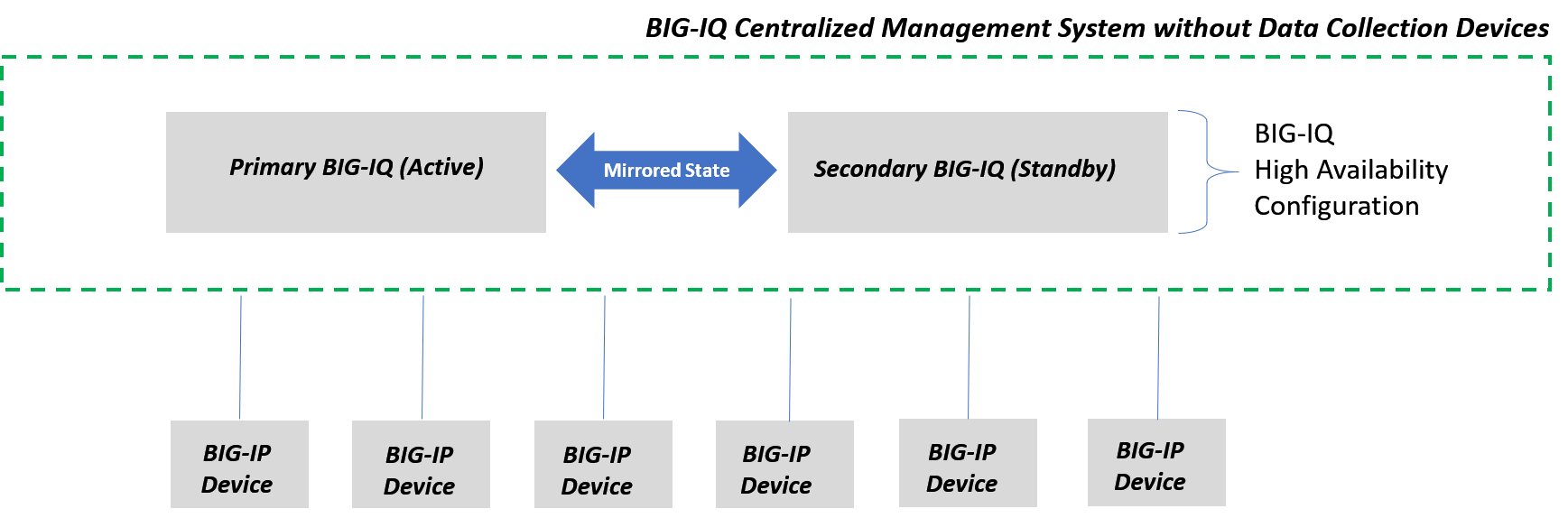
BIG-IQ Centralized Management: Upgrading from Version 5.2, 5.3, 5.4, 6.0.x, 6.1 without a Data Collection Device Cluster to Version 7.0
This example represents a BIG-IQ in a high availability configuration. During the upgrade, the BIG-IQ suspends BIG-IP device management. This can result in a downtime of services. The amount of downtime depends on the size of your system’s setup. BIG-IQ services resume when the active BIG-IQ is upgraded and restarted.
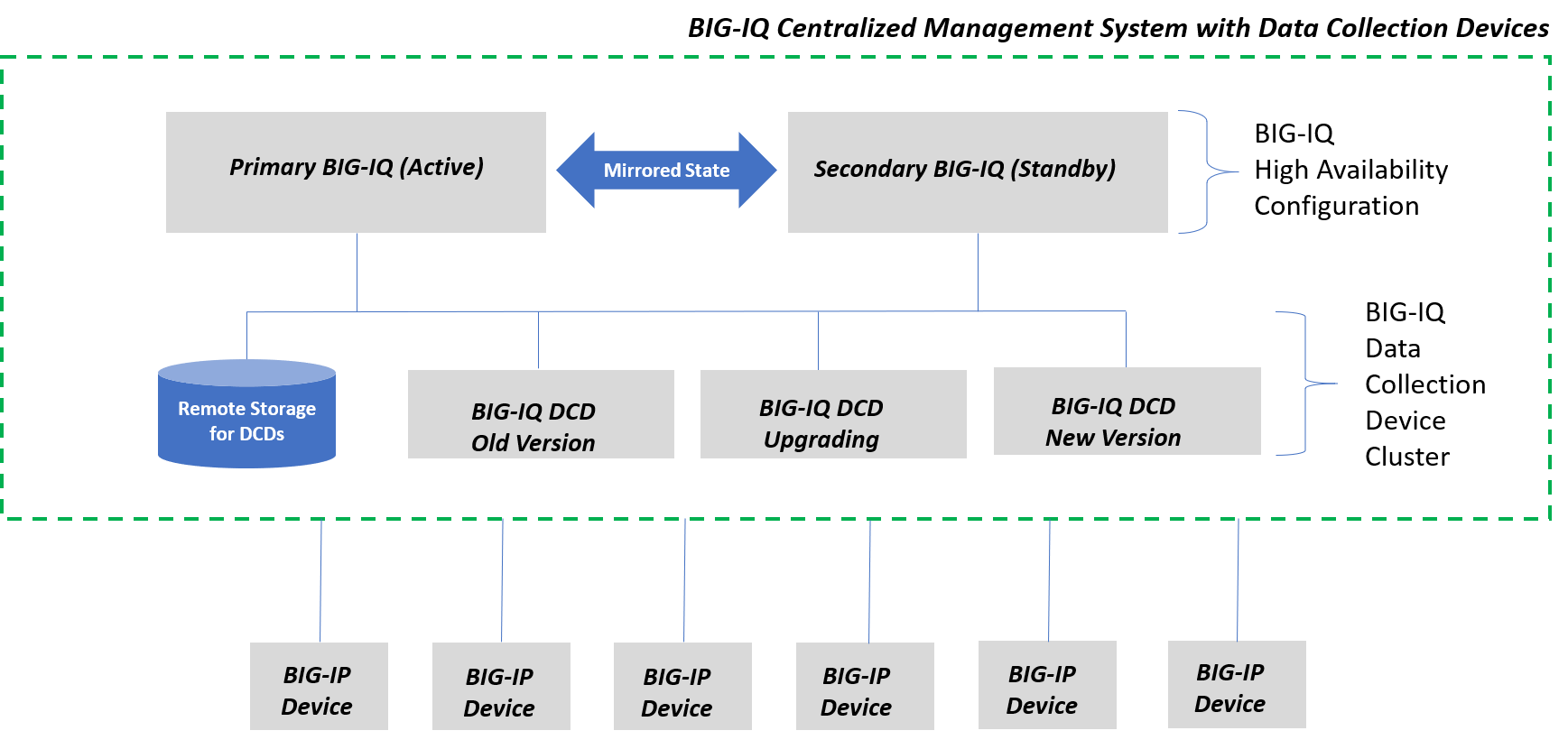
BIG-IQ Centralized Management: Upgrading Version 6.0.x System with a Data Collection Device Cluster to BIG-IQ 7.0 with Minimal Downtime
This figure represents BIG-IQ in a high-availability (HA) configuration with a data collection device (DCD) cluster. The DCD cluster continues to collect data until you start the upgrade process. Data collection for all BIG-IP devices resumes only after all devices in the DCD cluster are upgraded and restarted. For this example, there are three data collection devices: one has already completed the upgrade to version 7.0, one is undergoing an upgrade to version 7.0, and one is collecting data as version 6.0.x.
Note: This upgrade procedure with minimal downtime supports BIG-IQ configuration that include a minimum of three data collection devices. However, if the BIG-IQ system you are upgrading includes multiple zones, then in addition to the three DCD minimum, there must also be at least two DCDs in each zone before you can perform a rolling upgrade procedure
Note: If the BIG-IQ system you are upgrading includes multiple zones, then in addition to the three DCD minimum, there must also be at least two DCDs in each zone before you can perform a rolling upgrade procedure.
Note: As you calculate the optimum number of DCDs for your solution, make sure to consider the upgrade process. If you plan to use what’s referred to as a minimum downtime (or rolling) upgrade, you must have at least 3 DCDs in your Elasticsearch cluster.
To upgrade your BIG-IQ system from version 5.3 to the current version, use the upgrade process that supports your system’s configuration.
BIG-IQ Centralized Management: Upgrading from Version 5.2, 5.3, 5.4, 6.0.x, 6.1 without a Data Collection Device Cluster to Version 7.0
This example represents a BIG-IQ in a high availability configuration. During the upgrade, the BIG-IQ suspends BIG-IP device management. This can result in a downtime of services. The amount of downtime depends on the size of your system’s setup. BIG-IQ services resume when the active BIG-IQ is upgraded and restarted.
BIG-IQ Centralized Management: Upgrading Version 6.0.x System with a Data Collection Device Cluster to BIG-IQ 7.0 with Minimal Downtime
This figure represents BIG-IQ in a high-availability (HA) configuration with a data collection device (DCD) cluster. The DCD cluster continues to collect data until you start the upgrade process. Data collection for all BIG-IP devices resumes only after all devices in the DCD cluster are upgraded and restarted. For this example, there are three data collection devices: one has already completed the upgrade to version 7.0, one is undergoing an upgrade to version 7.0, and one is collecting data as version 6.0.x.
Note: This upgrade procedure with minimal downtime supports BIG-IQ configuration that include a minimum of three data collection devices. However, if the BIG-IQ system you are upgrading includes multiple zones, then in addition to the three DCD minimum, there must also be at least two DCDs in each zone before you can perform a rolling upgrade procedure
Note: If the BIG-IQ system you are upgrading includes multiple zones, then in addition to the three DCD minimum, there must also be at least two DCDs in each zone before you can perform a rolling upgrade procedure.
Note: As you calculate the optimum number of DCDs for your solution, make sure to consider the upgrade process. If you plan to use what’s referred to as a minimum downtime (or rolling) upgrade, you must have at least 3 DCDs in your Elasticsearch cluster.
To upgrade your BIG-IQ system from version 5.4 to the current version, use the upgrade process that supports your system’s configuration.
BIG-IQ Centralized Management: Upgrading from Version 5.2, 5.3, 5.4, 6.0.x, 6.1 without a Data Collection Device Cluster to Version 7.0
This example represents a BIG-IQ in a high availability configuration. During the upgrade, the BIG-IQ suspends BIG-IP device management. This can result in a downtime of services. The amount of downtime depends on the size of your system’s setup. BIG-IQ services resume when the active BIG-IQ is upgraded and restarted.
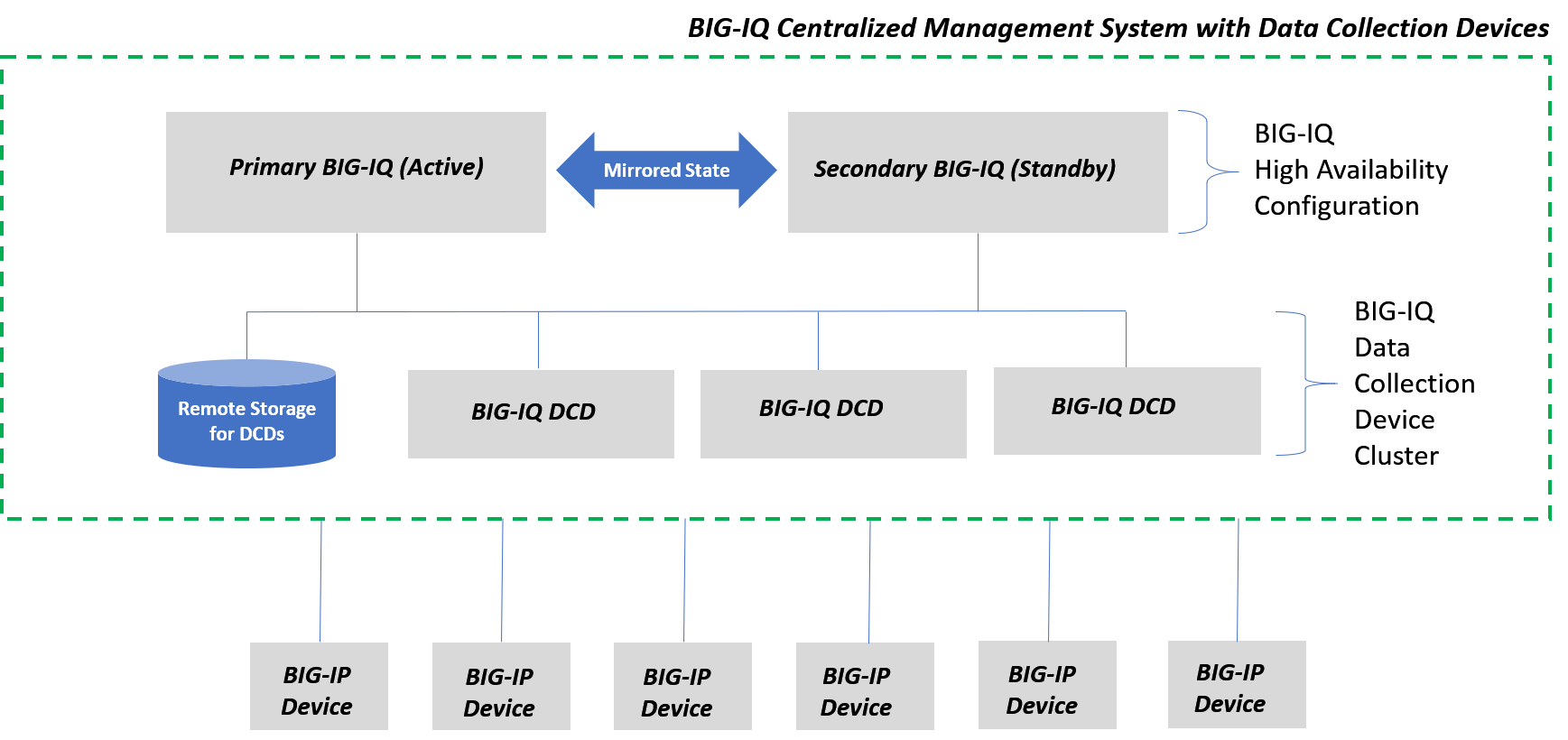
BIG-IQ Centralized Management: Upgrading Version 5.4 or 6.0.x with a Data Collection Device Cluster to Version 7.0
This example represents a BIG-IQ a high-availability (HA) configuration with a data collection device (DCD) cluster. During the upgrade, all devices in the DCD cluster are deactivated until they are all upgraded. Data collected from the managed BIG-IP devices resume only after all devices in the DCD cluster are upgraded and restarted.
To upgrade your BIG-IQ system from version 6.0 to the current version, use the upgrade process that supports your setup and meets your downtime requirements.
BIG-IQ Centralized Management: Upgrading from Version 5.2, 5.3, 5.4, 6.0.x, 6.1 without a Data Collection Device Cluster to Version 7.0
This example represents a BIG-IQ in a high availability configuration. During the upgrade, the BIG-IQ suspends BIG-IP device management. This can result in a downtime of services. The amount of downtime depends on the size of your system’s setup. BIG-IQ services resume when the active BIG-IQ is upgraded and restarted.
BIG-IQ Centralized Management: Upgrading Version 5.4 or 6.0.x with a Data Collection Device Cluster to Version 7.0
This example represents a BIG-IQ a high-availability (HA) configuration with a data collection device (DCD) cluster. During the upgrade, all devices in the DCD cluster are deactivated until they are all upgraded. Data collected from the managed BIG-IP devices resume only after all devices in the DCD cluster are upgraded and restarted.
BIG-IQ Centralized Management: Upgrading Version 6.0.x System with a Data Collection Device Cluster to BIG-IQ 7.0 with Minimal Downtime
This figure represents BIG-IQ in a high-availability (HA) configuration with a data collection device (DCD) cluster. The DCD cluster continues to collect data until you start the upgrade process. Data collection for all BIG-IP devices resumes only after all devices in the DCD cluster are upgraded and restarted. For this example, there are three data collection devices: one has already completed the upgrade to version 7.0, one is undergoing an upgrade to version 7.0, and one is collecting data as version 6.0.x.
Note: This upgrade procedure with minimal downtime supports BIG-IQ configuration that include a minimum of three data collection devices. However, if the BIG-IQ system you are upgrading includes multiple zones, then in addition to the three DCD minimum, there must also be at least two DCDs in each zone before you can perform a rolling upgrade procedure
Note: If the BIG-IQ system you are upgrading includes multiple zones, then in addition to the three DCD minimum, there must also be at least two DCDs in each zone before you can perform a rolling upgrade procedure.
Note: As you calculate the optimum number of DCDs for your solution, make sure to consider the upgrade process. If you plan to use what’s referred to as a minimum downtime (or rolling) upgrade, you must have at least 3 DCDs in your Elasticsearch cluster.
This table lists all the upgrade procedure options to BIG-IQ version 7.0.0. Refer to the guide that corresponds to the software you are upgrading from, https://support.f5.com.
| BIG-IQ Device | BIG-IQ Device With Data Collection Device Cluster | BIG-IQ Device With Data Collection Device Cluster and Minimal Downtime | |
|---|---|---|---|
| BIG-IQ Version 5.2 | Upgrading BIG-IQ from Version 5.2 through 6.1.0 | Upgrading BIG-IQ with a Data Collection Device Cluster from Version 5.2 or 5.3 | N/A |
| BIG-IQ Version 5.3 | |||
| BIG-IQ Version 5.4 | Upgrading BIG-IQ with a Data Collection Device Cluster from Version 5.4.0 through 6.1 | ||
| BIG-IQ Version 6.0 | Upgrading BIG-IQ with a Data Collection Device Cluster from Version 6.X with Minimal Downtime | ||
| BIG-IQ Version 6.0.1 |