


Updated Date: 07/07/2026
About Access
Access in BIG-IQ Centralized Management offers you centralized management for BIG-IP Access Policy Manager (APM) and F5 Secure Web Gateway (SWG) configurations. Centralized management provides you easy-to-deploy sets of access policies and access policy configuration objects. This means you don’t need to repeat the configuration on each BIG-IP system individually. Access also offers you centralized reporting, which lets you to compare and monitor BIG-IP APM usage across many device groups.
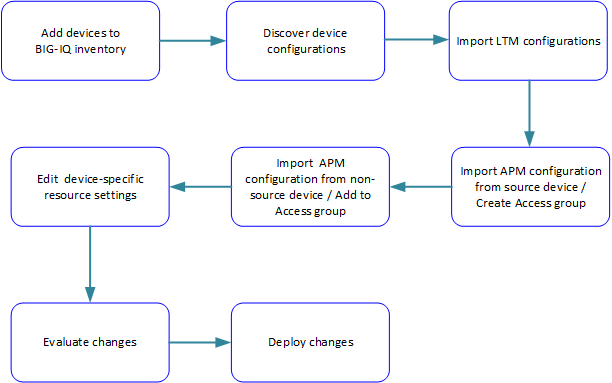
Each Access group is a group of BIG-IP devices across which you plan to share the same Access configuration. When you import an APM service configuration from a device, the device must join an Access group.
When you import an APM service configuration from a device, the device must join an Access group.
- If the device joins a new Access group, Access imports both shared resources and device-specific resources from the device.
- If the device joins an existing Access group, Access imports only the device-specific resources from the device.
In an Access group on the BIG-IQ system, shared resources are a set of configuration objects that are expected to be the same on every device in an Access group.
Initially, shared resources are imported with the APM® service configuration from the device. After import, they are read-only on the BIG-IQ system. The deployment process configures the shared resources on all devices in the Access group. This can result in major configuration changes on the devices, with resources being overwritten, deleted, or added on them.
In an Access group on the BIG-IQ system, device-specific resources are a set of configuration objects that are expected to exist on every device in the Access group. However, the properties of these resources can differ from device to device.
For example, an access policy could use an Active Directory server for user authentication. Device apm_north_america.xyz.com must use an Active Directory server configured in a North American domain or data center, while device apm_south_america.xyz.com must use an Active Directory server configured in a South American domain or data center.
When you add a device to an Access group, device-specific resources are created from the device’s APM® service configuration. Or, if particular resources do not exist on a device, Access creates device-specific resources that match those in the device configuration. After import, you are instructed to review and change device-specific resources if needed; in addition, you can change them at your option. You can also make a device-specific resource shared, so that its properties can only be configured in the shared resources. At deployment, device-specific resources are configured on the specific devices.
BIG-IQ logging nodes are required for Access and SWG reporting. To set up a discovered device so that it sends report data to a logging node, you must run the remote logging configuration. Then, you can run reports.
