Manual Chapter : Viewing connection details

Applies To:

  • BIG-IP APM

    17.1.0, 17.0.0, 16.1.6, 16.1.5, 16.1.4, 16.1.3, 16.1.2, 16.1.1, 16.1.0, 16.0.1, 16.0.0, 15.1.9, 15.1.8, 15.1.7, 15.1.6, 15.1.5, 15.1.4, 15.1.3, 15.1.2, 15.1.1, 15.1.0, 15.0.1, 15.0.0, 14.1.5, 14.1.4, 14.1.3, 14.1.2, 14.1.0, 14.0.1, 14.0.0, 13.1.5, 13.1.4, 13.1.3, 13.1.1, 13.1.0

Viewing connection details

You can view the details of the VPN connection, DNS Configuration, Routing Table, IP Configuration, and other settings.

From the status menu, click the Edge Client icon and then click View Details. The Details popup screen opens and displays the connection details.
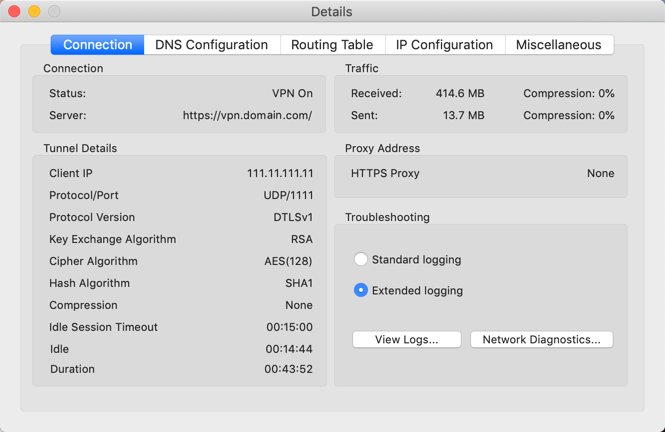
Edge Client details