Manual Chapter :
About Remote High-Speed Logging with the Network Firewall
Applies To:
Show Versions
BIG-IP AFM
- 11.4.1, 11.4.0

Overview: Configuring remote high-speed Network Firewall event logging
You can configure the BIG-IP® system to log information about the BIG-IP system Network Firewall events and send the log messages to remote high-speed log servers.
Important: The BIG-IP system Advanced Firewall Manager™ (AFM™) must be licensed and provisioned before you can configure Network Firewall
event logging.
When configuring remote high-speed logging of Network Firewall events, it is helpful to understand the objects you need to create and why, as described here:
| Object to create in implementation | Reason |
|---|---|
| Pool of remote log servers | Create a pool of remote log servers to which the BIG-IP system can send log messages. |
| Destination (unformatted) | Create a log destination of Remote High-Speed Log type that specifies a pool of remote log servers. |
| Destination (formatted) | If your remote log servers are the ArcSight, Splunk, or Remote Syslog type, create an additional log destination to format the logs in the required format and forward the logs to a remote high-speed log destination. |
| Publisher | Create a log publisher to send logs to a set of specified log destinations. |
| Logging profile | Create a custom Logging profile to enable logging of user-specified data at a user-specified level, and associate a log publisher with the profile. |
| LTM® virtual server | Associate a custom Logging profile with a virtual server to define how the BIG-IP system logs security events on the traffic that the virtual server processes. |
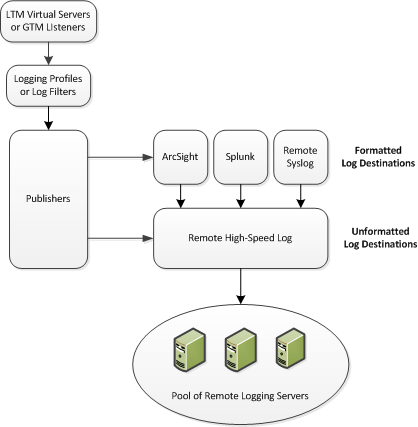 Association of remote high-speed logging configuration objects
Task summary
Perform these tasks to configure remote high-speed network firewall logging on the BIG-IP® system.
Note: Enabling remote high-speed logging impacts BIG-IP system performance.
Creating a pool of remote logging servers
Before creating a pool of log servers, gather the IP addresses of the servers that
you want to include in the pool. Ensure that the remote log servers are configured to
listen to and receive log messages from the BIG-IP®
system.
Create a pool of remote log servers to which the BIG-IP system can send log
messages.
Creating a remote high-speed log destination
Before creating a remote high-speed log destination, ensure that at least one pool
of remote log servers exists on the BIG-IP® system.
Create a log destination of the Remote High-Speed Log type to specify that log messages are sent to a pool of remote log servers.
Creating a formatted remote high-speed log destination
Ensure that at least one remote high-speed log destination exists on the BIG-IP® system.
Create a formatted logging destination to specify that log messages are sent to a pool of remote log servers, such as Remote Syslog, Splunk, or ArcSight servers.
Creating a publisher
Ensure that at least one destination associated with a pool of remote log servers
exists on the BIG-IP® system.
Create a publisher to specify where the BIG-IP system sends log messages for
specific resources.
Creating a custom Network Firewall Logging profile
Create a custom Logging profile to log messages about BIG-IP®
system Network Firewall events.
Assign this custom network firewall Logging profile to a virtual server.
Configuring an LTM virtual server for Network Firewall event logging
Ensure that at least one log publisher exists on the BIG-IP®
system.
Assign a custom Network Firewall Logging profile to a virtual server when you want
the BIG-IP system to log Network Firewall events on the traffic that the virtual server
processes.
Note: This task applies only to LTM®-provisioned systems.
Disabling logging
Disable Network Firewall, Protocol Security, or DoS Protection event logging when
you no longer want the BIG-IP® system to log specific events on the
traffic handled by specific resources.
Note: You can disable and re-enable
logging for a specific resource based on your network administration needs.
The BIG-IP system does not log the events specified in this profile for the
resources to which this profile is assigned.