


Updated Date: 07/07/2026
Using CGNAT Logging and Subscriber Traceability
You can configure the BIG-IP® system to send log messages about carrier grade network address translation (CGNAT) processes to the local Syslog database on the BIG-IP system.
Note: Enabling logging impacts BIG-IP system performance.
When configuring local logging of CGNAT processes, it is helpful to understand the objects you need to create and why:
| Object | Reason | Applies to |
|---|---|---|
| Destination (formatted/local) | Create a formatted log destination to format the logs in human-readable name/value pairs, and forward the logs to the local-syslog database. | Creating a formatted local log destination for CGNAT. |
| Publisher (local-syslog) | Create a log publisher to send logs to the previously created destination that formats the logs in name/value pairs, and forwards the logs to the local Syslog database on the BIG-IP system. | Creating a publisher to send log messages to the local Syslog database. |
| LSN pool | Associate a large scale NAT (LSN) pool with a log publisher in order to log messages about the traffic that uses the pool. | Configuring an LSN pool with a local Syslog log publisher. |
Create a formatted logging destination to specify that log messages about CGNAT processes are sent to the local Syslog database in a format that displays name/value pairs in a human-readable format.
-
On the Main tab, click System > Logs > Configuration > Log Destinations.
The Log Destinations screen opens.
-
Click Create.
-
In the Name field, type a unique, identifiable name for this destination.
-
From the Type list, select Splunk.
The Splunk format is a predefined format of key value pairs.
-
From the Forward To list, select local-syslog.
-
Click Finished.
Create a publisher to specify that the BIG-IP system sends formatted log messages to the local Syslog database, on the BIG-IP system.
-
On the Main tab, click System > Logs > Configuration > Log Publishers.
The Log Publishers screen opens.
-
Click Create.
-
In the Name field, type a unique, identifiable name for this publisher.
-
For the Destinations setting, select the previously created destination from the Available list (which formats the logs in the Splunk format and forwards the logs to the local Syslog database) and move the destination to the Selected list.
-
Click Finished.
Before associating a large scale NAT (LSN) pool with a log publisher, ensure that at least one log publisher exists that sends formatted log messages to the local Syslog database on the BIG-IP system.
Associate an LSN pool with the log publisher that the BIG-IP system uses to send formatted log messages to the local Syslog database.
-
On the Main tab, click Carrier Grade NAT > LSN Pools.
The LSN Pool List screen opens.
-
Click the name of an LSN pool.
-
From the Log Publisher list, select the log publisher that sends formatted log messages to the local Syslog database on the BIG-IP system.
-
Click Finished.
You can configure the BIG-IP® system to log information about carrier-grade network address translation (CGNAT) processes and send the log messages to remote high-speed log servers.
This illustration shows the association of the configuration objects for remote high-speed logging of CGNAT processes.
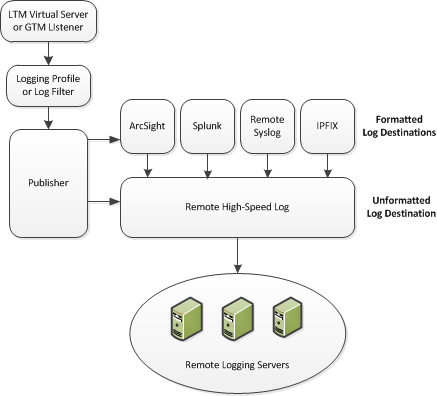
Perform these tasks to configure remote high-speed logging of CGNAT processes on the BIG-IP system.
Note: Enabling remote high-speed logging impacts BIG-IP system performance.
When configuring remote high-speed logging (HSL) of CGNAT processes, it is helpful to understand the objects you need to create and why, as described here:
| Object | Reason | Applies to |
|---|---|---|
| Pool of remote log servers | Create a pool of remote log servers to which the BIG-IP® system can send log messages. | Creating a pool of remote logging servers. |
| Destination (formatted) | Create log destination to format the logs in the required format and forward the logs to a remote high-speed log destination. | Creating a formatted remote high-speed log destination. |
| Publisher | Create a log publisher to send logs to a set of specified log destinations. | Creating a publisher. |
| Logging Profile (optional) | Create a logging profile to configure logging options for various large scale NAT (LSN) events. The options apply to all HSL destinations. | Creating a LSN logging profile. |
| LSN pool | Associate an LSN pool with a logging profile and log publisher in order to log messages about the traffic that uses the pool. | Configuring an LSN pool. |
Before creating a pool of log servers, gather the IP addresses of the servers that you want to include in the pool. Ensure that the remote log servers are configured to listen to and receive log messages from the BIG-IP system.
Create a pool of remote log servers to which the BIG-IP system can send log messages.
-
On the Main tab, click Local Traffic > Pools.
The Pool List screen opens.
-
Click Create.
The New Pool screen opens.
-
In the Name field, type a unique name for the pool.
-
Using the New Members setting, add the IP address for each remote logging server that you want to include in the pool:
-
Type an IP address in the Address field, or select a node address from the Node List.
-
Type a service number in the Service Port field, or select a service name from the list.
Note: Typical remote logging servers require port
514. -
Click Add.
-
-
Click Finished.
Before creating a remote high-speed log destination, ensure that at least one pool of remote log servers exists on the BIG-IP system.
Create a log destination of the Remote High-Speed Log type to specify that log messages are sent to a pool of remote log servers.
-
On the Main tab, click System > Logs > Configuration > Log Destinations.
The Log Destinations screen opens.
-
Click Create.
-
In the Name field, type a unique, identifiable name for this destination.
-
From the Type list, select Remote High-Speed Log.
Important: If you use log servers such as Remote Syslog, Splunk, or ArcSight, which require data be sent to the servers in a specific format, you must create an additional log destination of the required type, and associate it with a log destination of the Remote High-Speed Log type. With this configuration, the BIG-IP system can send data to the servers in the required format.
The BIG-IP system is configured to send an unformatted string of text to the log servers.
-
From the Pool Name list, select the pool of remote log servers to which you want the BIG-IP system to send log messages.
-
From the Protocol list, select the protocol used by the high-speed logging pool members.
-
Click Finished.
Ensure that at least one remote high-speed log destination exists on the BIG-IP system.
Create a formatted logging destination to specify that log messages are sent to a pool of remote log servers, such as Remote Syslog, Splunk, or IPFIX servers.
-
On the Main tab, click System > Logs > Configuration > Log Destinations.
The Log Destinations screen opens.
-
Click Create.
-
In the Name field, type a unique, identifiable name for this destination.
-
From the Type list, select a formatted logging destination, such as Remote Syslog, Splunk, or IPFIX.
The Splunk format is a predefined format of key value pairs.
The BIG-IP system is configured to send a formatted string of text to the log servers.
-
If you selected Remote Syslog, then from the Syslog Format list select a format for the logs, and then from the High-Speed Log Destination list, select the destination that points to a pool of remote Syslog servers to which you want the BIG-IP system to send log messages.
Important: For logs coming from Access Policy Manager (APM), only the BSD Syslog format is supported.
-
If you selected Splunk or IPFIX, then from the Forward To list, select the destination that points to a pool of high-speed log servers to which you want the BIG-IP system to send log messages.
-
Click Finished.
Ensure that at least one destination associated with a pool of remote log servers exists on the BIG-IP system.
Create a publisher to specify where the BIG-IP system sends log messages for specific resources.
-
On the Main tab, click System > Logs > Configuration > Log Publishers.
The Log Publishers screen opens.
-
Click Create.
-
In the Name field, type a unique, identifiable name for this publisher.
-
For the Destinations setting, select a destination from the Available list, and move the destination to the Selected list.
Note: If you are using a formatted destination, select the destination that matches your log servers, such as Remote Syslog, Splunk, or IPFIX.
Important: If you configure a log publisher to use multiple logging destinations, then, by default, all logging destinations must be available in order to log to each destination. Unless all logging destinations are available, no logging can occur. If you want to log to the available logging destinations when one or more destinations become unavailable, you must set the
logpublisher.atomicdb key to false. If all the remote high-speed log (HSL) destinations are down (unavailable), setting thelogpublisher.atomicdb key to false will not work to allow the logs to be written to local-syslog. Thelogpublisher.atomicdb key has no effect on local-syslog. -
Click Finished.
You can create an LSN logging profile to allow you to configure logging options for various LSN events that apply to high-speed logging destinations.
Note: For configuring remote high-speed logging of CGNAT processes on the BIG-IP system, these steps are optional.
-
On the Main tab, click Carrier Grade NAT > Logging Profiles > LSN.
The LSN logging profiles screen opens.
-
Click Create.
The New LSN Logging Profile screen opens.
-
In the Name field, type a unique name for the logging profile.
-
From the Parent Profile list, select a profile from which the new profile inherits properties.
-
For the Log Settings area, select the Custom check box.
-
For the Log Settings area, select Enabled for the following settings, as necessary.
Setting Description CSV Format Generates log entries in comma-separated-values (CSV) format. Start Outbound Session Generates event log entries at the start of a translation event for an LSN client. End Outbound Session Generates event log entries at the end of a translation event for an LSN client. Start Inbound Session Generates event log entries at the start of an incoming connection event for a translated endpoint. End Inbound Session Generates event log entries at the end of an incoming connection event for a translated endpoint. Quota Exceeded Generates event log entries when an LSN client exceeds allocated resources. Errors Generates event log entries when LSN translation errors occur. Subscriber ID Allows for subscriber ID logging. Note: Enabling the CSV check box affects splunk logs because IP addresses are shown as
ip,port,rtdominstead ofip%rtdom:port. Do not mix log types and only use standard syslog formats. -
Click Finished.
You can associate an LSN pool with a log publisher and logging profile that the BIG-IP system uses to send log messages to a specified destination.
-
On the Main tab, click Carrier Grade NAT > LSN Pools > LSN Pool List.
The LSN Pool List screen opens.
-
Select an LSN pool from the list.
The configuration screen for the pool opens.
-
From the Log Publisher list, select the log publisher the BIG-IP system uses to send log messages to a specified destination.
Important: If you configure a log publisher to use multiple logging destinations, then, by default, all logging destinations must be available in order to log to each destination. Unless all logging destinations are available, no logging can occur. If you want to log to the available logging destinations when one or more destinations become unavailable, you must set the
logpublisher.atomicdb key to false. If all the remote high-speed log (HSL) destinations are down (unavailable), setting thelogpublisher.atomicdb key to false will not work to allow the logs to be written to local-syslog. Thelogpublisher.atomicdb key has no effect on local-syslog. -
Optional: From the Logging Profile list, select the logging profile the BIG-IP system uses to configure logging options for various LSN events.
-
Click Finished.
You now have an LSN pool for which the BIG-IP system logs messages using the specified logging profile.
You can configure the BIG-IP® system to log information about carrier grade network address translation (CGNAT) processes and send the log messages to remote IPFIX collectors.
IPFIX is a set of IETF standards described in RFCs 5101 and 5102. The BIG-IP system supports logging of CGNAT translation events over the IPFIX protocol. IPFIX logs are raw, binary-encoded strings with their fields and field lengths defined by IPFIX templates. IPFIX collectors are external devices that can receive IPFIX templates, and use them to interpret IPFIX logs.
Perform these tasks to configure IPFIX logging of CGNAT processes on the BIG-IP system.
Note: Enabling IPFIX logging impacts BIG-IP system performance.
The configuration process involves creating and connecting the following configuration objects.
| Object | Reason | Applies to |
|---|---|---|
| Pool of IPFIX collectors | Create a pool of remote log servers to which the BIG-IP® system can send log messages. | Assembling a pool of IPFIX collectors. |
| Destination | Create a log destination to format the logs in IPFIX templates, and forward the logs to the IPFIX collectors. | Creating an IPFIX log destination. |
| Publisher | Create a log publisher to send logs to a set of specified log destinations. | Creating a publisher. |
| Logging Profile (optional) | Create a logging profile to configure logging options for various large scale NAT (LSN) events. The options apply to all HSL destinations. | Creating an LSN logging profile. |
| LSN pool | Associate an LSN pool with a logging profile and log publisher in order to log messages about the traffic that uses the pool. | Configuring an LSN pool. |
Before creating a pool of IPFIX collectors, gather the IP addresses of the collectors that you want to include in the pool. Ensure that the remote IPFIX collectors are configured to listen to and receive log messages from the BIG-IP system.
You can create a pool of IPFIX collectors to which the system can send IPFIX log messages.
-
On the Main tab, click Local Traffic > Pools.
The Pool List screen opens.
-
Click Create.
The New Pool screen opens.
-
In the Name field, type a unique name for the pool.
-
Using the New Members setting, add the IP address for each IPFIX collector that you want to include in the pool:
-
Type the collector’s IP address in the Address field, or select a node address from the Node List.
-
Type a port number in the Service Port field.
By default, IPFIX collectors listen on UDP or TCP port
4739and Netflow V9 devices listen on port2055, though the port is configurable at each collector. -
Click Add.
-
-
Click Finished.
A log destination of the IPFIX type specifies that log messages are sent to a pool of IPFIX collectors. Use these steps to create a log destination for IPFIX collectors.
-
On the Main tab, click System > Logs > Configuration > Log Destinations.
The Log Destinations screen opens.
-
Click Create.
-
In the Name field, type a unique, identifiable name for this destination.
-
From the Type list, select IPFIX.
-
From the Protocol list, select IPFIX or Netflow V9, depending on the type of collectors you have in the pool.
-
From the Pool Name list, select an LTM pool of IPFIX collectors.
-
From the Transport Profile list, select TCP, UDP, or any customized profile derived from TCP or UDP.
-
The Template Retransmit Interval is the time between transmissions of IPFIX templates to the pool of collectors. The BIG-IP system only retransmits its templates if the Transport Profile is a UDP profile.
An IPFIX template defines the field types and byte lengths of the binary IPFIX log messages. The logging destination sends the template for a given log type (for example, NAT44 logs or customized logs from an iRule) before sending any of those logs, so that the IPFIX collector can read the logs of that type. The logging destination assigns a template ID to each template, and places the template ID into each log that uses that template.
The log destination periodically retransmits all of its IPFIX templates over a UDP connection. The retransmissions are helpful for UDP connections, which are lossy.
-
The Template Delete Delay is the time that the BIG-IP device should pause between deleting an obsolete template and re-using its template ID. This feature is helpful for systems that can create custom IPFIX templates with iRules.
-
The Server SSL Profile applies Secure Socket Layer (SSL) or Transport Layer Security (TLS) to TCP connections. You can only choose an SSL profile if the Transport Profile is a TCP profile. Choose an SSL profile that is appropriate for the IPFIX collectors’ SSL/TLS configuration.
SSL or TLS requires extra processing and therefore slows the connection, so we only recommend this for sites where the connections to the IPFIX collectors have a potential security risk.
-
Click Finished.
Ensure that at least one destination associated with a pool of remote log servers exists on the BIG-IP system.
Create a publisher to specify where the BIG-IP system sends log messages for specific resources.
-
On the Main tab, click System > Logs > Configuration > Log Publishers.
The Log Publishers screen opens.
-
Click Create.
-
In the Name field, type a unique, identifiable name for this publisher.
-
For the Destinations setting, select a destination from the Available list, and move the destination to the Selected list.
Note: If you are using a formatted destination, select the destination that matches your log servers, such as Remote Syslog, Splunk, or IPFIX.
Important: If you configure a log publisher to use multiple logging destinations, then, by default, all logging destinations must be available in order to log to each destination. Unless all logging destinations are available, no logging can occur. If you want to log to the available logging destinations when one or more destinations become unavailable, you must set the
logpublisher.atomicdb key to false. If all the remote high-speed log (HSL) destinations are down (unavailable), setting thelogpublisher.atomicdb key to false will not work to allow the logs to be written to local-syslog. Thelogpublisher.atomicdb key has no effect on local-syslog. -
Click Finished.
You can create an LSN logging profile to allow you to configure logging options for various LSN events that apply to high-speed logging destinations.
Note: For configuring remote high-speed logging of CGNAT processes on the BIG-IP system, these steps are optional.
-
On the Main tab, click Carrier Grade NAT > Logging Profiles > LSN.
The LSN logging profiles screen opens.
-
Click Create.
The New LSN Logging Profile screen opens.
-
In the Name field, type a unique name for the logging profile.
-
From the Parent Profile list, select a profile from which the new profile inherits properties.
-
For the Log Settings area, select the Custom check box.
-
For the Log Settings area, select Enabled for the following settings, as necessary.
Setting Description CSV Format Generates log entries in comma-separated-values (CSV) format. Start Outbound Session Generates event log entries at the start of a translation event for an LSN client. End Outbound Session Generates event log entries at the end of a translation event for an LSN client. Start Inbound Session Generates event log entries at the start of an incoming connection event for a translated endpoint. End Inbound Session Generates event log entries at the end of an incoming connection event for a translated endpoint. Quota Exceeded Generates event log entries when an LSN client exceeds allocated resources. Errors Generates event log entries when LSN translation errors occur. Subscriber ID Allows for subscriber ID logging. Note: Enabling the CSV check box affects splunk logs because IP addresses are shown as
ip,port,rtdominstead ofip%rtdom:port. Do not mix log types and only use standard syslog formats. -
Click Finished.
You can associate an LSN pool with a log publisher and logging profile that the BIG-IP system uses to send log messages to a specified destination.
-
On the Main tab, click Carrier Grade NAT > LSN Pools > LSN Pool List.
The LSN Pool List screen opens.
-
Select an LSN pool from the list.
The configuration screen for the pool opens.
-
From the Log Publisher list, select the log publisher the BIG-IP system uses to send log messages to a specified destination.
Important: If you configure a log publisher to use multiple logging destinations, then, by default, all logging destinations must be available in order to log to each destination. Unless all logging destinations are available, no logging can occur. If you want to log to the available logging destinations when one or more destinations become unavailable, you must set the
logpublisher.atomicdb key to false. If all the remote high-speed log (HSL) destinations are down (unavailable), setting thelogpublisher.atomicdb key to false will not work to allow the logs to be written to local-syslog. Thelogpublisher.atomicdb key has no effect on local-syslog. -
Optional: From the Logging Profile list, select the logging profile the BIG-IP system uses to configure logging options for various LSN events.
-
Click Finished.
You now have an LSN pool for which the BIG-IP system logs messages using the specified logging profile.
Carrier Grade Network Address Translation (CGNAT) log formats are specific to the type of logging used, for example, high-speed logging (HSL) or Splunk.
This topic lists the available log fields and provides a description of each.
| Log field | Description |
|---|---|
| bigip_hostname | BIG-IP hostname. |
| bigip_mgmt_ip_address | BIG-IP management IP address. |
| bigip_software_version | BIG-IP software version. An example format is 11.4.0.132.0. |
| client_ipv4_address | Client IPV4 address. |
| client_ipv6_address | Client IPV6 address(IPV6 or NAT64 client). |
| client_port | Client TCP/UDP port. |
| client_rtdomid | Client route domain ID. |
| date_time | Date and time. An example format is Apr 04 2013 08:13:26. |
| destination_address | Client’s destination IPV4/IPV6 address. |
| destination_port | Client’s port. |
| dslite_ipv6_remote_ip | DS-Lite remote end point. |
| dslite_rtdomid | DS-Lite tunnel route domain ID. |
| duration | Duration of the translation (in ms). |
| egress_rtdomid | Route domain ID of the egress interface. |
| end | End time. |
| errdefs_msgno | TMM internal value. |
| errdefs_msg_name | TMM internal value. |
| internet_client_ipv4_address | IP address of the inbound client connections from the internet. |
| internet_client_rtdomid | Route domain ID of the inbound client connecting from the internet. |
| lsn_address | IPV4/IPV6 translation address. |
| lsn_dnat_log_version | DNAT log version. |
| lsn_dnat_port_range_min | LSN pool translation port range low value. |
| lsn_dnat_port_range_max | LSN pool translation port range high value. |
| lsn_dnat_prefix_list | List of LSN pool translation prefixes. |
| lsn_dnat_source_list | List of all the virtual server source prefixes that are attached to this lsn pool. |
| lsn_dnat_state | DNAT algorithm internal state. |
| lsn_dnat_dag_id | LSN Deterministic NAT libdag identifier. |
| lsn_port | TCP/UDP translation port. |
| lsn_rtdomid | Translation address route domain ID. |
| lsn_result | Reason for translation failure. |
| lsn_pool_name | LSN pool name with complete path. For example, /Common/lsnp1. |
| protocol | UDP, TCP, or ICMP. |
| sa_trans_pool | Source Address Translation Pool name, for example, SNAT pool, LSN, or Automap. |
| start | The unixtime for the start of the translation. |
| timestamp | Unix time, always in UTC. |
| tmm_daglib_state | TMM DAG library state. |
This reference content describes the logging format specific to BIG-IP software version 11.3.0 and 11.4.0.
This release provides the following logging changes:
- CGNAT HSL and Splunk logging introduced in 11.3.0, unchanged in 11.4.0.
|
Log Message |
Type |
Format |
|---|---|---|
|
NAT44 session create |
HSL |
|
|
Splunk |
| |
|
NAT64 session create |
HSL |
|
|
Splunk |
| |
|
DSLITE session create |
HSL |
|
|
Splunk |
| |
|
NAT44/NAT64/DSLITE Translation failed |
HSL |
|
|
Splunk |
| |
|
DNAT config |
HSL |
|
|
Splunk |
| |
|
DNAT session delete |
HSL |
|
|
Splunk |
|
This reference content describes the log format changes specific to BIG-IP software versions 11.3.0 and 11.4.0.
This release introduces CGNAT high-speed logging (HSL) and Splunk logging.
|
Type |
Format |
|---|---|
|
HSL |
|
|
Splunk |
|
Note: IPFIX is not implemented for NAT44 session create.
|
Type |
Format |
|---|---|
|
HSL |
|
|
Splunk |
|
Note: IPFIX is not implemented for NAT64 session create.
|
Type |
Format |
|---|---|
|
HSL |
|
|
Splunk |
|
Note: IPFIX is not implemented for DSLITE session create.
|
Type |
Format |
|---|---|
|
HSL |
|
|
Splunk |
|
Note: IPFIX is not implemented for NAT44/NAT64/DSLITE Translation failed.
|
Type |
Format |
|---|---|
|
HSL |
|
|
Splunk |
|
Note: IPFIX is not implemented for DNAT config.
|
Type |
Format |
|---|---|
|
HSL |
|
|
Splunk |
|
|
LTM log |
|
Note: IPFIX is not implemented for DNAT session delete.
This reference content describes the logging format specific to BIG-IP software version 11.5.0.
This release provides the following logging changes:
- IPFIX logging introduced, egress_rtdomid used in logs instead of lsn_rtdomid and following new logs were added
- Log delete for NAT44/NAT64/DSLITE events
- Log create/delete for inbound connections
- Log quota exceeded events
- Log outbound create/delete with destination address/port
- Log start-time/duration in delete for outbounds
|
Log Message |
Type |
Format |
|---|---|---|
|
NAT44 session create |
HSL |
|
|
Splunk |
| |
|
NAT44 session delete |
HSL |
|
|
Splunk |
| |
|
NAT44 session create (with log.lsn.session.destination enabled) |
HSL |
|
|
Splunk |
| |
|
NAT44 session delete (with log.lsn.session.destination enabled) |
HSL |
|
|
Splunk |
| |
|
NAT44 inbound session create |
HSL |
|
|
Splunk |
| |
|
NAT44 inbound session delete |
HSL |
|
|
Splunk |
| |
|
NAT64 session create |
HSL |
|
|
Splunk |
| |
|
NAT64 session delete |
HSL |
|
|
Splunk |
| |
|
NAT64 session create (with log.lsn.session.destination enabled) |
HSL |
|
|
Splunk |
| |
|
NAT64 session delete (with log.lsn.session.destination enabled) |
HSL |
|
|
Splunk |
| |
|
NAT64 inbound session create |
HSL |
|
|
Splunk |
| |
|
NAT64 inbound session delete |
HSL |
|
|
Splunk |
| |
|
DSLITE session create |
HSL |
|
|
Splunk |
| |
|
DSLITE session delete |
HSL |
|
|
Splunk |
| |
|
DSLITE session create (with log.lsn.session.destination enabled) |
HSL |
|
|
Splunk |
| |
|
DSLITE session delete (with log.lsn.session.destination enabled) |
HSL |
|
|
Splunk |
| |
|
DSLITE inbound session create |
HSL |
|
|
Splunk |
| |
|
DSLITE inbound session delete |
HSL |
|
|
Splunk |
| |
|
Translation failed |
HSL |
|
|
Splunk |
| |
|
DNAT config |
HSL |
|
|
Splunk |
| |
|
DNAT session delete |
HSL |
|
|
Splunk |
| |
|
NAT44 client quota exceeded |
HSL |
|
|
Splunk |
| |
|
NAT64 client quota exceeded |
HSL |
|
|
Splunk |
| |
|
DSLITE client quota exceeded |
HSL |
|
|
Splunk |
|
This reference content describes the log format changes specific to BIG-IP software version 11.5.0.
This release includes the following changes:
- Log delete for NAT44/NAT64/DSLITE events.
- Log create/delete for inbound connections.
- Log quota exceeded events.
- Log outbound create/delete with destination address/port.
- Log start-time/duration in delete for outbounds.
|
Description |
Type |
Format |
|---|---|---|
|
Without destination address/port |
HSL |
|
|
With destination address/port |
HSL |
|
|
Without destination address/port |
Splunk |
|
|
With destination address/port |
Splunk |
|
| Field | Bytes | Description |
|---|---|---|
observationTimeMilliseconds |
8 | |
ingressVRFID |
4 | The client routing domain ID. |
egressVRFID |
4 | The LSN routing domain ID. |
sourceIPv4Address |
4 | |
postNATSourceIPv4Address |
4 | |
protocolIdentifier |
1 | |
sourceTransportPort |
2 | |
postNAPTsourceTransportPort |
2 | |
destinationIPv4Address |
2 | 0, if obscured. |
destinationTransportPort |
2 | 0, if obscured. |
natOriginatingAddressRealm |
1 | 1 (Private/internal realm – Subscriber side). |
natEvent |
1 | 1 (Create Event) or 2 (Delete Event). |
| Field | Bytes | Description |
|---|---|---|
observationTimeMilliseconds |
8 | |
ingressVRFID |
4 | The client routing domain ID. |
egressVRFID |
4 | The LSN routing domain ID. |
sourceIPv4Address |
4 | |
postNATSourceIPv4Address |
4 | |
protocolIdentifier |
1 | |
sourceTransportPort |
2 | |
postNAPTsourceTransportPort |
2 | |
destinationIPv4Address |
2 | 0, if obscured. |
destinationTransportPort |
2 | 0, if obscured. |
natOriginatingAddressRealm |
1 | 1 (Private/internal realm – Subscriber side). |
natEvent |
1 | 1 (Create Event) or 2 (Delete Event). |
flowStartMilliseconds |
8 | |
flowDurationMilliseconds |
4 |
|
Type |
Format |
|---|---|
|
HSL |
|
|
Splunk |
|
| Field | Bytes | Description |
|---|---|---|
observationTimeMilliseconds |
8 | |
ingressVRFID |
4 | The LSN routing domain ID. |
egressVRFID |
4 | The client routing domain ID. |
sourceIPv4Address |
4 | |
protocolIdentifier |
1 | |
sourceTransportPort |
2 | |
destinationIPv4Address |
4 | |
postNATDestinationIPV4Address |
4 | |
destinationTransportPort |
2 | |
postNAPTDestinationTransportPort |
2 | |
natOriginatingAddressRealm |
1 | 2 (Public/external realm – Internet side). |
natEvent |
1 | 1 (Create Event) or 2 (Delete Event). |
|
Description |
Type |
Format |
|---|---|---|
|
Without destination address/port |
HSL |
|
|
With destination address/port |
HSL |
|
|
Without destination address/port |
Splunk |
|
|
With destination address/port |
Splunk |
|
| Field | Bytes | Description |
|---|---|---|
observationTimeMilliseconds |
8 | |
ingressVRFID |
4 | The LSN routing domain ID. |
egressVRFID |
4 | The client routing domain ID. |
sourceIPv6Address |
16 | |
postNATSourceIPv4Address |
4 | |
protocolIdentifier |
1 | |
sourceTransportPort |
2 | |
postNAPTsourceTransportPort |
2 | |
postNATDestinationIPV4Address |
4 | 0, if obscured. |
destinationTransportPort |
2 | 0, if obscured. |
postNAPTDestinationTransportPort |
2 | |
natOriginatingAddressRealm |
1 | 2 (Public/external realm – Internet side). |
natEvent |
1 | 1 (Create Event) or 2 (Delete Event). |
| Field | Bytes | Description |
|---|---|---|
observationTimeMilliseconds |
8 | |
ingressVRFID |
4 | The LSN routing domain ID. |
egressVRFID |
4 | The client routing domain ID. |
sourceIPv6Address |
16 | |
postNATSourceIPv4Address |
4 | |
protocolIdentifier |
1 | |
sourceTransportPort |
2 | |
postNAPTsourceTransportPort |
2 | |
postNATDestinationIPV4Address |
4 | 0, if obscured. |
destinationTransportPort |
2 | 0, if obscured. |
postNAPTDestinationTransportPort |
2 | |
natOriginatingAddressRealm |
1 | 2 (Public/external realm – Internet side). |
natEvent |
1 | 1 (Create Event) or 2 (Delete Event) |
flowStartMilliseconds |
8 | |
flowDurationMilliseconds |
4 |
|
Type |
Format |
|---|---|
|
HSL |
|
|
Splunk |
|
| Field | Bytes | Description |
|---|---|---|
observationTimeMilliseconds |
8 | |
ingressVRFID |
4 | The LSN routing domain ID. |
egressVRFID |
4 | The client routing domain ID. |
sourceIPv4Address |
4 | |
protocolIdentifier |
1 | |
sourceTransportPort |
2 | |
destinationIPv4Address |
4 | |
postNATDestinationIPv6Address |
16 | 0, if obscured. |
destinationTransportPort |
2 | |
postNAPTDestinationTransportPort |
2 | |
natOriginatingAddressRealm |
1 | 2 (Public/external realm – Internet side). |
natEvent |
1 | 1 (Create Event) or 2 (Delete Event). |
|
Description |
Type |
Format |
|---|---|---|
|
Without destination address/port |
HSL |
|
|
With destination address/port |
HSL |
|
|
Without destination address/port |
Splunk |
|
|
With destination address/port |
Splunk |
|
| Field | Bytes | Description |
|---|---|---|
observationTimeMilliseconds |
8 | |
ingressVRFID |
4 | The LSN routing domain ID. |
egressVRFID |
4 | The client routing domain ID. |
sourceIPv4Address |
4 | |
postNATSourceIPv4Address |
4 | |
protocolIdentifier |
1 | |
sourceTransportPort |
2 | |
postNAPTsourceTransportPort |
2 | |
sourceIPv6Address |
16 | IPv6 address for remote endpoint of the DS-Lite tunnel. |
destinationIPv4Address |
4 | 0, if obscured. |
destinationTransportPort |
2 | |
natOriginatingAddressRealm |
1 | 2 (Public/external realm – Internet side). |
natEvent |
1 | 1 (Create Event) or 2 (Delete Event). |
| Field | Bytes | Description |
|---|---|---|
observationTimeMilliseconds |
8 | |
ingressVRFID |
4 | The LSN routing domain ID. |
egressVRFID |
4 | The client routing domain ID. |
sourceIPv4Address |
4 | |
postNATSourceIPv4Address |
4 | |
protocolIdentifier |
1 | |
sourceTransportPort |
2 | |
postNAPTsourceTransportPort |
2 | |
sourceIPv6Address |
16 | IPv6 address for remote endpoint of the DS-Lite tunnel. |
destinationIPv4Address |
4 | 0, if obscured. |
destinationTransportPort |
2 | |
natOriginatingAddressRealm |
1 | 2 (Public/external realm – Internet side). |
natEvent |
1 | 1 (Create Event) or 2 (Delete Event). |
flowStartMilliseconds |
8 | |
flowDurationMilliseconds |
4 |
|
Type |
Format |
|---|---|
|
HSL |
|
|
Splunk |
|
| Field | Bytes | Description |
|---|---|---|
observationTimeMilliseconds |
8 | |
ingressVRFID |
4 | The LSN routing domain ID. |
egressVRFID |
4 | The client routing domain ID. |
sourceIPv4Address |
4 | |
protocolIdentifier |
1 | |
sourceTransportPort |
2 | |
destinationIPv4Address |
4 | |
postNATDestinationIPv6Address |
16 | DSLITE remote endpoint IPV6 address. |
postNatDestinationIPv4Address |
4 | |
destinationTransportPort |
2 | |
postNAPTDestinationTransportPort |
2 | |
natOriginatingAddressRealm |
1 | 2 (Public/external realm – Internet side). |
natEvent |
1 | 1 (Create Event) or 2 (Delete Event). |
|
Type |
Format |
|---|---|
|
HSL |
|
|
Splunk |
|
| Field | Bytes | Description |
|---|---|---|
| observationTimeMilliseconds | 8 | |
| ingressVRFID | 4 | The client routing domain ID. |
| sourceIPv4Address | 4 | |
| protocolIdentifier | 1 | |
| sourceTransportPort | 2 | |
| destinationIPv4Address | 4 | 0, if obscured. |
| destinationTransportPort | 2 | 0, if obscured. |
| natEvent | 1 | Translation failed. |
| natPoolName | Variable | This IE is omitted for NetFlow v9 compatible configurations. |
| Field | Bytes | Description |
|---|---|---|
| observationTimeMilliseconds | 8 | |
| ingressVRFID | 4 | The client routing domain ID. |
| sourceIPv6Address | 16 | |
| protocolIdentifier | 1 | |
| sourceTransportPort | 2 | |
| destinationIPv4Address | 4 | 0, if obscured. |
| destinationTransportPort | 2 | 0, if obscured. |
| natEvent | 1 | Translation failed. |
| natPoolName | Variable | This IE is omitted for NetFlow v9 compatible configurations. |
| Field | Bytes | Description |
|---|---|---|
| observationTimeMilliseconds | 8 | |
| ingressVRFID | 4 | The client routing domain ID. |
| sourceIPv4Address | 4 | IPv4 address used by F5 CGNAT in the IPv4-mapped IPv6 format, for the DS-Lite tunnel terminated on the BIG-IP. |
| protocolIdentifier | 1 | |
| sourceTransportPort | 2 | |
| sourceIPv6Address | 16 | IPv6 address for remote endpoint of the DS-Lite tunnel. |
| destinationIPv4Address | 4 | 0, if obscured. |
| destinationTransportPort | 2 | 0, if obscured. |
| natEvent | 1 | Translation failed. |
| natPoolName | Variable | This IE is omitted for NetFlow v9 compatible configurations. |
|
Type |
Format |
|---|---|
|
HSL |
|
|
Splunk |
|
Note: IPFIX is not implemented for DNAT configuration.
|
Type |
Format |
|---|---|
|
HSL |
|
|
Splunk |
|
|
LTM log |
|
Note: IPFIX is not implemented for DNAT session delete.
|
Type |
Format |
|---|---|
|
HSL |
|
|
Splunk |
|
| Field | Bytes | Description |
|---|---|---|
observationTimeMilliseconds |
8 | |
ingressVRFID |
4 | The client routing domain ID. |
sourceIPv4Address |
4 | |
natEvent |
1 | Session Quota Exceeded/Port Quota Exceeded. |
natPoolName |
Variable | This IE is omitted for NetFlow v9 compatible configurations. |
|
Type |
Description |
|---|---|
|
HSL |
|
|
Splunk |
|
| Field | Bytes | Description |
|---|---|---|
observationTimeMilliseconds |
8 | |
ingressVRFID |
4 | The client routing domain ID. |
sourceIPv6Address |
16 | |
natEvent |
1 | Session Quota Exceeded/Port Quota Exceeded. |
natPoolName |
Variable | This IE is omitted for NetFlow v9 compatible configurations. |
|
Type |
Description |
|---|---|
|
HSL |
|
|
Splunk |
|
| Field | Bytes | Description |
|---|---|---|
observationTimeMilliseconds |
8 | |
ingressVRFID |
4 | The client routing domain ID. |
sourceIPv4Address |
4 | |
sourceIPv6Address |
16 | IPv6 address for remote endpoint of the DS-Lite tunnel. |
natEvent |
1 | Session Quota Exceeded/Port Quota Exceeded |
natPoolName |
Variable | This IE is omitted for NetFlow v9 compatible configurations. |
This reference content describes the logging format specific to BIG-IP software version 11.6.0.
This release provides the following logging changes:
- PBA Logging introduced.
- Added ports exhausted message for NAT44, NAT64, and DSLITE
- Log for DNAT inbound connections on connection end
|
Log Message |
Type |
Format |
|---|---|---|
|
NAT44 session create |
HSL |
|
|
Splunk |
| |
|
NAT44 session delete |
HSL |
|
|
Splunk |
| |
|
NAT44 session create |
HSL |
|
|
Splunk |
| |
|
NAT44 session delete |
HSL |
|
|
Splunk |
| |
|
NAT44 inbound session create |
HSL |
|
|
Splunk |
| |
|
NAT44 inbound session delete |
HSL |
|
|
Splunk |
| |
|
NAT64 session create |
HSL |
|
|
Splunk |
| |
|
NAT64 session delete |
HSL |
|
|
Splunk |
| |
|
NAT64 session create |
HSL |
|
|
Splunk |
| |
|
NAT64 session delete |
HSL |
|
|
Splunk |
| |
|
NAT64 inbound session create |
HSL |
|
|
Splunk |
| |
|
NAT64 inbound session delete |
HSL |
|
|
Splunk |
| |
|
DSLITE session create |
HSL |
|
|
Splunk |
| |
|
DSLITE session delete |
HSL |
|
|
Splunk |
| |
|
DSLITE session create |
HSL |
|
|
Splunk |
| |
|
DSLITE session delete |
HSL |
|
|
Splunk |
| |
|
DSLITE inbound session create |
HSL |
|
|
Splunk |
| |
|
DSLITE inbound session delete |
HSL |
|
|
Splunk |
| |
|
Translation failed |
HSL |
|
|
Splunk |
| |
|
DNAT config |
HSL |
|
|
Splunk |
| |
|
DNAT session delete (on connection end, and inbound connection end) |
HSL |
|
|
Splunk |
| |
|
NAT44 client quota exceeded |
HSL |
|
|
Splunk |
| |
|
NAT64 client quota exceeded |
HSL |
|
|
Splunk |
| |
|
DSLITE client quota exceeded |
HSL |
|
|
Splunk |
| |
|
NAT44 Port-block allocated |
HSL |
|
|
Splunk |
| |
|
NAT44 Port-block released |
HSL |
|
|
Splunk |
| |
|
NAT44 Client block limit reached |
HSL |
|
|
Splunk |
| |
|
NAT44 Ports Exhausted |
HSL |
|
|
Splunk |
| |
|
NAT64 Port-block allocated |
HSL |
|
|
Splunk |
| |
|
NAT64 Port-block released |
HSL |
|
|
Splunk |
| |
|
NAT64 Client block limit reached |
HSL |
|
|
Splunk |
| |
|
NAT64 Ports Exhausted |
HSL |
|
|
Splunk |
| |
|
DSLITE Port-block allocated |
HSL |
|
|
Splunk |
| |
|
DSLITE Port-block released |
HSL |
|
|
Splunk |
| |
|
DSLITE Client block limit reached |
HSL |
|
|
Splunk |
| |
|
DSLITE Ports Exhausted |
HSL |
|
|
Splunk |
|
This reference content describes the log format changes specific to BIG-IP software version 11.6.0.
This release includes log messages for the following translation modes:
|
Message |
Type |
Format |
|---|---|---|
|
Port block allocated |
HSL |
NAT44: NAT64: DSLITE: |
|
Splunk |
NAT44: NAT64: DSLITE: | |
|
Port-block released |
HSL |
NAT44: NAT64: DSLITE: |
|
Splunk |
NAT44: NAT64: DSLITE: | |
|
Client block limit reached |
HSL |
NAT44: NAT64: DSLITE: |
|
Splunk |
NAT44: NAT64: DSLITE: | |
|
Ports exhausted |
HSL |
NAT44: NAT64: DSLITE: |
|
Splunk |
NAT44: NAT64: DSLITE: |
| Field | Size (Bytes) | IANA IPFIX ID | Description |
|---|---|---|---|
| timeStamp | 8 | 323 | |
| ingressVRFID | 4 | 234 | The client routing domain ID. |
| egressVRFID | 4 | 235 | The egress routing domain ID. |
| sourceIPv4Address | 4 | 8 | Not applicable |
| postNATSourceIPv4Address | 4 | 225 | Not applicable |
| PortRangeStart | 2 | 361 | Not applicable |
| PortRangeEnd | 2 | 362 | Not applicable |
| natEvent | 1 | 230 | 13 for allocation. 14 for released. |
| Field | Size (Bytes) | IANA IPFIX ID | Description |
|---|---|---|---|
| timeStamp | 8 | 323 | |
| ingressVRFID | 4 | 234 | The client routing domain ID. |
| egressVRFID | 4 | 235 | The egress routing domain ID. |
| sourceIPv4Address | 16 | 8 | Not applicable |
| postNATSourceIPv4Address | 4 | 225 | Not applicable |
| PortRangeStart | 2 | 361 | Not applicable |
| PortRangeEnd | 2 | 362 | Not applicable |
| natEvent | 1 | 230 | 13 for allocation. 14 for released. |
| Field | Size (Bytes) | IANA IPFIX ID | Description |
|---|---|---|---|
| timeStamp | 8 | 323 | |
| ingressVRFID | 4 | 234 | The client routing domain ID. |
| egressVRFID | 4 | 235 | The egress routing domain ID. |
| sourceIPv4Address | 16 | 8 | DSLITE remote endpoint address. |
| postNATSourceIPv4Address | 4 | 235 | Not applicable |
| PortRangeStart | 2 | 361 | Not applicable |
| PortRangeEnd | 2 | 362 | Not applicable |
| natEvent | 1 | 230 | 13 for allocation. 14 for released. |
| Field | Size (Bytes) | IANA IPFIX ID | Description |
|---|---|---|---|
| observationTimeMilliseconds | 8 | 323 | |
| ingressVRFID | 4 | 234 | The client routing domain ID. |
| sourceIPv4Address | 4 | 8 | The egress routing domain ID. |
| natEvent | 1 | 230 | Client block limit reached (15) or ports exhausted (16). |
| natPoolName | Variable | 284 | This IE is omitted for NetFlow v9 compatible configurations. |
| Field | Size (Bytes) | IANA IPFIX ID | Description |
|---|---|---|---|
| observationTimeMilliseconds | 8 | 323 | |
| ingressVRFID | 4 | 234 | The client routing domain ID. |
| sourceIPv4Address | 16 | 27 | The egress routing domain ID. |
| natEvent | 1 | 230 | Client block limit reached (15) or ports exhausted (16). |
| natPoolName | Variable | 284 | This IE is omitted for NetFlow v9 compatible configurations. |
| Field | Size (Bytes) | IANA IPFIX ID | Description |
|---|---|---|---|
| natEvent | 1 | 230 | Client block limit reached (15) or ports exhausted (16). |
| sourceIPv4Address | 16 | 27 | IPv6 address for remote endpoint of the DS-Lite tunnel. |
| ingressVRFID | 4 | 234 | The client routing domain ID. |
| natPoolName | Variable | 284 | This IE is omitted for NetFlow v9 compatible configurations. |
| observationTimeMilliseconds | 8 | 323 | |
| sourceIPv4Address | 4 | 8 |
This reference content describes the logging format specific to BIG-IP software version 12.0.0.
This release provides the following logging changes:
- Port-block released (added start and duration)
- Start time added to LSN_ADD messages.
|
Log Message |
Type |
Format |
|---|---|---|
|
NAT44 session create |
HSL |
|
|
Splunk |
| |
|
NAT44 session delete |
HSL |
|
|
Splunk |
| |
|
NAT44 session create (with log.lsn.session.destination enabled) |
HSL |
|
|
Splunk |
| |
|
NAT44 session delete (with log.lsn.session.destination enabled) |
HSL |
|
|
Splunk |
| |
|
NAT44 inbound session create |
HSL |
|
|
Splunk |
| |
|
NAT44 inbound session delete |
HSL |
|
|
Splunk |
| |
|
NAT64 session create |
HSL |
|
|
Splunk |
| |
|
NAT64 session delete |
HSL |
|
|
Splunk |
| |
|
NAT64 session create (with log.lsn.session.destination enabled) |
HSL |
|
|
Splunk |
| |
|
NAT64 session delete (with log.lsn.session.destination enabled) |
HSL |
|
|
Splunk |
| |
|
NAT64 inbound session create |
HSL |
|
|
Splunk |
| |
|
NAT64 inbound session delete |
HSL |
|
|
Splunk |
| |
|
DSLITE session create |
HSL |
|
|
Splunk |
| |
|
DSLITE session delete |
HSL |
|
|
Splunk |
| |
|
DSLITE session create (with log.lsn.session.destination enabled) |
HSL |
|
|
Splunk |
| |
|
DSLITE session delete (with log.lsn.session.destination enabled) |
HSL |
|
|
Splunk |
| |
|
DSLITE inbound session create |
HSL |
|
|
Splunk |
| |
|
DSLITE inbound session delete |
HSL |
|
|
Splunk |
| |
|
Translation failed |
HSL |
|
|
Splunk |
| |
|
DNAT config |
HSL |
|
|
Splunk |
| |
|
DNAT session delete (on connection end, and inbound connection end) |
HSL |
|
|
Splunk |
| |
|
NAT44 client quota exceeded |
HSL |
|
|
Splunk |
| |
|
NAT64 client quota exceeded |
HSL |
|
|
Splunk |
| |
|
DSLITE client quota exceeded |
HSL |
|
|
Splunk |
| |
|
NAT44 Port-block allocated |
HSL |
|
|
Splunk |
| |
|
NAT44 Port-block released |
HSL |
|
|
Splunk |
| |
|
NAT44 Client block limit reached |
HSL |
|
|
Splunk |
| |
|
NAT44 Ports Exhausted |
HSL |
|
|
Splunk |
| |
|
NAT64 Port-block allocated |
HSL |
|
|
Splunk |
| |
|
NAT64 Port-block released |
HSL |
|
|
Splunk |
| |
|
NAT64 Client block limit reached |
HSL |
|
|
Splunk |
| |
|
NAT64 Ports Exhausted |
HSL |
|
|
Splunk |
| |
|
DSLITE Port-block allocated |
HSL |
|
|
Splunk |
| |
|
DSLITE Port-block released |
HSL |
|
|
Splunk |
| |
|
DSLITE Client block limit reached |
HSL |
|
|
Splunk |
| |
|
DSLITE Ports Exhausted |
HSL |
|
|
Splunk |
|
This reference content describes the log format changes specific to BIG-IP software version 12.0.0.
This release includes log messages for the following:
- Port-block released (added start and duration)
- Start time added to LSN_ADD messages and LSN_INBOUND_CREATE messages
|
Translation Mode |
Type |
Format |
|---|---|---|
|
Port Block Allocation (PBA) log formats |
HSL |
|
|
Splunk |
| |
|
NAT 44 session create |
HSL |
With destination logging (log.lsn.session.destination) enabled:
|
|
Splunk |
With destination logging (log.lsn.session.destination) enabled:
| |
|
NAT 64 session create |
HSL |
With destination logging (log.lsn.session.destination) enabled:
|
|
Splunk |
With destination logging (log.lsn.session.destination) enabled:
| |
|
DSLITE session create |
HSL |
With destination logging (log.lsn.session.destination) enabled:
|
|
Splunk |
With destination logging (log.lsn.session.destination) enabled:
| |
|
NAT44 Inbound session create |
HSL |
|
|
Splunk |
| |
|
NAT64 Inbound session create |
HSL |
|
|
Splunk |
| |
|
DSLITE Inbound session create |
HSL |
|
|
Splunk |
|
This reference content describes the log format changes specific to BIG-IP software version 12.1.0.
This release includes log messages for translation failures, specifically, when a suggested resource is unavailable for iRules, or a preserve strict source port setting applies.
| Message | Type | Format |
|---|---|---|
| Translation failed - iRules suggested port busy | HSL | "<date_time>","<bigip_mgmt_ip_address>","<bigip_hostname>","<lsn_event>","Translation failed - iRule port busy","<client_ipv4_address/client_ipv6_address>","<client_port>","<client_rtdomid>","<protocol>","<lsn_address>","<lsn_port>","<lsn_rtdomid>" |
| Translation failed - iRules suggested address busy | HSL | "<date_time>","<bigip_mgmt_ip_address>","<bigip_hostname>","<lsn_event>","Translation failed - iRule address busy","<client_ipv4_address/client_ipv6_address>","<client_port>","<client_rtdomid>","<protocol>","<lsn_address>","<lsn_port>","<lsn_rtdomid>" |
| Translation failed - Preserve strict source port busy | HSL | "<date_time>","<bigip_mgmt_ip_address>","<bigip_hostname>","<lsn_event>","Translation failed - Preserve strict source port busy","<client_ipv4_address/client_ipv6_address>","<client_port>","<client_rtdomid>","<protocol>","<lsn_address>","<lsn_port>","<lsn_rtdomid>" |
This reference content describes the logging format specific to BIG-IP software version 12.1.1.
This release provides the following logging changes:
- Log specific translation failed messages when a suggested resource is unavailable (for iRules and source port preserve strict).
|
Log Message |
Type |
Format |
|---|---|---|
|
NAT44 session create |
HSL |
|
|
Splunk |
| |
|
NAT44 session delete |
HSL |
|
|
Splunk |
| |
|
NAT44 session create (with log.lsn.session.destination enabled) |
HSL |
|
|
Splunk |
| |
|
NAT44 session delete (with log.lsn.session.destination enabled) |
HSL |
|
|
Splunk |
| |
|
NAT44 inbound session create |
HSL |
|
|
Splunk |
| |
|
NAT44 inbound session delete |
HSL |
|
|
Splunk |
| |
|
NAT64 session create |
HSL |
|
|
Splunk |
| |
|
NAT64 session delete |
HSL |
|
|
Splunk |
| |
|
NAT64 session create (with log.lsn.session.destination enabled) |
HSL |
|
|
Splunk |
| |
|
NAT64 session delete (with log.lsn.session.destination enabled) |
HSL |
|
|
Splunk |
| |
|
NAT64 inbound session create |
HSL |
|
|
Splunk |
| |
|
NAT64 inbound session delete |
HSL |
|
|
Splunk |
| |
|
DSLITE session create |
HSL |
|
|
Splunk |
| |
|
DSLITE session delete |
HSL |
|
|
Splunk |
| |
|
DSLITE session create (with log.lsn.session.destination enabled) |
HSL |
|
|
Splunk |
| |
|
DSLITE session delete (with log.lsn.session.destination enabled) |
HSL |
|
|
Splunk |
| |
|
DSLITE inbound session create |
HSL |
|
|
Splunk |
| |
|
DSLITE inbound session delete |
HSL |
|
|
Splunk |
| |
|
Translation failed |
HSL |
|
|
Splunk |
| |
|
DNAT config |
HSL |
|
|
Splunk |
| |
|
DNAT session delete (on connection end, and inbound connection end) |
HSL |
|
|
Splunk |
| |
|
NAT44 client quota exceeded |
HSL |
|
|
Splunk |
| |
|
NAT64 client quota exceeded |
HSL |
|
|
Splunk |
| |
|
DSLITE client quota exceeded |
HSL |
|
|
Splunk |
| |
|
NAT44 Port-block allocated |
HSL |
|
|
Splunk |
| |
|
NAT44 Port-block released |
HSL |
|
|
Splunk |
| |
|
NAT44 Client block limit reached |
HSL |
|
|
Splunk |
| |
|
IPFIX | ||
|
NAT44 Ports Exhausted |
HSL |
|
|
Splunk |
| |
|
NAT64 Port-block allocated |
HSL |
|
|
Splunk |
| |
|
NAT64 Port-block released |
HSL |
|
|
Splunk |
| |
|
NAT64 Client block limit reached |
HSL |
|
|
Splunk |
| |
|
NAT64 Ports Exhausted |
HSL |
|
|
Splunk |
| |
|
DSLITE Port-block allocated |
HSL |
|
|
Splunk |
| |
|
DSLITE Port-block released |
HSL |
|
|
Splunk |
| |
|
DSLITE Client block limit reached |
HSL |
|
|
Splunk |
| |
|
DSLITE Ports Exhausted |
HSL |
|
|
Splunk |
|
This reference content describes the log format changes specific to BIG-IP software version 13.0.0.
This release includes the following changes:
- In IPFIX logs, added flowStartMilliseconds to inbound/outbound NAT44, NAT64, and DSLITE create events, as well as PBA allocated/released events.
| Field | Bytes | Description |
|---|---|---|
| observationTimeMilliseconds | 8 | |
| ingressVRFID | 4 | The client routing domain ID. |
| egressVRFID | 4 | The LSN routing domain ID. |
| sourceIPv4Address | 4 | |
| postNATSourceIPv4Address | 4 | |
| protocolIdentifier | 1 | |
| sourceTransportPort | 2 | |
| postNAPTsourceTransportPort | 2 | |
| destinationIPv4Address | 2 | 0, if obscured. |
| destinationTransportPort | 2 | 0, if obscured. |
| natOriginatingAddressRealm | 1 | 1 (Private/internal realm – Subscriber side). |
| natEvent | 1 | 1 (Create Event) or 2 (Delete Event). |
| flowStartMilliseconds | 8 | Start time, in ms since Epoch(1/1/1970). |
| Field | Bytes | Description |
|---|---|---|
| observationTimeMilliseconds | 8 | |
| ingressVRFID | 4 | The LSN routing domain ID |
| egressVRFID | 4 | The client routing domain ID. |
| sourceIPv4Address | 4 | |
| protocolIdentifier | 1 | |
| sourceTransportPort | 2 | |
| destinationIPv4Address | 4 | |
| postNAPTsourceTransportPort | 4 | |
| destinationTransportPort | 2 | 0, if obscured. |
| postNAPTDestinationTransportPort | 2 | |
| natOriginatingAddressRealm | 1 | 2 (Public/external realm – Internet side). |
| natEvent | 1 | 1 (Create Event) or 2 (Delete Event). |
| flowStartMilliseconds | 8 | Start time, in ms since Epoch(1/1/1970). |
| Field | Bytes | Description |
|---|---|---|
| observationTimeMilliseconds | 8 | |
| ingressVRFID | 4 | The LSN routing domain ID |
| egressVRFID | 4 | The client routing domain ID. |
| sourceIPv6Address | 16 | |
| postNATSourceIPv4Address | 4 | |
| protocolIdentifier | 1 | |
| sourceTransportPort | 2 | |
| postNAPTsourceTransportPort | 2 | |
| postNATDestinationIPV4Address | 4 | 0, if obscured. |
| destinationTransportPort | 2 | 0, if obscured. |
| postNAPTDestinationTransportPort | 2 | |
| natOriginatingAddressRealm | 1 | 2 (Public/external realm – Internet side). |
| natEvent | 1 | 1 (Create Event) or 2 (Delete Event). |
| flowStartMilliseconds | 8 | Start time, in ms since Epoch(1/1/1970). |
| Field | Bytes | Description |
|---|---|---|
| observationTimeMilliseconds | 8 | |
| ingressVRFID | 4 | The LSN routing domain ID |
| egressVRFID | 4 | The client routing domain ID. |
| sourceIPv4Address | 4 | |
| protocolIdentifier | 1 | |
| sourceTransportPort | 2 | |
| destinationIPv4Address | 4 | |
| postNATDestinationIPV6Address | 16 | 0, if obscured. |
| destinationTransportPort | 2 | |
| postNAPTDestinationTransportPort | 2 | |
| natOriginatingAddressRealm | 1 | 2 (Public/external realm – Internet side). |
| natEvent | 1 | 1 (Create Event) or 2 (Delete Event). |
| flowStartMilliseconds | 8 | Start time, in ms since Epoch(1/1/1970). |
| Field | Bytes | Description |
|---|---|---|
| observationTimeMilliseconds | 8 | |
| ingressVRFID | 4 | The LSN routing domain ID |
| egressVRFID | 4 | The client routing domain ID. |
| sourceIPv4Address | 4 | |
| postNATSourceIPv4Address | 4 | |
| protocolIdentifier | 1 | |
| sourceTransportPort | 2 | |
| postNAPTsourceTransportPort | 2 | |
| sourceIPv6Address | 16 | IPv6 address for remote endpoint of the DS-Lite tunnel |
| destinationIPv4Address | 2 | 0, if obscured. |
| destinationTransportPort | 2 | |
| natOriginatingAddressRealm | 1 | 2 (Public/external realm – Internet side). |
| natEvent | 1 | 1 (Create Event) or 2 (Delete Event). |
| flowStartMilliseconds | 8 | Start time, in ms since Epoch(1/1/1970). |
| Field | Bytes | Description |
|---|---|---|
| observationTimeMilliseconds | 8 | |
| ingressVRFID | 4 | The LSN routing domain ID |
| egressVRFID | 4 | The client routing domain ID. |
| sourceIPv4Address | 4 | |
| protocolIdentifier | 1 | |
| sourceTransportPort | 2 | |
| destinationIPv4Address | 4 | |
| postNATDestinationIPv6Address | 16 | DSLITE remote endpoint IPV6 address |
| postNatDestinationIPv4Address | 4 | |
| destinationTransportPort | 2 | |
| postNAPTDestinationTransportPort | 2 | |
| natOriginatingAddressRealm | 1 | 2 (Public/external realm – Internet side). |
| natEvent | 1 | 1 (Create Event) or 2 (Delete Event). |
| flowStartMilliseconds | 8 | Start time, in ms since Epoch(1/1/1970). |
| Field | Bytes | IANA IPFIX ID | Description |
|---|---|---|---|
| timeStamp | 8 | 323 | |
| ingressVRFID | 4 | 234 | The client routing domain ID. |
| egressVRFID | 4 | 235 | The egress routing domain ID. |
| sourceIPv4Address | 4 | 8 | |
| postNATSourceIPv4Address | 4 | 225 | |
| PortRangeStart | 2 | 361 | |
| PortRangeEnd | 2 | 362 | |
| natEvent | 1 | 230 | 13 for allocation, 14 for released |
| flowStartMilliseconds | 8 | 152 | Start time, in ms since Epoch(1/1/1970) |
| Field | Bytes | IANA IPFIX ID | Description |
|---|---|---|---|
| timeStamp | 8 | 323 | |
| ingressVRFID | 4 | 234 | The client routing domain ID. |
| egressVRFID | 4 | 235 | The egress routing domain ID. |
| sourceIPv4Address | 16 | 27 | |
| postNATSourceIPv4Address | 4 | 225 | |
| PortRangeStart | 2 | 361 | |
| PortRangeEnd | 2 | 362 | |
| natEvent | 1 | 230 | 13 for allocation, 14 for released |
| flowStartMilliseconds | 8 | 152 | Start time, in ms since Epoch(1/1/1970) |
| Field | Bytes | IANA IPFIX ID | Description |
|---|---|---|---|
| timeStamp | 8 | 323 | |
| ingressVRFID | 4 | 234 | The client routing domain ID. |
| egressVRFID | 4 | 235 | The egress routing domain ID. |
| sourceIPv6Address | 16 | 27 | DSLITE remote endpoint address. |
| postNATSourceIPv4Address | 4 | 225 | |
| PortRangeStart | 2 | 361 | |
| PortRangeEnd | 2 | 362 | |
| natEvent | 1 | 230 | 13 for allocation, 14 for released |
| flowStartMilliseconds | 8 | 152 | Start time, in ms since Epoch(1/1/1970) |