
Applies To:
-
BIG-IP APM
15.1.10, 15.1.9, 15.1.8, 15.1.7, 15.1.6, 15.1.5, 15.1.4, 15.1.3, 15.1.2, 15.1.1, 15.1.0


Forward Proxy Chaining Per Request
The BIG-IP system supports forward proxy chaining which enables connection to a next hop proxy server. Access Policy Manager (APM®) brings these abilities to forward proxy chaining:
- Offload authentication from and support authentication to the next hop on the client’s behalf.
- Support single sign-on to the next hop and to resources at the next hop.
- Select different proxy servers for different requests.
- Select different SSO configurations for different requests.
In a forward proxy chain, Access Policy Manager (APM®) selects the next hop proxy server, and interacts with it and resource servers behind it.
Note: A proxy server can be located in the cloud. It can be located in another department of an enterprise.
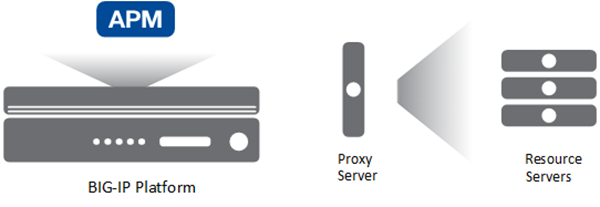
For the BIG-IP system, proxy server, and resource servers behind the proxy server, let’s focus on these configuration characteristics.
- Forward proxy mode
- APM can be configured to act as an explicit or as a transparent forward proxy. The proxy server can be configured to act as explicit or transparent forward proxy. APM supports any combination of forward proxy modes.
- SSL bypass mode
- APM can be configured for SSL bypass or SSL intercept. The proxy server can be configured for SSL bypass or SSL intercept. APM supports all combinations of SSL bypass mode.
- Authentication
- Authentication might be configured on one or more servers:
- On APM, you can configure no authentication or any type of authentication that APM supports for an SWG-Explicit or SWG-Transparent access profile.
- On a proxy server, if you have HTTP Basic, NTLM, or Kerberos authentication configured, APM should authenticate to the proxy server. You can also have no authentication configured on the proxy server.
- On a resource server, if you have HTTP Basic, NTLM, or Kerberos authentication configured, APM should authenticate to the resource server. You can also have no authentication configured on the resource server.
- Single sign-on
- APM supports these types of SSO configuration to the proxy server or to a resource server: HTTP Basic, NTLMv1, NTLMv2, or Kerberos.
To a large extent, APM supports combinations of these configuration characteristics. However, given the number of possible configuration combinations and the varying capabilities of proxy servers, some configuration constraints can exist. Refer to BIG-IP Access Policy Manager: Secure Web Gateway and to Release Note: BIG-IP APM (for the product version you are using) on the AskF5™ web site located at support.f5.com.
When configured to act as an explicit or transparent forward proxy, Access Policy Manager (APM®) supports forward proxy chaining, with or without an SWG subscription. These configuration elements are key to forward proxy chaining:
-
One or more pools of proxy servers. All servers in a pool must support the same forward proxy mode: explicit or transparent.
-
A per-request policy that includes a Proxy Select agent, which specifies a pool of proxy servers.
Note: Only the Proxy Select agent signals that a connection must be made to a next hop. A Pool Assign agent does not.
-
An HTTP Proxy Connect profile configured with its state disabled.
-
The virtual server that processes HTTPS traffic for the forward proxy configuration with the disabled HTTP Proxy Connect profile specified.
In this example, Access Policy Manager (APM) performs simple forward proxy chaining from a BIG-IP system to a proxy server. Refer to BIG-IP Access Policy Manager: Secure Web Gateway for additional detailed examples of forward proxy chaining using different methods of authentication and single sign on.
To support this configuration, you need a per-session access policy, but no specific configuration is required in it. Because you are configuring proxy chaining for each request, you need to create a per-request policy that can select the next hop. The proxy servers to which you are sending the next hop need to have been previously set up, and organized in a pool.
For forward proxy chaining, APM requires an HTTP proxy connect profile configured with its state disabled. The HTTP proxy connect profile must be specified in the virtual server that processes the HTTPS traffic for the explicit or transparent forward proxy configuration. The per-request policy also needs to be associated with the virtual server that specifies the per-session policy.
Refer to BIG-IP Access Policy Manager: Secure Web Gateway for additional examples of using per-request policies with different authentication methods for forward proxy chaining.
Before you start, you must have configured a pool of proxy servers that all support the same forward proxy mode: explicit or transparent. (Create pools using Local Traffic > Pools.)
You create a per-request policy that uses a Proxy Select agent to select the next hop in a forward proxy chain.
Note: If you include SSL Intercept or SSL Bypass agents in the policy, be sure to place them before other agents.
-
On the Main tab, click Access > Profiles / Policies > Per-Request Policies.
The Per-Request Policies screen opens.
-
To create a new per-request policy, click Create, type a name that is unique among all access profiles and per-request policies, select the accepted languages, and click Finished.
The Per-Request Policies screen displays the new per-request policy.
-
In the Name field, locate the policy that you want to update, then in the Per-Request Policy field, click the Edit link.
The visual policy editor opens in another tab.
-
On a policy branch, click the (+) icon to add an item to the policy.
The actions you can use for building a per-request policy are displayed on a popup screen with actions on tabs, such as Authentication, Classification, and General Purpose, and a search field.
-
On the Traffic Management tab, select Proxy Select and click Add Item.
A Properties popup screen opens.
-
From the Pool list, select a pool of one or more proxy servers to serve as the next hop.
Important: All proxy servers in the pool that you select must support the forward proxy mode that you specify in the Upstream Proxy Mode setting.
-
From Upstream Proxy Mode, select:
- Explicit if the proxy servers in the pool support explicit forward proxy.
- Transparent if the proxy servers in the pool support transparent forward proxy.
-
For Username and Password, most of the time you can retain the default values (blank).
These fields support the use of static credentials to authenticate the user at the next hop using HTTP Basic authentication.
-
Click Save.
The properties screen closes. The visual policy editor displays.
Be sure to add a disabled HTTP Connect Profile to the virtual server that processes SSL traffic for the forward proxy configuration.
Note: A per-request policy is not in effect unless it and an access profile are specified in virtual servers in the forward proxy configuration.
For Access Policy Manager (APM) to support forward proxy chaining, you need an HTTP proxy connect profile with its default state disabled.
-
On the Main tab, select Local Traffic > Profiles > Other > HTTP Proxy Connect.
-
Click Create.
-
Type a name for the profile and, for the Parent Profile setting, retain http-proxy-connect.
-
In the Settings area, for Default State clear the Enabled check box.
-
Click Finished.
For Access Policy Manager (APM) to support forward proxy chaining, you must specify an HTTP proxy connect profile on the virtual server that processes SSL traffic in the forward proxy configuration.
Important: If this virtual server functions as a captive portal or processes HTTP traffic, you must retain the default value of None for the HTTP Proxy Connect Profile setting.
-
On the Main tab, click Local Traffic > Virtual Servers.
The Virtual Server List screen opens.
-
Click the name of the virtual server you want to modify.
-
In the Configuration area from HTTP Proxy Connect Profile, select a profile that you know to be configured with the Default State setting disabled.
-
Click Update to save the changes.
Following is an example of a per-request policy that performs forward proxy chaining in addition to an SSL check, a category lookup, and an SSL Bypass Set. This per-request policy example requires the following:
- An APM access (per-session) policy configured and associated with a virtual server.
- For the SSL check, a virtual server with client and server SSL profiles.
- An HTTP proxy connect profile configured with its state disabled and associated with the virtual server
- Two pools of proxy servers. All servers in each pool need support the same mode of forward proxy chaining (explicit or transparent)

In the example, the system first checks whether the SSL is found on the endpoint. Whether it is found or not, the request is forwarded to two separate Category Lookups based on reviewing the URL. Requests then move to Proxy Select agents that specify the pool of proxy servers to which to send the request. Requests that did not pass the SSL check go to one pool, and those that pass the SSL check can bypass additional inspection. The next hop is selected from the pools.