Updated Date: 07/07/2026
Plan BIG-IQ Interface Requirements
BIG-IQ v8.0.0 can operate in a single network card configuration. Previous versions required that you have at least two, although only one had to be configured. Consider the following best practice recommendations for field use.
Important: Because a single network interface card (NIC) is not supported in versions prior to 8.0.0, you cannot upgrade to BIG-IQ version 8.0.0 if you are running BIG-IQ in a single-NIC configuration in a previous version.
For lab or proof of concept demonstrations, BIG-IQ can be configured to use only one interface. In this configuration all data flows through the out-of-band interface. Also referred to as eth0, or OOB, this 10Mb interface can only handle so much.
For production use, F5 recommends a minimum of two interfaces. In this configuration only BIG-IQ management functions use the OOB interface. The rest of the data uses one of the in-band interfaces. Because the eth1, eth2, and eth3 interfaces are 100 times faster (10 Gb vs. 100 Mb), they are obviously much better at handling the data requirements of a production environment.
For better isolation, security, and performance F5 recommends adding additional in-band interfaces. The number of additional interfaces needed for optimal performance depends on your business needs.
A good understanding of the data flow requirements between each component in your BIG-IQ solution helps a lot when you consider how many interfaces and network subnets best suit your network environment. For a discussion of this data flow, refer to How does data flow in a BIG-IQ solution on support.f5.com
The deployment requirements for the BIG-IQ solution you install depends on which functions you need to perform. Generally, as you add interfaces and subnets to your BIG-IQ solution, you can expect increases in performance level, security, and dependability.
|
What functions does your deployment need to perform? |
Which hardware components do you need? |
Optimal number of interfaces and subnets |
|---|---|---|
|
Manage and configure BIG-IP devices. For example, you might want to just manage virtual edition licenses or configure local traffic and security policy objects. |
2 BIG-IQ CM systems (1 active, 1 standby)BIG-IP devices |
eth0 to access the BIG-IQ CM.eth1 and a single (Discovery) subnet to communicate to the BIG-IQ devices. |
|
Manage and configure BIG-IP devices. Collect and view Local Traffic, DNS, and Device statistical data from the BIG-IP devices. Collect, manage, and view events and alerts from BIG-IP services (like LTM, APM, or FPS). |
2 BIG-IQ CM systems (1 active, 1 standby) BIG-IP devices 3 or more DCDs. An external storage device (if you choose to back up your DCD content). |
eth0 to access the BIG-IQ CMeth1 and a (Discovery) subnet to communicate to the BIG-IQ devices. eth2 (see note below the table) and a (Cluster) subnet to communicate to handle data management and storage on the DCDs. |
|
Manage and configure BIG-IP devices. Collect and view Local Traffic, DNS, and Device statistical data from the BIG-IP devices. Collect, manage, and view events and alerts from BIG-IP services (like LTM, APM, or FPS). Separate network traffic to support large, distributed deployments of the F5 BIG-IQ solution for improved performance, security, and interactions in multiple data center environments. Or, for disaster recovery capability, you could operate multiple data centers, each with its own set of BIG-IQ systems. (For additional detail, refer to Managing Disaster Recovery Scenarios in the Setting up and Configuring a BIG-IQ Centralized Management Solution article on s |
2 BIG-IQ CM systems (1 active, 1 standby3 or more DCDs BIG-IP devices An external storage device (if you choose to back up your DCD content) |
eth0 to access the BIG-IQ CMeth1 and a (Discovery) subnet to communicate to the BIG-IQ devices. eth2 (see note below the table) and a (Cluster) subnet to communicate to handle data management and storage on the DCDs. eth3 (see note below the table) and a (Listener) subnet to improve performance |
Note: If you plan to use the eth2 and eth3 interfaces, but your VE has only 2 interfaces, use the software application for the hypervisor used to create your VE instances to add two additional interfaces.
To design the network structure that your BIG-IQ solution requires, it’s helpful to understand a little bit about how the BIG-IQ operates. There are four functions essential to BIG-IQ operations.
- Management (out of band)
- Discovery
- Listener
- Cluster
Each of these functions is enabled by a specific flow of data. Not all BIG-IQ solutions require all four functions, so if your solution doesn’t use one of those functions, you probably won’t need the network infrastructure that supports that function. Additionally, understanding the data flow requirements for each function helps you understand how decisions you make regarding the number of network interfaces and the number of network subnets you use can impact the reliability, performance, and security of your BIG-IQ solution.
Knowing what data must flow between BIG-IQ components for each function helps you determine the ideal number of network interfaces needed for your BIG-IQ solution. The solution you choose and the performance levels you need determine the optimal number of interfaces you need. For example, if you use BIG-IQ just to manage your BIG-IP licenses, your setup will be very different than if you use BIG-IQ to centrally manage a set of applications across multiple data centers.
To get started, consider the generic BIG-IQ setup illustrated in this diagram.
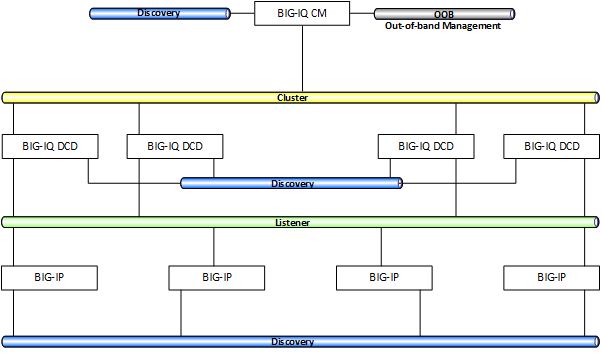
This illustration shows a BIG-IQ system performing centralized management functions for four BIG-IP devices. Four data collection devices (DCDs), managing the data generated by the applications running on the BIG-IP devices. One way to understand the data flow requirements of this system is to think of the flow hierarchy.
- The BIG-IQ uses an out of band (OOB) subnet to perform internal management functions and to facilitate autofailover high availability.
- The BIG-IQ manages your BIG-IP devices, so direct communication to each of those devices is an obvious necessity. However, to give you the insight you need for that management, the BIG-IQ needs the analytics, events, and alert data that those BIG-IP devices store on your DCDs. BIG-IQ uses the Discovery subnet to communicate with the BIG-IPs and the DCDs.
- Data generated by the traffic running on your BIG-IP applications routes to the DCDs that store and manage this data. This data ranges from metrics you use to analyze device and application performance to events and alerts generated by the traffic services running on those BIG-IP devices. This data flows on the Listener subnet.
- The DCD cluster manages your data using an Elasticsearch database. The database makes replicas of your data and distributes those replicas throughout the cluster so that no single DCD failure can put your data at risk. This data flows on the Cluster subnet.
Best practices for which interface to route to which subnet is spelled out in this table.
| Interface | Name | Primary Functions |
|---|---|---|
| eth0 | Management out-of-band | Best practice is to use the eth0, out-of-band (OOB) interface to communicate with the BIG-IQ CM. The 100 Mb interface speed is not a problem for the modest amounts of data required for this function. |
| eth1 | Discovery | BIG-IQ uses the Discovery function to communicate with the BIG-IP devices it manages and the BIG-IQ DCDs that manage the data. Best practice is to use a dedicated, Discovery self IP interface and subnet for this communication. Depending on your interface configuration, the eth1 interface has 10-100x more bandwidth than the OOB, management (mgmt) interface. |
| eth2 | Cluster | BIG-IQ CM and DCDs use the Cluster function to route and manage the Elasticsearch (ES) data replicas that store your data. BIG-IQ CM and all of the DCDs in the ES cluster use this communication channel. Best practice is to use the eth2 interface for this communication. |
| eth3 | Listener | BIG-IQ DCDs use the Listener function to receive data from application traffic event logging and alerts; as well as performance analytics from the BIG-IP devices. Best practice is to use the eth3 interface for this communication. |
Note: The interfaces on a BIG-IQ Virtual Edition (VE) are commonly referred to as eth0-ethn, while the interfaces on hardware platforms are referred to as 1.0-1.n. Because BIG-IQ VE is the more common use case, in this article the term eth0 will be used to describe either eth0 on a VE and interface or 1.0 on a hardware platform.
The simple answer is, yes; unless you are deploying BIG-IQ for a lab or proof of concept demonstration, best practice is to use at least two interfaces. The ideal number of networks for you depends on which functions your BIG-IQ solution requires and what type of environment you deploy it on.
Although BIG-IQ can deploy using a single network subnet and interface, best practice is best to use the following networks and interfaces:
- On eth0, an out-of-band network for internal BIG-IQ management, and autofailover high availability (HA).
- On eth1, an in-band network for BIG-IPdevice management (BIG-IQ CM and DCD inter-node communication) and Cluster (Elasticsearch configuration and status operations) functions.
- On eth2, an in-band network for Listener/Discovery that connects the BIG-IQ CM to the DCDs and to the managed BIG-IP devices. BIG-IQ uses this network to receive events and analytics from the BIG-IP devices.
| Interface | Recommended Function(s) | Speed |
|---|---|---|
| eth0 | Management (internal), Autofailover HA | 100 Mb |
| eth1 | Management, Cluster, & Listener | 10 Gb |
| eth2 | Management, Cluster, & Listener | 10 Gb |
For lab or proof of concept demonstrations, BIG-IQ can be configured to use only one interface. In this configuration all data flows through the out-of-band (OOB) interface. Also referred to as eth0, this 100 Mb interface can only handle so much.
For production use, F5 recommends a minimum of two interfaces. In this configuration only BIG-IQ management functions use the OOB interface. The rest of the data uses one of the in-band interfaces. Because the eth1, eth2, and eth3 interfaces are 100 times faster (10 Gb vs. 100 Mb), they are obviously much better at handling the data requirements of a production environment.
For better isolation, security, and performance F5 recommends adding additional in-band interfaces. The number of additional interfaces needed for optimal performance depends on your business needs.
A good understanding of the data flow requirements between each component in your BIG-IQ solution helps a lot when you consider how many interfaces and network subnets best suit you. For a discussion of this data flow, refer to How does data flow in a BIG-IQ solution on support.f5.com.
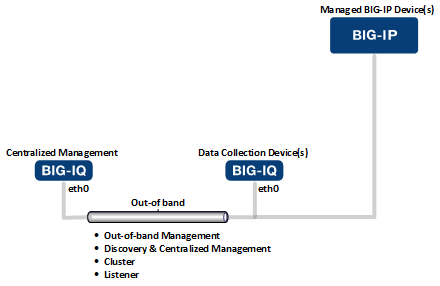
To deploy BIG-IQ for a proof of concept (POC) demonstration, you can use a single network interface and subnet. The available bandwidth and performance level are not generally suitable for production, but more than sufficient for seeing how the BIG-IQ Centralized Management works for you.
This figure illustrates the network topology required to deploy BIG-IQ for a POC demonstration.
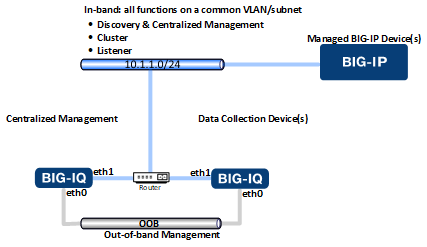
You can deploy BIG-IQ to a production environment with just two network interfaces and network subnets. Although this option requires fewer resources and configuration effort, you might need to consider some trade-offs if you choose this configuration:
- Might not provide the bandwidth and performance levels your solution requires as Elasticsearch queries and replication traffic competes for bandwidth on a shared network/interface.
- Elasticsearch traffic between cluster members (some of which is not encrypted) is open to the outside world. You can mitigate this issue by using firewalls to restrict access to this subnet.
This figure illustrates the network topology required to deploy BIG-IQ with just two subnets.
Note: When your network topology combines cluster management and listener traffic on the same subnet you need to perform some additional routing work. For detail, see Setting up routing for an in-band subnet on askf5.com.
Note: For optimum performance, F5 makes the following maximum round trip latency recommendations:
| For connections between these components | Round trip latency cannot exceed |
|---|---|
| between any two DCD or BIG-IQ devices in a DCD cluster | 75 ms. |
| between the BIG-IQ CM and the BIG-IP devices it manages | 250 ms. |
| between the managed BIG-IP devices and the DCDs that collect their data | 250 ms. |
If you configure the networks that support your BIG-IQ solution so that the discovery and listener functions use the same subnet, F5 recommends that you configure the routing so that the listener and cluster functions use a different network interface.
When you discover a BIG-IP from the BIG-IQ, you can either use the BIG-IP device’s out-of-band eth0 address or you can use one of the device’s self IP addresses. Using the eth0 address for the discovery function is fine, but you want to make certain that traffic for the listener functions flows over an in-band, self IP address.
When you configure a BIG-IQ or BIG-IP device, you specify whether to use the management (mgmt) address (eth0) to discover that device or one of the device’s self IP addresses, which always use another network interface. Once you set the discovery address for a device, the process for changing it, requires that you reconfigure any DCD cluster setup you have already completed. Consequently, it’s best to get this right the first time.
The volume of traffic that the BIG-IP needs to send to the DCD for statistics/analytics as well as logging events and alerts is referred to as listener traffic. This listener traffic can overwhelm the BIG-IP device’s eth0 interface. To avoid performance degradation triggered by excessively high traffic levels, F5 recommends that you route this traffic over one of the device’s self-IP addresses. These self IP addresses use one of the (eth1-3) interfaces instead of the slower eth0 interface. To ensure that the listener traffic uses one of the higher speed interfaces, you can configure a routing scheme.
If you don’t create a route to the DCD listener addresses that prefers the BIG-IP device’s default gateway, it is quite possible that the listener traffic will use the (10-100 times slower), OOB network.
For further information on how to configure routing for BIG-IP interfaces, refer to: https://support.f5.com/csp/article/K13284
A simpler way to make sure that traffic for these two functions use a separate interface and subnet is to add additional subnets.
F5 recommends that you use at least three network interfaces and network subnets for the environment into which you deploy your BIG-IQ Centralized Management solution. This configuration provides the minimum bandwidth and performance levels recommended for a production environment.
- Isolated, in-band interfaces and VLANs are available for specific functions.
- Better isolation for troubleshooting.
- More secure design: Elasticsearch traffic between cluster members stays within your firewalls.
- More bandwidth between nodes
- Dual stack IPv4/v6 is supported on the in-band VLANs. The out-of-band eth0 interface does not support dual stack IPv4/v6.
- The out-of-band management (mgmt) network supports a floating IP address. The floating IP address is required for BIG-IQ systems in an automatic failover HA configuration. The in-band interfaces do not support the floating IP address.
This figure illustrates the network topology required to deploy BIG-IQ with three subnets.
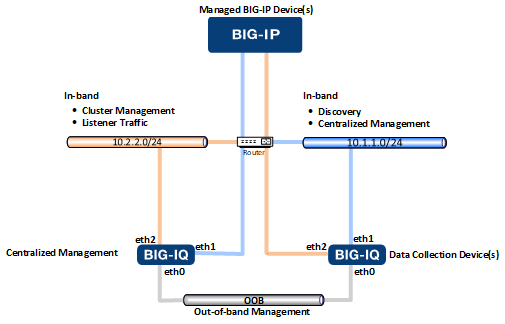
Note: When your network topology combines cluster management and listener traffic on the same subnet you need to perform some additional routing work. For detail, see Setting up routing for an in-band subnet on askf5.com.
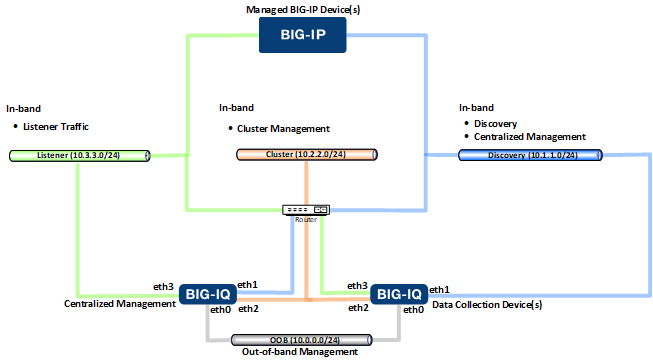
Adding a fourth network interface and subnet provides all of the benefits that you get when you use 3 network subnets, but allows you to separate the Listener traffic from the cluster management traffic. This configuration provides greater bandwidth for both of these key functions.
This figure illustrates the network topology required to deploy BIG-IQ with four subnets.