


Updated Date: 09/02/2026
System Overview
This table lists some of the terms you will encounter when configuring the F5 rSeries system.
F5 rseries platforms are powerful systems that are designed specifically for application delivery performance and scalability.
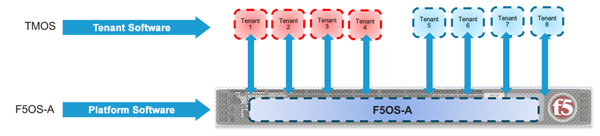
F5 rSeries systems include a platform layer that runs F5OS-A software, on which you can have multiple tenants. A tenant is a guest system running software (for example, a BIG-IP system). F5 r5000/r10000 platforms can run a minimum of one tenant up to 36 tenants. F5 r2000/r4000 platforms can run only one tenant on the low end and up to four tenants on the higher end. F5 r12000 platforms can run up to 60 tenants depending on the platform.
This illustration shows a simplified rSeries deployment. The rSeries system shown here has four tenants attached. In this example, you can have up to eight tenants running at one time.
F5 rSeries platforms offer upgradable three-tier Pay-as-you-Grow (PAYG) licensing options. For more information about the PAYG options, see K44211301: PAYG license support for F5 r5000 and r10000 series platforms or K44442211: PAYG license support for F5 r2000 and r4000 series platforms.
For more information about rSeries hardware components, see the platform guide for your hardware model at Documentation - F5OS-A and F5 rSeries.
This table lists some of the terms you will encounter when configuring the F5 rSeries system.
|
Term |
Definition |
|---|---|
|
appliance mode |
Restricts user access to root and Bash at the system and tenant levels. When enabled, the root user cannot log in to the system by any means, including from the serial console. Disabled by default. |
|
F5OS-A |
Platform operating system software that runs on F5 rSeries systems. |
|
LAG |
Link aggregation group. A way to group interfaces on the system so they function as a single interface. The LAG (like a trunk on BIG-IP systems) distributes traffic across multiple links, increasing the bandwidth by adding the bandwidth of multiple links together. |
|
port group |
A configuration object that is used to control the mode of the physical ports, whether they are bundled or unbundled, and adjust their speed. |
|
tenant |
A guest system (similar to a vCMP guest) running software on the system. You can deploy multiple tenants on a system. |
|
webUI |
Browser-based user interface for configuring the F5 rSeries system. F5OS webUIs fully support the latest versions of Chrome, Firefox, and Edge browsers at the time of each F5OS release. |
Before you can configure and use the rSeries system, you must activate a valid license. The license service coordinates the license installation on the system controllers and configures the same license on the chassis partitions and the tenants. Because the system controller license applies to the whole system, the chassis partitions and tenants all inherit licenses from the system controllers.
Before you can configure and use the rSeries system, you must activate a valid license. The license service coordinates the license installation on the system and configures the same license on the system and the tenants. Because the license applies to the whole system, the tenants all inherit licenses from the system.
Note: For information about BIG-IP Next tenant licensing, see my.f5.com.
A base registration key, generated by F5, identifies a set of entitlements and is used to obtain the license for an F5 product. The base registration key with associated add-on keys are pre-installed on a new rSeries system. If you do not have a base registration key, contact F5 Technical Support (support.f5.com). You can obtain add-on keys to enable additional features and functionality.
For more information about licensing your rSeries system, see F5 rSeries system licensing overview.
| Term | Description |
|---|---|
| entitlements | Features and functionality of an F5 product that a customer can enable by purchasing a license. |
| base registration key | A 27-character string that informs the license server about which F5 products are included in the license. |
| add-on key | A 7-character string that enables features on a device, in addition to the entitlements associated with the device base registration key. |
| dossier | A digital fingerprint of an F5 product instance. The dossier uniquely identifies the device. |
You can configure and manage the rSeries system at two different levels: the platform layer or the individual tenants. Each has their own webUI, CLI, and REST API access.
The users at the platform and tenant levels are independent from each other, and the roles and what users can do are different depending on where the account was created. Even if one person is performing more than one role, separate accounts are needed at each level.
These administration roles are available on rSeries systems:
System administrator Manages the whole system configuration with read-write access to all system settings. Able to change the system root and admin passwords.
Tenant administrator Has access to the tenant only. Performs user management on the deployed tenant(s). No management of the rSeries system.
There are many different tasks involved in administering an rSeries system. Though you might have several different administrators for the system and tenants, it is useful to have a general idea of all of the tasks involved and the order in which you might perform them. This is generally the order in which things happen, and it is just an overview of the many tasks involved:
- Complete hardware installation. For information about the hardware, see the platform guide for your hardware model at Documentation - F5OS-A and F5 rSeries.
- Complete an initial configuration. For information about initial configuration, see F5 rSeries Systems: Getting Started at Documentation - F5OS-A and F5 rSeries.
- Make sure the rSeries system is made accessible. Configure network settings, DHCP, DNS, and NTP. For information about software installation, see F5 rSeries Systems: Software Installation and Upgrade at Documentation - F5OS-A and F5 rSeries.
Note: F5OS manages platform container resources internally. Tenant resources (vCPU, memory, and storage) are configurable per tenant, but per-container resource limits within the F5OS platform layer are not configurable. If you experience Out-of-Memory (OOM) events, generate a QKView and contact F5 Support.
For additional guidance, see the following topics.
• System reports (QKView) overview • Docker services restart and status • Tenant resource allocation overview
- What is the network configuration at the system level, including management interfaces, port groups, interfaces, and VLANs. Will you use link aggregation or spanning tree protocol?
- How many administrators and operators will need accounts on the system? At the tenant level?
- How will system users be authenticated? RADIUS, TACACS+, or LDAP?
- How many tenants do you plan to deploy?
- What will the tenants be used for? For example, which application delivery modules will you be configuring? Multiple modules?
- The configuration can be modified later if needs change.
- Log in to the system.
- License the system, if it wasn’t done already. See System Settings.
- Adjust network settings such as management interfaces if needed. See Network Settings.
- Optionally, create accounts for administrators, operators, or tenants. See the Authentication & Access.
- Consider tenant resources needed with regard to the different tenant images of different sizes that are available. See Tenant Management.
- Deploy one or more tenants. See Tenant Management.
- Log in to each tenant and configure the systems as needed. For BIG-IP tenants, see the BIG-IP system documentation at K000130285: F5 Product Manuals Index.